TumbleRig 1.23

Try them Every demo on this page is a recipe: Asset Browser > TumbleRig > Changelog > 1.23.

New and updated nodes in 1.23

Highlights

In depth

Noise, filters, mocap and Live Record

New ways to put animation on a rig, and to clean it up, without leaving Scene Animate.

Animating
NewBeta

Mocap to Controls

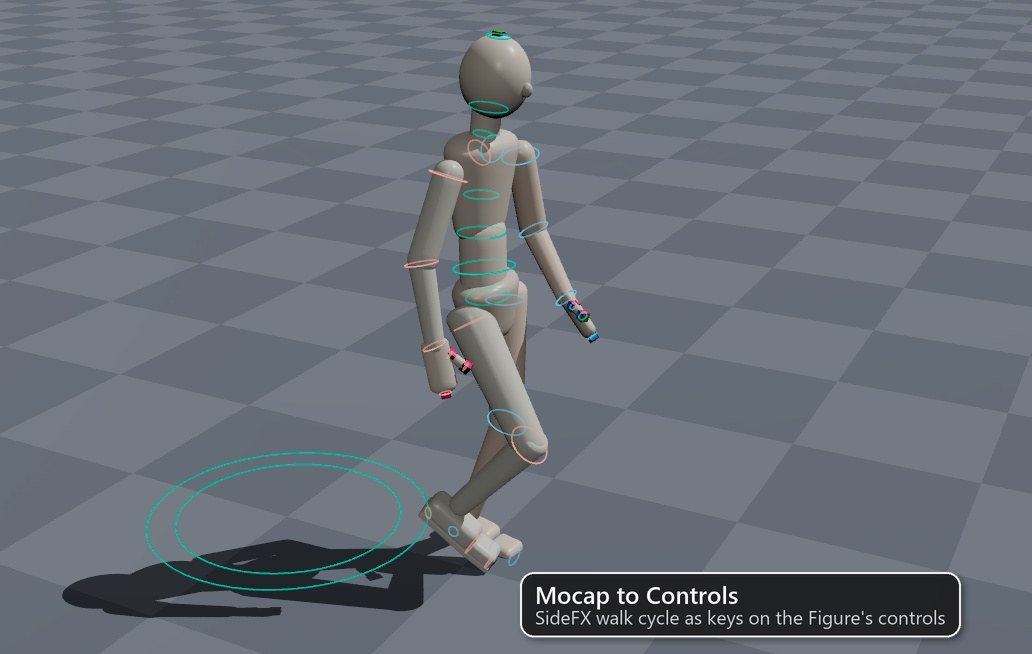
Motion capture usually lands on a joint skeleton you can't animate. Mocap to Controls puts a mocap clip, or any animated biped, onto your character's controls as keys on a layer, so you keep animating on your own rig. 1.1 adds Source: Library: pick a clip from the CMU and SideFX library, no setup, and it plays from its own frame 1 in a shot. It also follows IK-spline spines like the Noodle's and no longer recomputes on every frame: Apex Crowd on a mocap clip went from 1.5 s to 50 ms a frame. Two recipes: a mocap walk on the Figure, and mocap into the base keys.
Video The Figure walking on mocap keys, looped with Loop Animation. Its control shapes ride the walk.
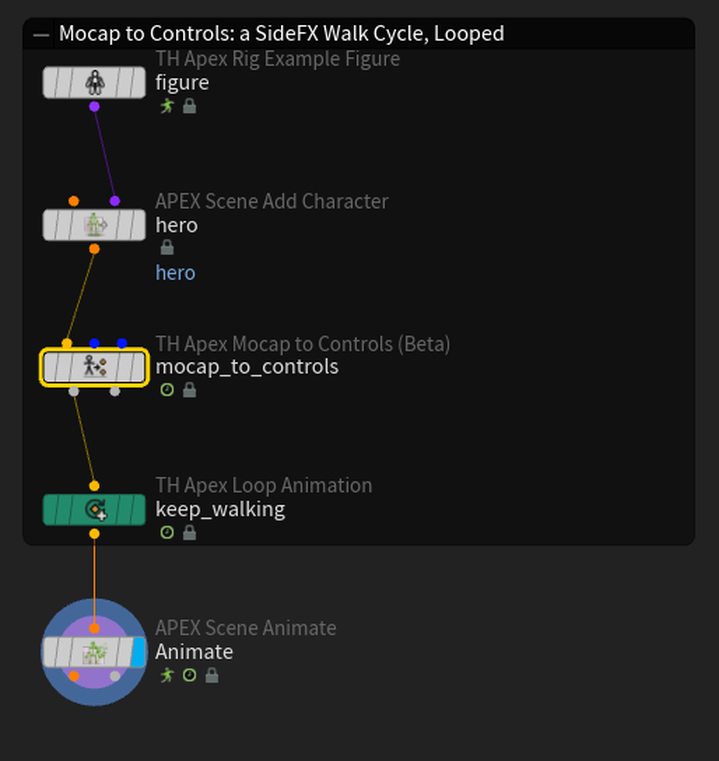
The recipe: Mocap to Controls, then Loop Animation. Asset Browser > TumbleRig > Examples.
Node setup The recipe: Mocap to Controls, then Loop Animation. Asset Browser > TumbleRig > Examples.
TumbleTrove+

Rig Noise: living noise on controls and joints

Hand-keyed idles take hours and still look mechanical. Rig Noise adds noise after a control: the handle stays on your keys and the noise plays on top, with a keyable Amount per row. 1.1 runs noise along a chain with per-chain offsets and random seeds, adds a Sine shape for a clean wave, and Works On picks Controls or Joints per row (noise on joints after IK). The noise keeps moving while the timeline is parked on a frame. Needs a TumbleTrove+ plan.

  • Add the node after the controls it moves; Bake to Layer keys the difference on an additive layer of the Scene Animate below.
  • Animation Noise 1.0 is now Rig Noise. The old node stays installed, hidden from the Tab menu.
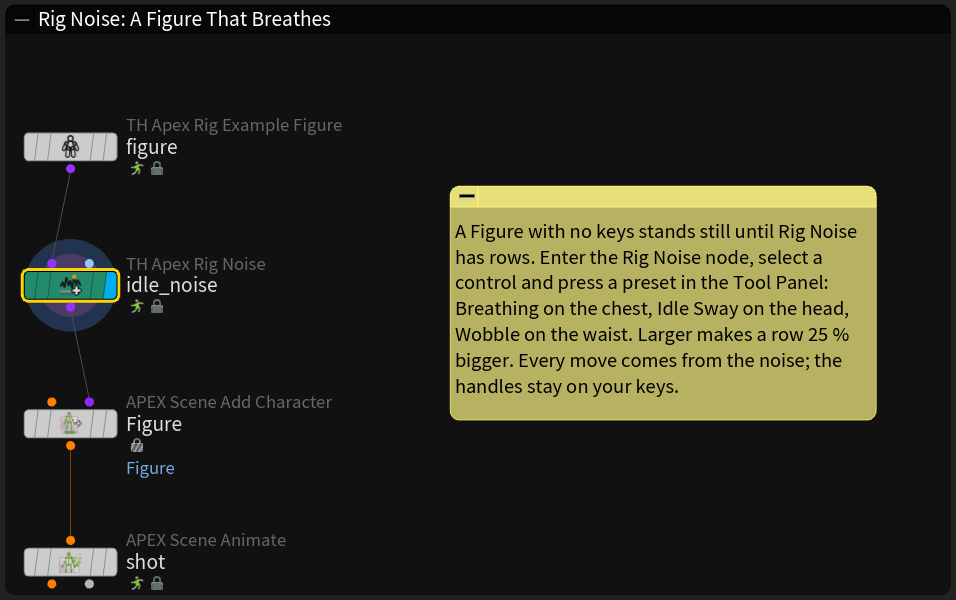
Video Just noise, on a whole character. The Figure stands still with no keys. Select the chest and press Breathing in the Tool Panel, the head and Idle Sway, the waist and Wobble: each press adds a row, Larger turns it up, and the Figure comes alive.
The setup: the Figure, Rig Noise with three rows, Scene Add Character and Scene Animate.
Node setup The setup: the Figure, Rig Noise with three rows, Scene Add Character and Scene Animate.
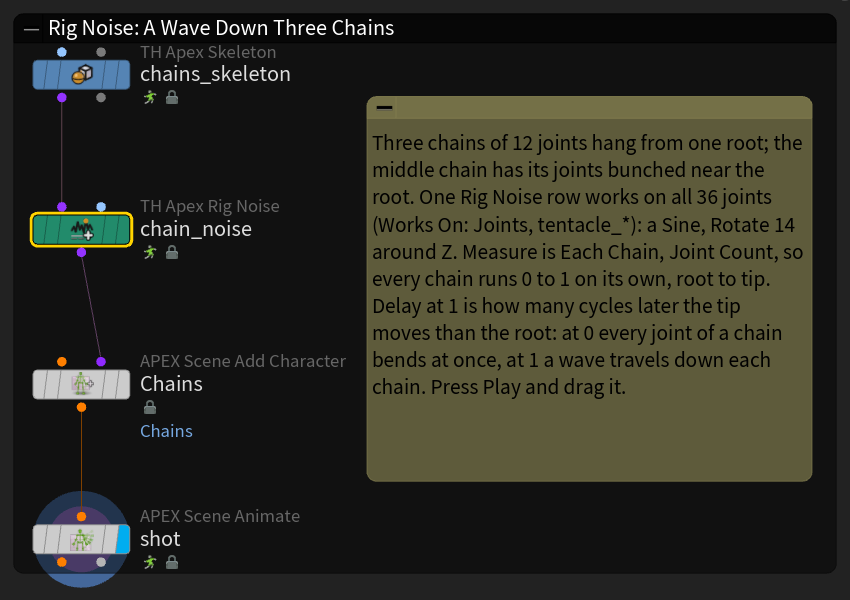
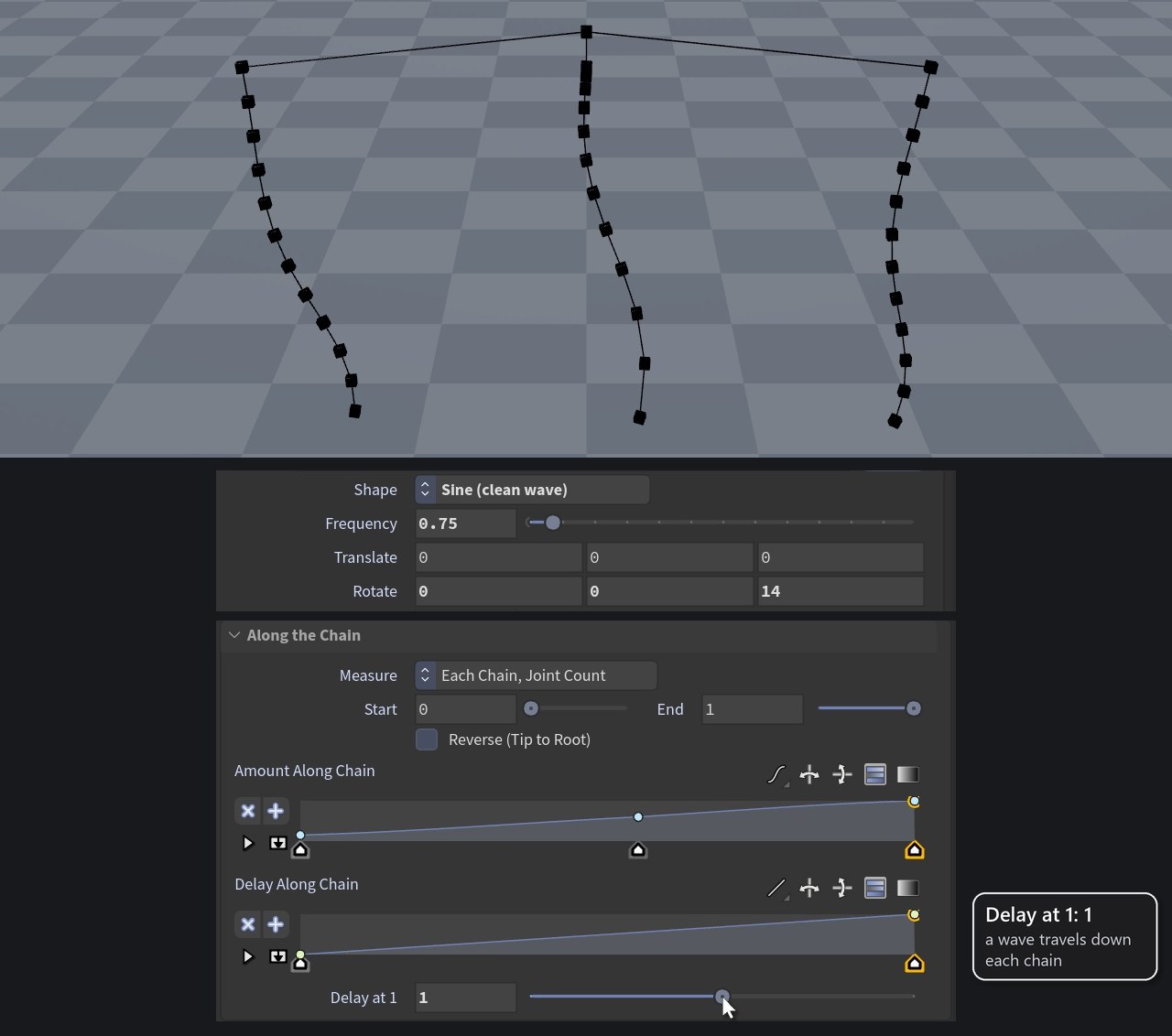
Video Along a chain. One row on three joint chains. Delay at 1 turns each chain's swing into a wave running root to tip; the Amount ramp sets how much each joint moves (even, growing to the tip, tip only); Measure counts along the chain by joints or by distance, which shows on the middle chain, its joints bunched at the root.
Video Per chain, and five shapes. Offset Step starts each chain later than the one before; Random Offset, Amount and Speed give each chain its own timing, size and speed, with a Chain Seed for another set; then Smooth, Turbulent, Jitter, Breathe and Sine from the Shape menu.
The setup: a skeleton of three chains, one Rig Noise row on the joints (Works On: Joints), Scene Add Character and Scene Animate.
Node setup The setup: a skeleton of three chains, one Rig Noise row on the joints (Works On: Joints), Scene Add Character and Scene Animate.
TumbleTrove+

Animation Noise: the same noise as keys

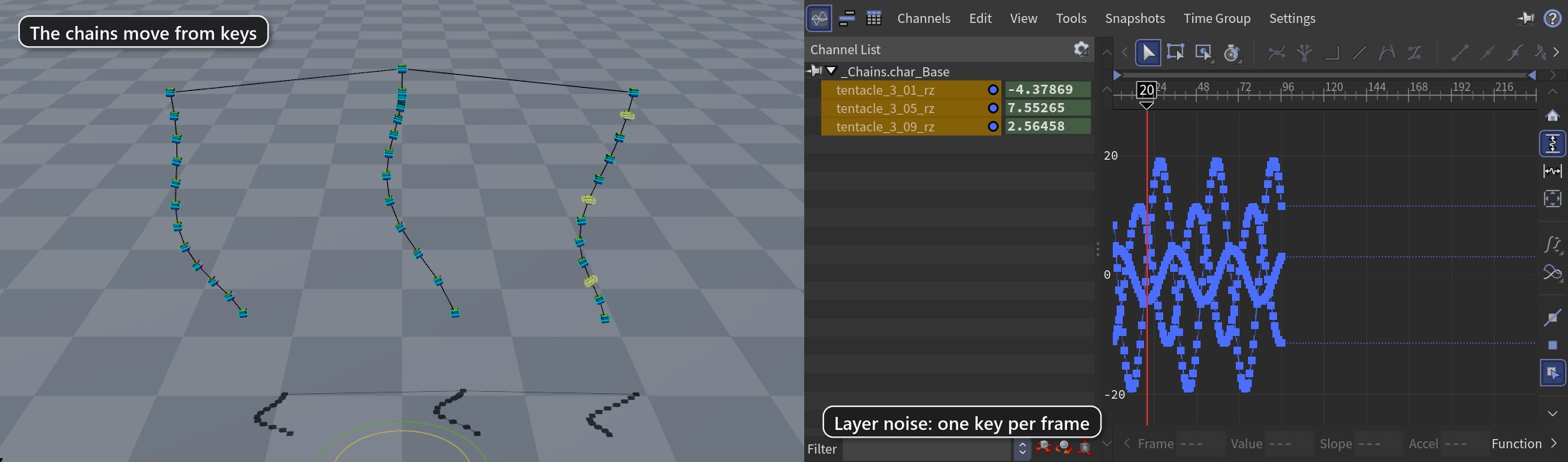
Animation Noise writes noise as keys on an additive animation layer below a Scene Animate, one key per frame. Every node in the rig sees it, the curves show in the Animation Editor, the layer mutes and blends in the Animation Layers pane, and Copy and Loop Animation take it along. Needs a TumbleTrove+ plan.

The same noise, as keys. The same three chains, keyed by Animation Noise: one key per frame on a layer, in the Animation Editor.
TumbleTrove+

Animation Filters: clean up any animation

Live Record's Clean filters as a node below Scene Animate: Smooth, Simplify, Holdify (near stops become held poses), Hard start and stop, plus Rotation Unwrap and Bouncify, with an Amount to blend. Use it on a shaky recorded pass, on mocap, or after noise. Needs a TumbleTrove+ plan.

Video Smooth hops become a bouncing ball. Bouncify 0, then 100: rounded humps turn into arcs with a sharp landing.
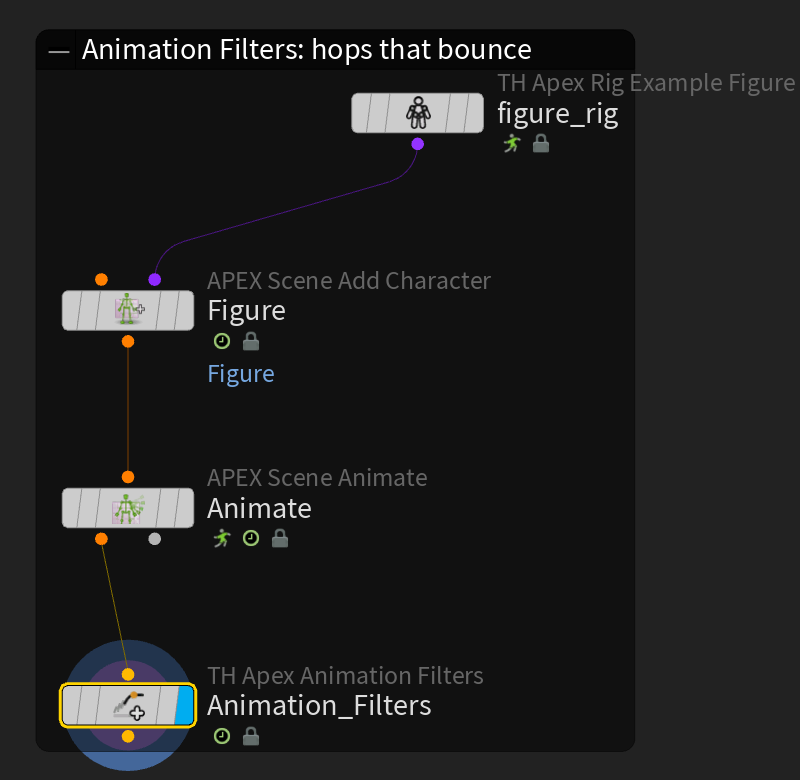
The recipe: Animation Filters below the Scene Animate.
Node setup The recipe: Animation Filters below the Scene Animate.
Video Holdify turns slow drifts into held poses. 0, then 60: the sloping steps go flat.
Video Hard Start and Hard Stop. Moves leave and land at speed, with sharp corners.
Video Smooth takes the shake out of a hand-recorded turn.
Video Simplify keeps the motion and drops the keys. 60 keys become 6.
Video Rotation Unwrap keeps a spin from snapping back. The sawtooth becomes one continuous spin.
Tool

Live Record 1.2: takes, countdown, Holdify

Live Record keeps every take in its panel: one line per take with its own Record, add controls, mute and Animation Editor buttons, and Record goes into the take you pick. A countdown in seconds runs in the viewport before recording starts. The Clean filters gain Holdify, Hard start and Hard stop, so a hand-recorded move lands in clean holds.

  • Record tile on the tab bar, or Shift + right-click > Live Record; Shift+R records into the last take.
Video Select a control, press Record, drag it while the timeline plays. A 3-2-1 count-in, the take records, it lands as a line in the takes panel, and the move plays back.
TumbleTrove+

Copy and Loop Animation: As Played

Copy Animation 1.2 and Loop Animation 1.1 read either the Base Animation or the animation As Played, with every layer applied, and say which layers they leave out. Last Frame: Own Pose loops a mocap cycle on all its frames, so a walk no longer skips a pose at the seam. Needs a TumbleTrove+ plan.

Video 1. Played once. One jumping jack over 25 frames, then the keys end and the Figure stops.
Video 2. Loop Animation added. The jumping jack repeats with no pop at the seam: Last Frame is set to Own Pose, and the hips curve below shows the same cycle again and again.
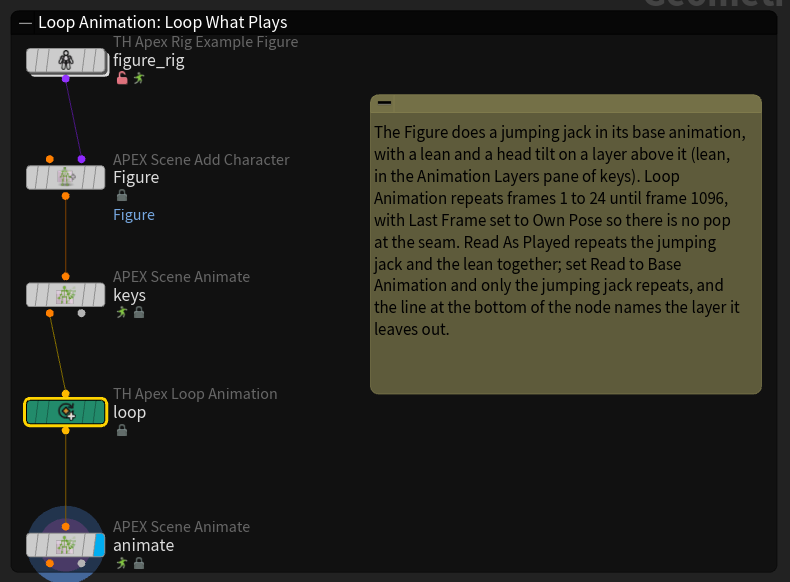
Video 3. Base Animation against As Played. A lean and a head tilt sit on a layer above the jack. Base Animation (left) repeats only the jumping jack; As Played (right) repeats the lean too.
The setup: the Figure, its keys, Loop Animation, then Animate.
Node setup The setup: the Figure, its keys, Loop Animation, then Animate.
ToolBeta

Channel Box (preview)

Maya's Channel Box, docked beside the viewport in Animate: select, type, slide and key channels on every selected control, with animation layers (mute, solo, a weight you can slide) and display layers (hide, Template, Reference). It collapses when you leave Animate. Turn it on in TumbleTrove Settings > TumbleRig > General > Animate state = Full.

Video Both wrists selected: one slide moves both. Drag Translate Y in the Channel Box beside the viewport.
The setup: the Figure in a Scene Animate; the Channel Box docks when Animate starts.
Node setup The setup: the Figure in a Scene Animate; the Channel Box docks when Animate starts.
Video Type a value and key it. Click, type 0.8, Enter; Shift+click the name keys the channel (green).
Video Animation layers in the box. From Selected makes a layer; pose on it, drag its weight and the pose blends in and out, M mutes it.
Video Display layers: hide, grey out, show. Box-select an arm's controls, New From Selected, V hides them, N greys them out, V shows them again.
Tool

A Maya-style Animation Editor

One click gives the Animation Editor a Maya Graph Editor look: a grey graph, one red, green or blue curve per axis, yellow selected keys, grey selected rows instead of amber (an option, as it greys every selected list row in Houdini) and a channel list wide enough for full names. TumbleTrove Settings > TumbleRig.

Video Houdini's defaults, then the Maya look, and back. Black graph with the channel names piled up over the curves and amber rows, against a grey graph and grey rows with one red, green or blue curve per axis.

Overlap, wheels and crowds

Secondary motion you can key, on one character or on a whole shot.

Motion and simulation
Updated

Scene mode for the Temporal family

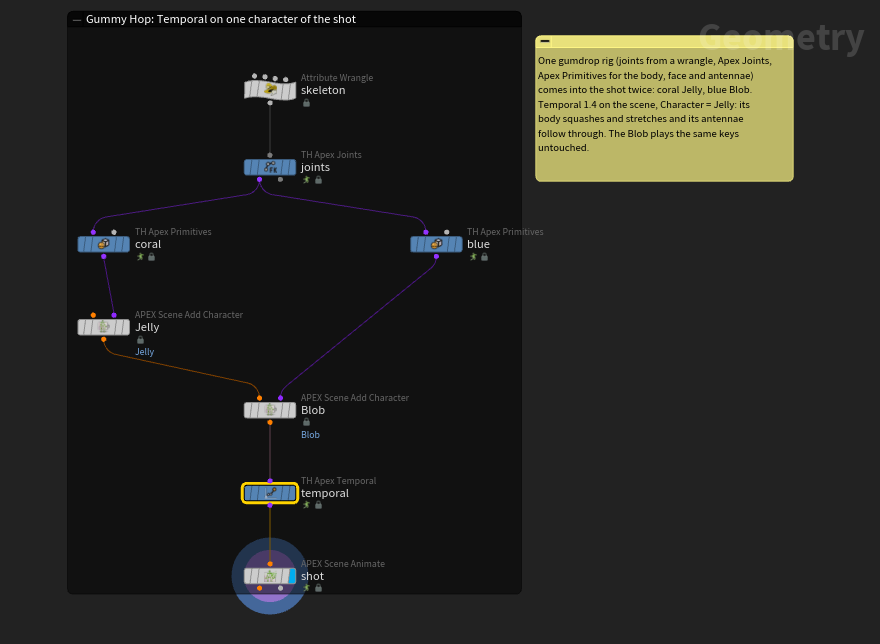
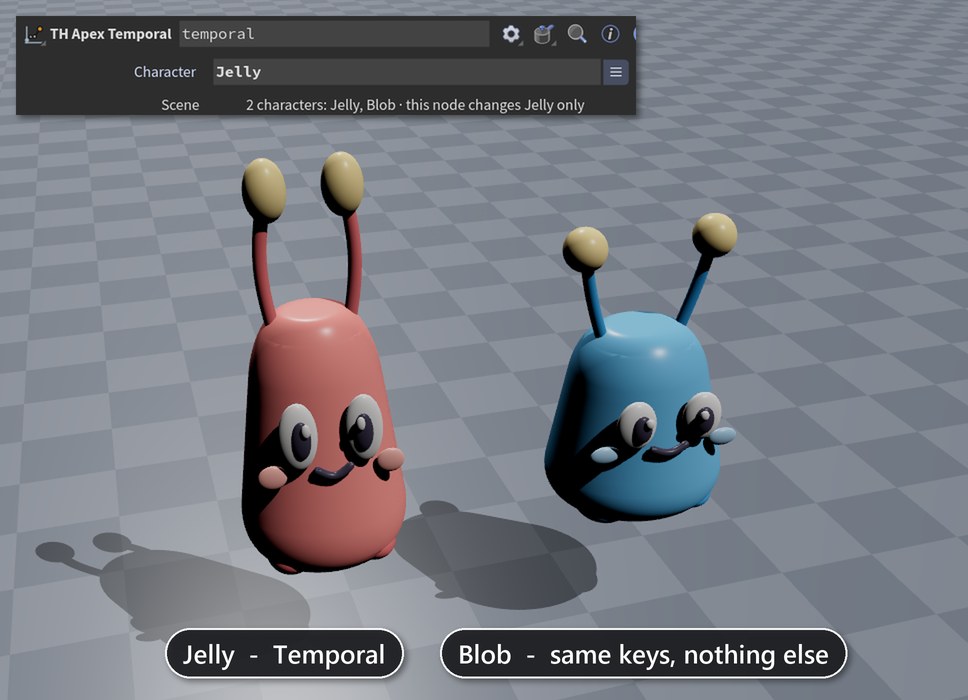
Before, a motion node needed the character unpacked from the shot and packed back. Temporal 1.4, Motion Effects 2.7, Shape Temporal 1.2, Rig Noise 1.3, Foot Plant 1.2, Camera Shake 1.2 and Camera Lag 1.2 now sit straight on a shot's APEX scene: pick a Character and the node changes it, while the other characters, their order and the animation pass through. Temporal is free; the others need TumbleTrove+.

Video Same hop keys on both, spring on one. Temporal on the shot with Character set to Jelly: it squashes on every landing and its antennae lag and follow through; Blob plays the same keys stiff.
One Temporal node on the shot's scene. No unpack and pack.
Node setup One Temporal node on the shot's scene. No unpack and pack.
TumbleTrove+

Motion Effects 2.4-2.6: pick, add, key

Pick icons on Target and Lags Behind pick in the viewport; + buttons add the controls selected in Animate. Strength, Half-life, Frequency and Damping are channels you can key with Apex Channels, so overlap and jiggle can be animated. A Lags Behind target keeps its translate and rotate handles, and Motion Effects works on IK Spline rigs. Needs a TumbleTrove+ plan.

Video Pick the controls, press + Add selected. Three arm controls become a lag chain in one click, each labelled in the viewport.
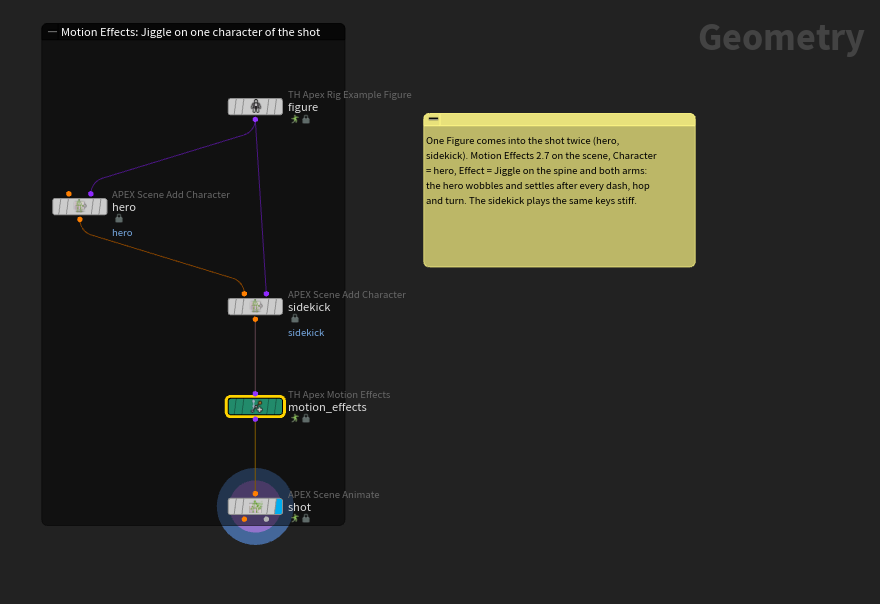
Video Motion Effects on the shot, for one character. Two copies of the Figure on the same keys: Jiggle on one makes its spine and arms wobble and settle after every dash, hop and turn; its twin stays stiff.
One Motion Effects on the shot's scene, Character set to one Figure, Effect Jiggle.
Node setup One Motion Effects on the shot's scene, Character set to one Figure, Effect Jiggle.
TumbleTrove+

Wheel 1.3: backing up, leaning with speed

Wheels roll backwards when the vehicle backs up instead of turning round, casters face where they move, and Limit Turn and Max Turn Speed swing a caster round over a few frames, like a shopping cart (45 degrees a frame by default in 1.3). New in 1.3, Lean With Speed Changes: pick a control and it tips forward as the vehicle speeds up and back as it brakes, through a spring, so a scooter rocks and settles after a stop. Needs a TumbleTrove+ plan.

Video Backing up into a parking spot. The wheels roll backwards; they don't turn round.
Video Lean With Speed Changes (new in 1.3). The scooter tips forward as it speeds up, back as it brakes, and settles after the stop.
Video Max Turn Speed. At 90 degrees a frame (left) a caster flips round in about 3 frames; at 18 (right) it swings round over about 10.
Video A shopping cart on four loose casters. Each caster faces where it moves.
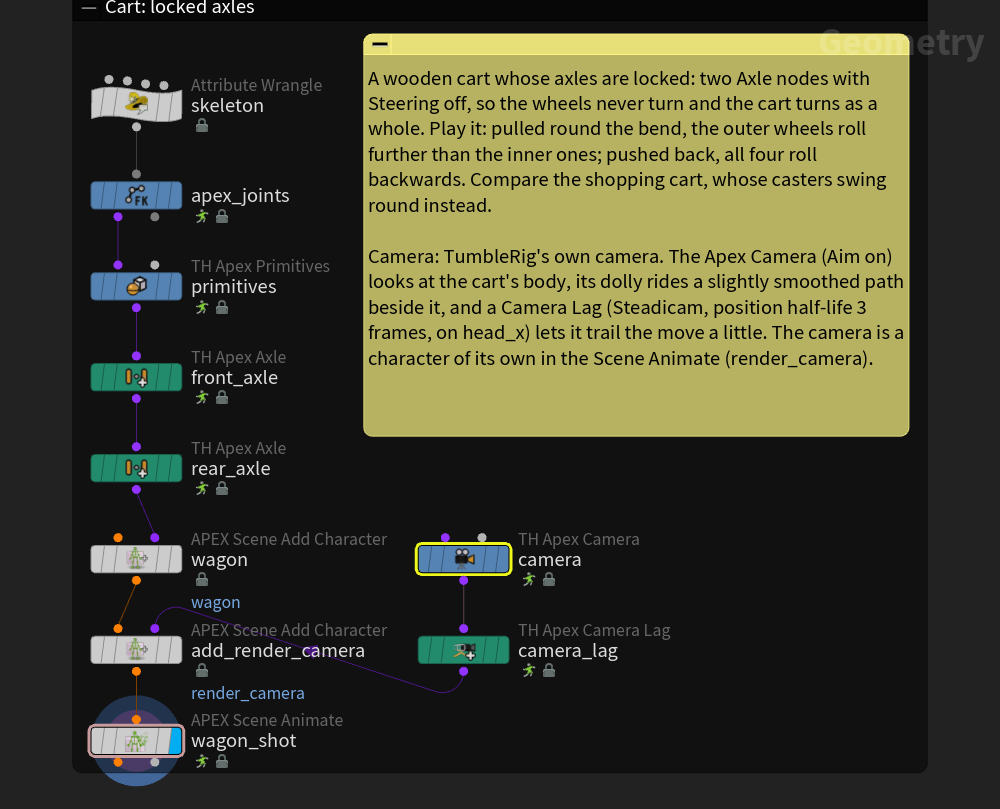
Video Two casters locked. The cart steers from its free pair. Filmed through TumbleRig's Apex Camera with Aim and a little Camera Lag.
The camera setup: Apex Camera with Aim, then Camera Lag, as a character in the shot.
Node setup The camera setup: Apex Camera with Aim, then Camera Lag, as a character in the shot.
Video A go-kart. Limit Turn steers the front wheels through an S bend.
Video A racing car on Vehicle. Hero wheels rolling with the car.
Video One wheel backing up. 1.1 turned round; now it rolls backwards.
Updated

Apex Collisions 1.3-1.4: chains that don't pass through each other

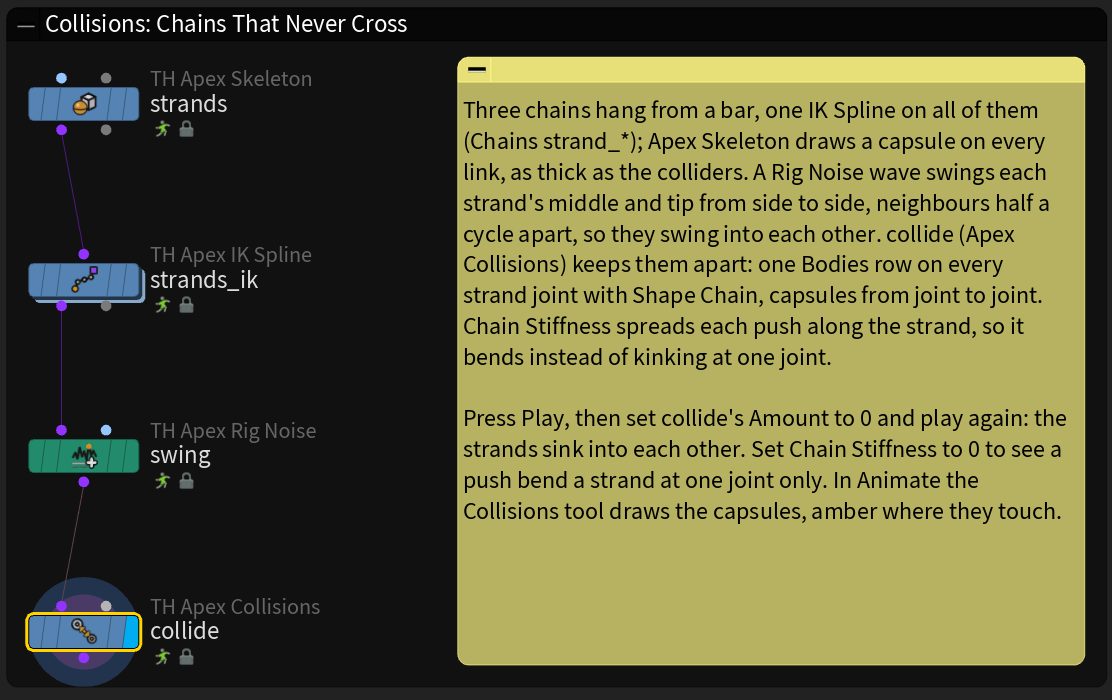
Collisions used to do nothing on IK Spline chains: it pushed the spline's guide instead of the joints, and kept only the first joint of each chain. 1.3 pushes the joints themselves, a Bodies row can be a Chain of capsules that taper to the tip, and Chain Stiffness spreads each push along the chain so it bends smoothly instead of creasing. Three strands on one IK Spline, swung by Rig Noise half a cycle apart, crossed on 72 of 96 frames, up to 14 cm inside each other; with Collisions 1.3, on none. Rest pose unchanged. 1.4 adds Release, Rebound and Friction: a body remembers its push from frame to frame, so it eases back, bounces or drags along a surface instead of snapping free. Recipe: Let Go Slowly.

Video Off against on, the same swing. Three strands on one IK Spline, swung by Rig Noise: with Collisions off (left) they pass through each other; on (right) they touch and bend away.
The recipe: Apex Skeleton, one IK Spline on all three strands, Rig Noise, Apex Collisions. Asset Browser > TumbleRig > Changelog > 1.23.
Node setup The recipe: Apex Skeleton, one IK Spline on all three strands, Rig Noise, Apex Collisions. Asset Browser > TumbleRig > Changelog > 1.23.
TumbleTrove+

Apex Crowd: a new node

Tens of characters on points, each playing and blending clips from one Scene Animate at its own time, speed and size. Promote any agent to a hero you animate by hand. It is a light way to fill a shot with your own rig's animation, not a crowd system: it has none of Houdini's crowd features, such as agent simulation, steering and avoidance, terrain adaptation or ragdolls, and doesn't replace them. Needs a TumbleTrove+ plan.

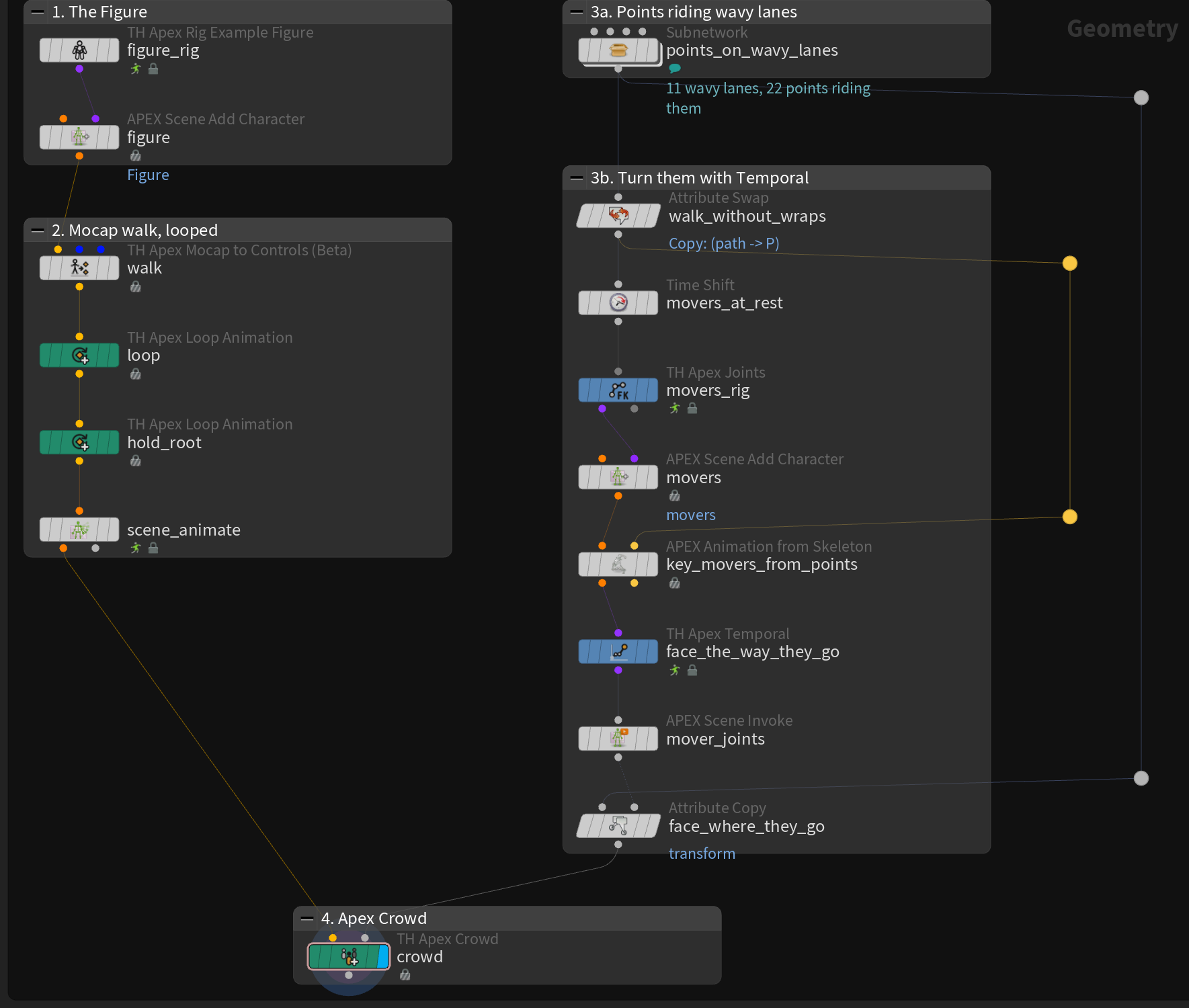
Video 1. Start with the Figure.
Video 2. Add motion capture, loop it. Mocap to Controls puts SideFX's walk on the Figure's controls; Loop Animation repeats it in place, with Last Frame set to Own Pose so the seam doesn't hitch.
Video 3a. Points moving. Points riding wavy lanes both ways, made with SOP nodes.
Video 3b. Turn them with Temporal. Each point gets a mover control; Animation from Skeleton keys it from the point, and Temporal's Mover turns it to face where it goes, eased by Turn Smoothing.
Video 4. Apex Crowd: the walk loop on the points. 22 Figures, each at its own time, speed and size, turning with their lanes.
The parts, in order: the Figure, the walk loop, the animated points, the movers turned by Temporal, the Crowd. Asset Browser > TumbleRig > Changelog > 1.23.
Node setup The parts, in order: the Figure, the walk loop, the animated points, the movers turned by Temporal, the Crowd. Asset Browser > TumbleRig > Changelog > 1.23.

Skeletons, controls and the boards that drive them

Orient joints in the Skeleton tool, place control shapes, drive poses from joysticks.

Skeleton and controls
Updated

Joysticks 1.4-1.6: modes, poses, animation

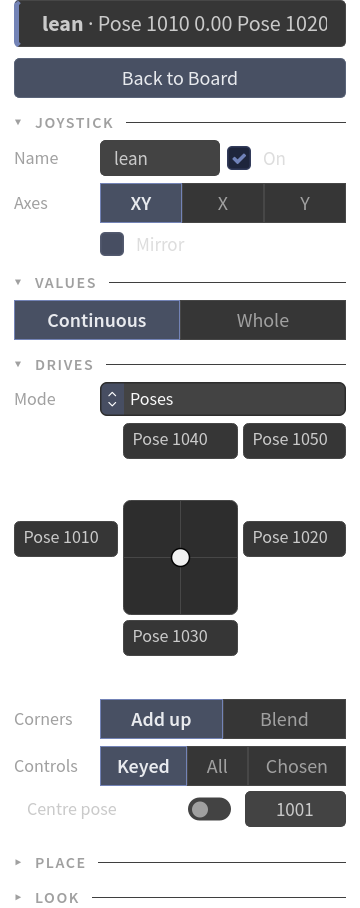
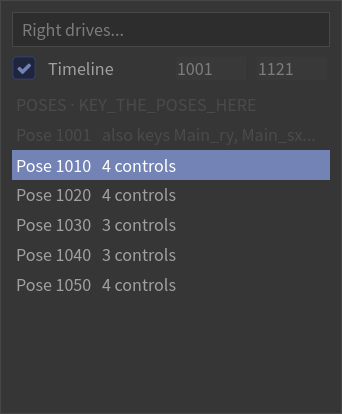
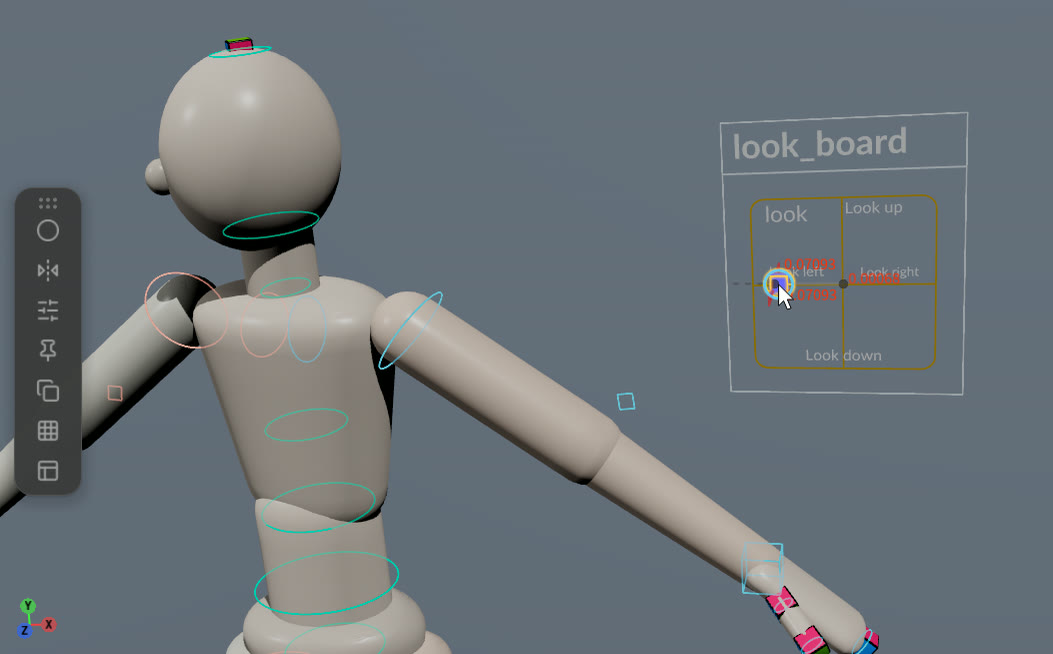
Each side of a joystick has a Mode: Shapes, Poses, Animation or Clips. A pose is read whole and blends linearly from the centre to the side, with dead zones per side and Side Names drawn in the stick's frame. A 2D board moves its poses too.

Video The look stick blending the Figure's keyed poses: push it left and the head turns left on screen.
The Direction Pad in Poses mode.
The + list: poses, animation ranges and clips.
Tool

Joysticks Sculpt sets up the blend shapes

Sculpt on the Joysticks panel with no Apex Blendshapes above makes one in the right place for you. Shift drags a 2D stick along one axis.

Video From a stick to a new shape. Push the brow stick up, press New shape on Up and name it, and Sculpt adds an Apex Blendshapes for you. Brush the brows in pose (mirrored), Store, and the stick plays the new shape.
Updated

Skeleton 1.8-1.10: orient joints in the tool

Orienting joints no longer needs another node: Apex Skeleton has an Orient mode with readable axes (hold X, Y or Z to try an axis). Name Chain names a drawn chain brow_1, brow_2 ..., Joint Only (O) moves a joint without its children, and joints of a Skeleton to Extend can be renamed and picked as a parent (P) to draw from. Skeleton 1.10 builds the same rig with less work and hides joint controls outside Joints mode.

Video Orient, name, move. Pick a brow's bones and make a chain (the other brow follows by Mirror), hold X, Y or Z to try an axis on the gold copy, name the chain brow, and move one joint with Joint Only while the next one stays.
Tool

Place Shapes: move the shape, not the joint

In Apex Controls 2.0 the Place Shapes handle moves, turns and scales a control's shape instead of the joint under it, mirrored to the other side, so a box or ring sits where it is easy to grab.

Video Move the shape, not the joint. Place Shapes on, drag the wrist box: it lifts off the hand, the joint stays, the other side follows; after Save the Channel Box shows the control's transforms still at zero.
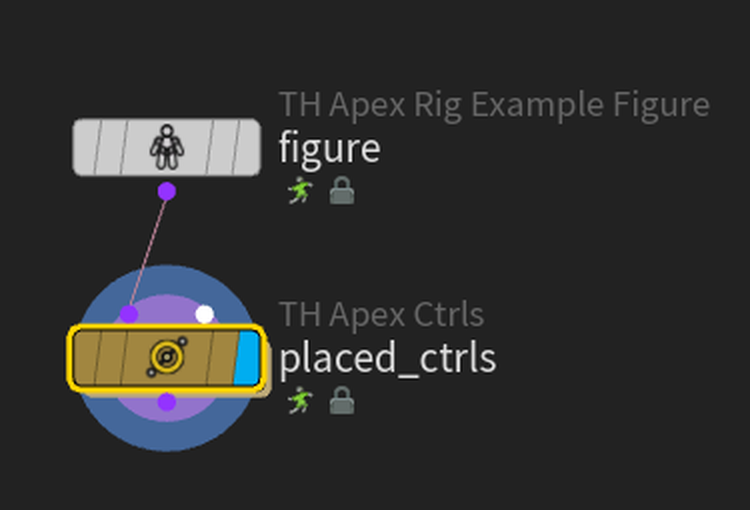
The setup: the Figure and Apex Controls 2.0.
Node setup The setup: the Figure and Apex Controls 2.0.
Updated

Visibility 2.3-2.4: Limbs

Hide a limb while you animate, FK and IK alike, from the Character Picker's Limbs tab. Add Limb Switches finds the arms, hands, legs, feet and spine, on the Figure too. Clicking an arm or leg hides its hand or foot with it, leaves nothing behind, and takes about a third of a second. Switches read any .shp of the character, and a slider wired to a switch replaces its Default Value.

Video Click a limb, it hides. The Figure with the Character Picker's Limbs tab beside the viewport: click R Arm and the arm goes with its hand, every FK and IK control with it; click L Arm, then both again, and they return.
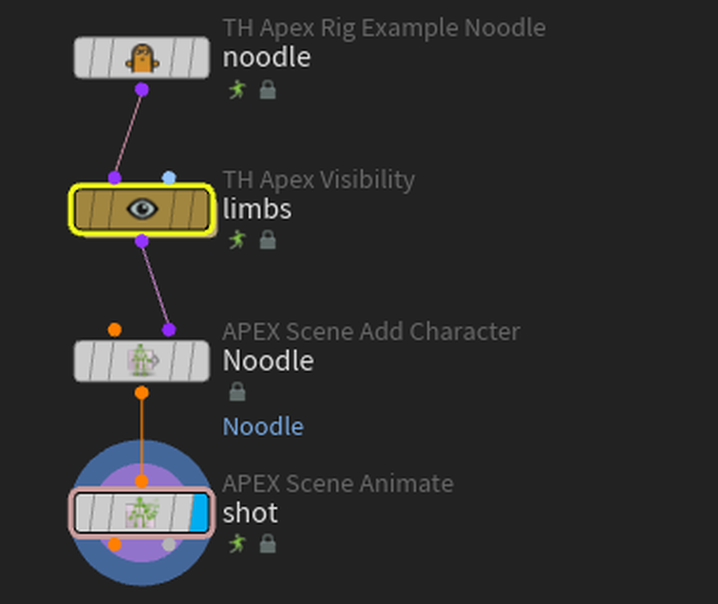
The setup: Apex Visibility 2.4 on the Noodle.
Node setup The setup: Apex Visibility 2.4 on the Noodle.
Updated

Apex Channels 1.2: any port as a channel

Add From Port... makes any port in the rig a keyable channel through the shared port picker, and Add Channels lists multiparm rows and the parts of vector settings. Typing Sliders in the Tab menu now puts down Apex Channels.

Video Pick any port, get a channel, animate it. Add From Port... opens the shared port picker: search peak and pick the Peak node's distance. In Animate the new channel is on the Main control in the Channel Box; drag it and the Noodle swells.
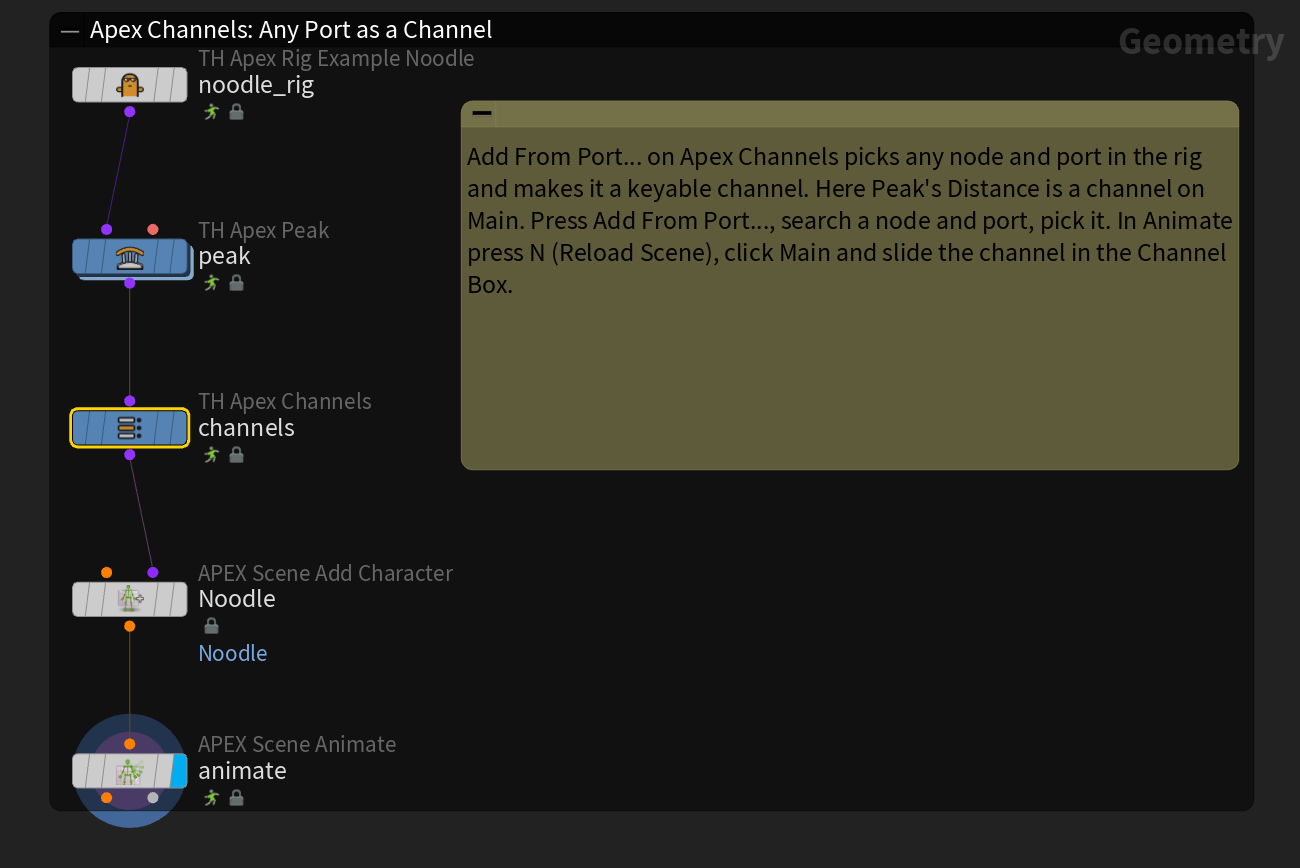
The setup: Apex Channels with a channel added from a port.
Node setup The setup: Apex Channels with a channel added from a port.
Updated

Pupils with Ring and Dot controls

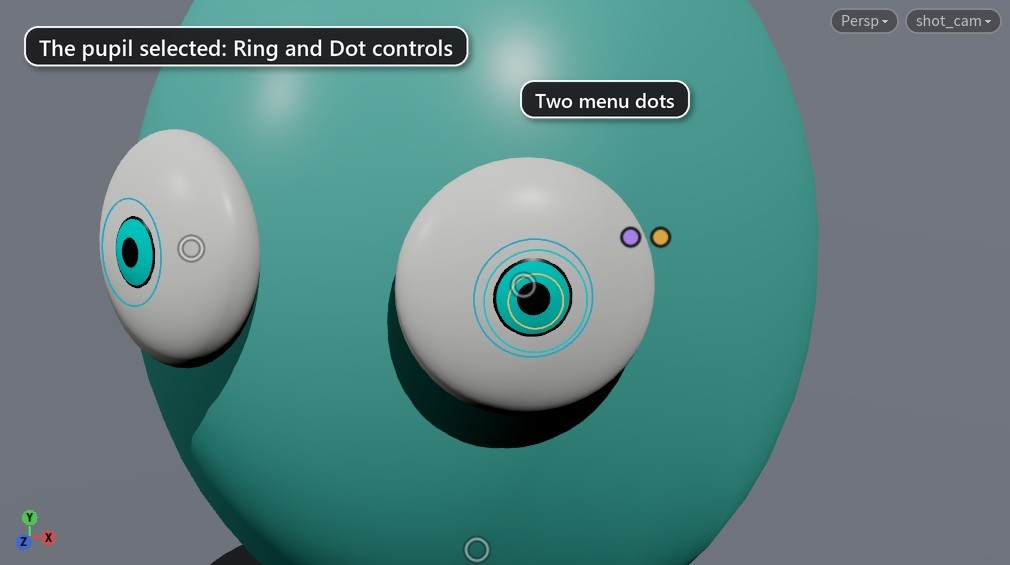
Pupils get Ring and Dot controls drawn where you can see them, and two 2D menus (Pupil and Shape) that appear as dots while the pupil is selected. Recipes: googly eyes, linked eyes, spiral pupils.

The pupil selected. Its Ring and Dot controls sit on the eye, and its two menu dots (Pupil and Shape) appear beside it.
Updated

Primitives 1.6-1.7: tubes you can twist, lighter rigs

A Tube twists smoothly when you rotate one of its points in Animate, its Box control is as tall as the tube is wide, and shapes on a mirrored joint face out (left-side shapes were inside out). With Handle Style Dots (the default) 1.7 leaves out the hidden size handles 1.6 built: on 150 shapes the rig goes from 14,381 nodes to 4,141 and a size edit from 744 to 460 ms. A second Primitives node on the same Name keeps its edit switch.

Updated

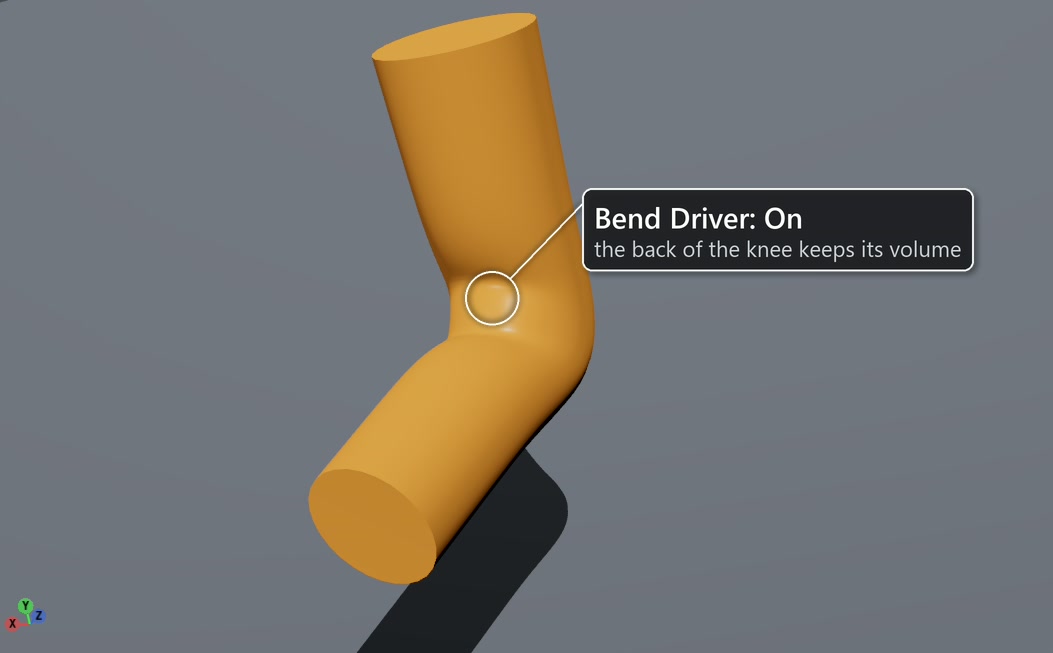
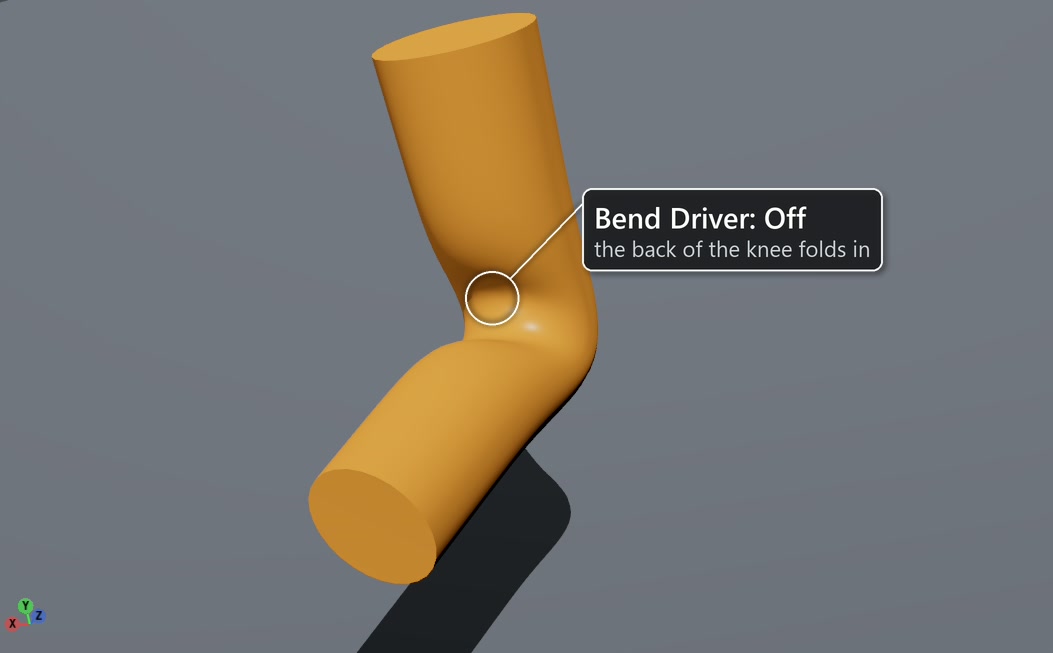
Helper Joints 1.1: knees that keep their volume

A bent knee folds flat at the back. Helper Joints' volume joints now carry skin weights with Apex Skinning's default capture, so a keyed push really holds the back of the knee out. The push holds past 120 degrees of bend, the blend joint follows scale, a mirrored row follows its own side's channel, and each row shows only the parameters it uses.

  • Recipes: A Knee That Keeps Its Volume, A Slider That Swells the Knees, A Tilted Ring With One Joint Moved.
Bend Driver on. It keeps its volume.Bend Driver off. The back of the knee folds.OffOn
Off Bend Driver off. The back of the knee folds.On Bend Driver on. It keeps its volume.
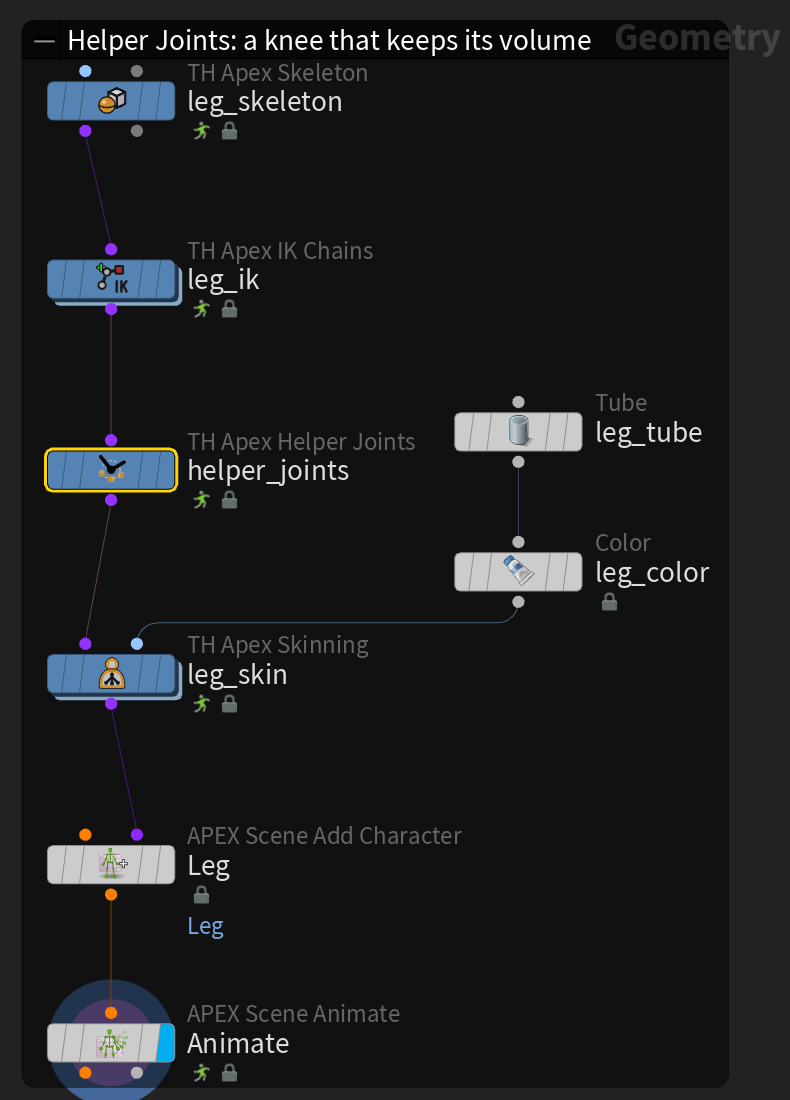
The recipe: A Knee That Keeps Its Volume.
Node setup The recipe: A Knee That Keeps Its Volume.
Updated

Set Driven Keys 1.3: Pick menus

Driven Controls and Driver Control get a menu and a Pick icon, the same picker as the other nodes.

Updated

Noodle 1.7 and Figure 1.3: the FK/IK dot

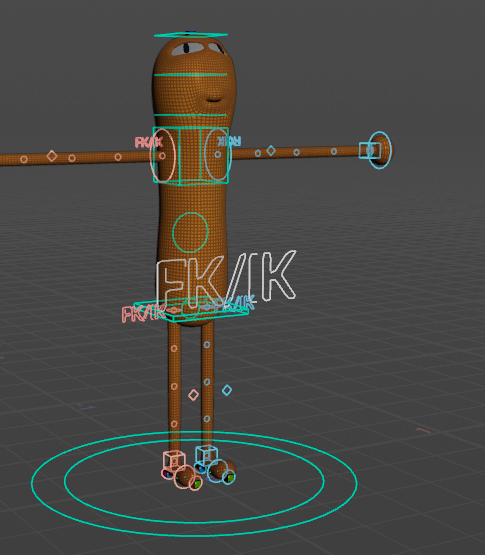
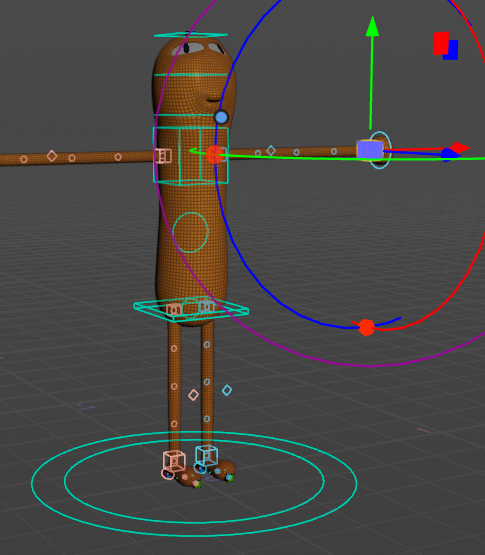
The example characters show the FK/IK switch as a small dot that appears while one of its limb's or spine's controls is selected, instead of a big FK/IK box, and every node inside them is on its newest version. Poses, controls and skin match 1.6 and 1.2 (the Noodle's skin within 0.25 mm).

Noodle 1.7: nothing extra until you select a limb.Noodle 1.6: big FK/IK boxes drawn all the time.1.61.7
1.6 Noodle 1.6: big FK/IK boxes drawn all the time.1.7 Noodle 1.7: nothing extra until you select a limb.
Select the left wrist: only that arm's FK/IK dot appears, beside the shoulder.

Mirrored splines, lips and limbs

Draw half a face; IK chains that keep their pose.

Splines and limbs
Updated

Spline 6.13: Mirror Across X

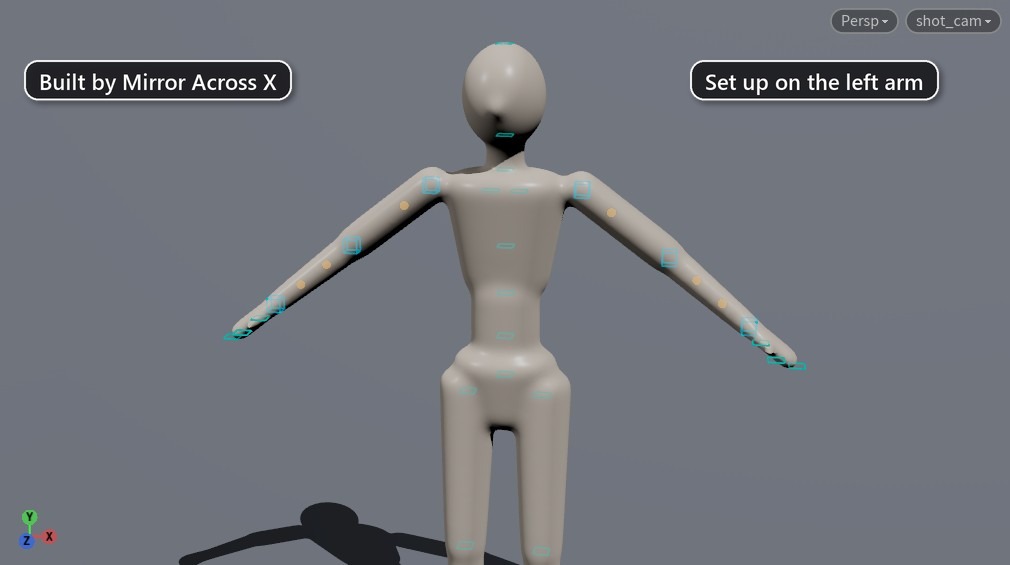
Mirror Across X builds the other side of a spline in every CV source: draw one brow, lip or arm and get its twin, with its own controls.

One arm set up, both arms built. The spline is set up on the Figure's left arm; Mirror Across X builds the right arm's spline and its controls.
Updated

Spline 6.14-6.15: Pair CVs Across X, closed loops

A spline over the middle of the face pairs its CVs left to right, so Mirror Pose and Flip work on a lip or a brow line. Read Joints From = Rest Skeleton reads every skeleton, also joints another spline added. 6.15 adds Order for closed loops, with From the Middle Out.

Video Mirror to the other side on a lip: pull one lip CV up, and Ctrl+M lifts its twin on the right.
Updated

Zipper 3.5: corner controls

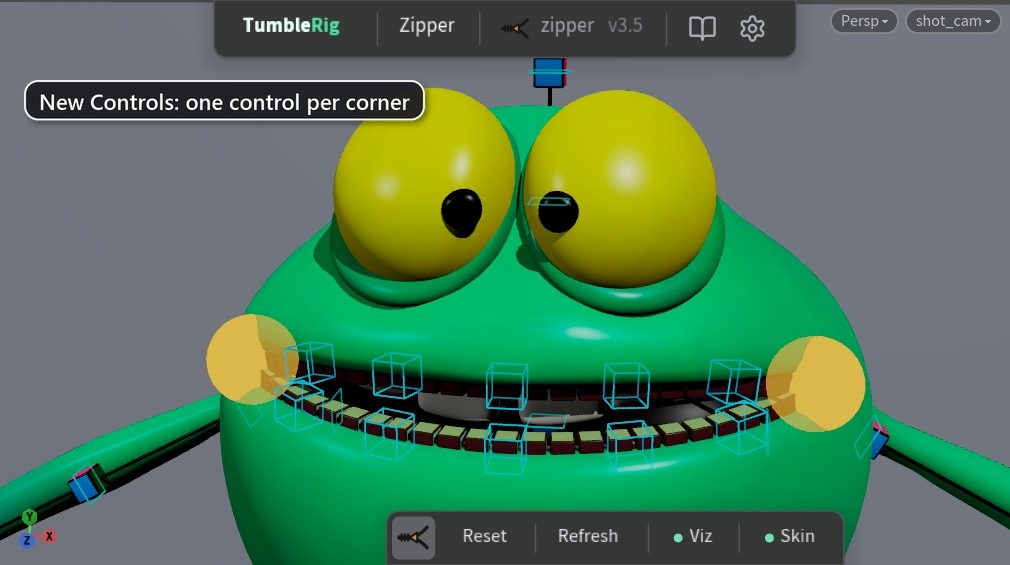
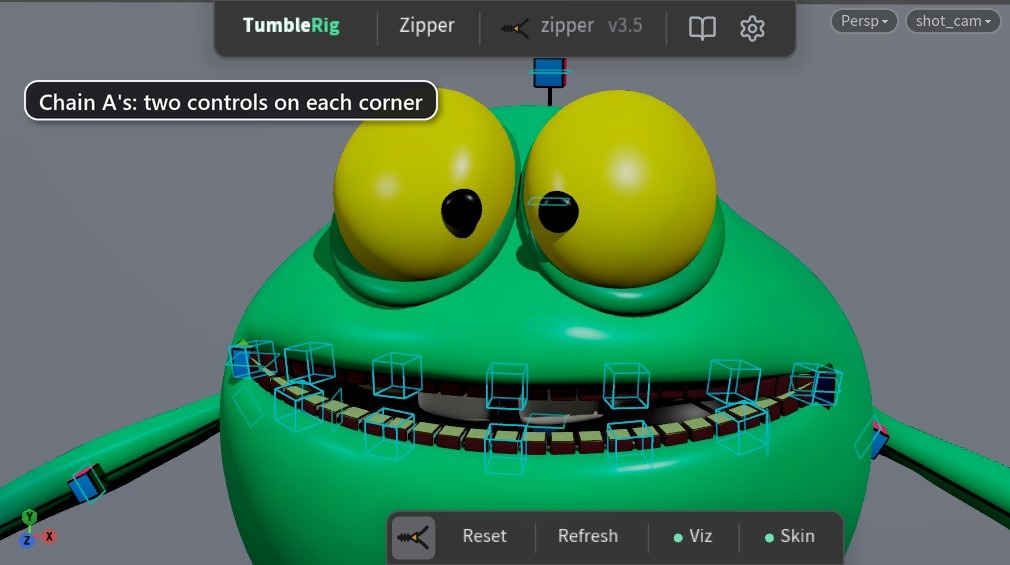
Corner Controls hides the lip end controls that sat on the mouth corners, or builds named, oriented corner controls with a joint each. Corner controls follow the skeleton's l_ / r_ names, and a Mirror setting picks how the sides mirror.

Corner Controls: New Controls. One control per corner, here a big ball you can grab.Corner Controls: Chain A's. The lip's end controls sit stacked on each mouth corner.Chain A'sNew Controls
Chain A's Corner Controls: Chain A's. The lip's end controls sit stacked on each mouth corner.New Controls Corner Controls: New Controls. One control per corner, here a big ball you can grab.
Updated

IK Spline 1.15: one node, many chains

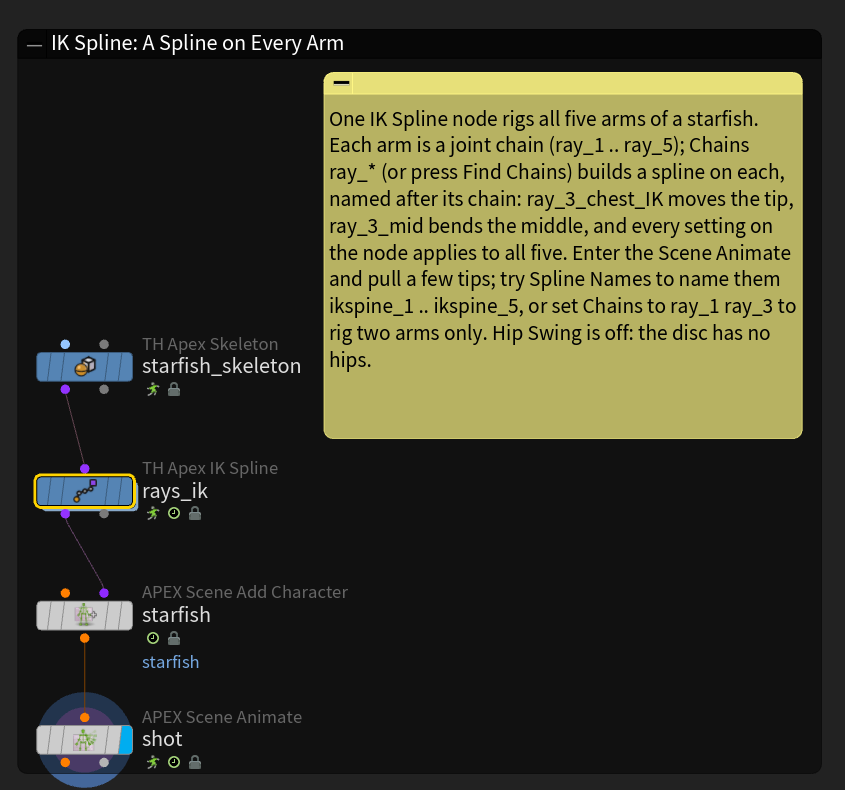
Before, an octopus needed eight IK Spline nodes, one per tentacle. Now one node rigs several chains: type tentacle_* in Chains (or press Find Chains) and it builds a spline on each, every setting shared. One chain works exactly as before. On eight tentacles one node cooks in 6.0 s where eight separate nodes took 10.2 s, and each spline keeps its FK/IK dot at its own chain.

Video One node, five chains. Chains set from ray_1 to ray_*: a spline with its controls on every ray of the starfish; pulling ray_3's tip bends only ray_3.
The recipe: one IK Spline 1.15 on the starfish skeleton. Asset Browser > TumbleRig > Changelog > 1.23.
Node setup The recipe: one IK Spline 1.15 on the starfish skeleton. Asset Browser > TumbleRig > Changelog > 1.23.
Updated

IK Spline 1.14, IK Chains 2.18

IK Spline has IK Spaces on the chest, IK Chains keeps IK Spline's control looks, and neither recooks on every frame. FK/IK Match no longer throws a locked elbow or knee to the pole.

Video Switch to IK with the elbow locked and nothing pops. A click on FK / IK, then a drag of the IK wrist: the elbow stays put.

Lattices, capture and blend shapes

Mirrored lattices, capture that says when it's wrong, blend shapes that find their points.

Capture and deformation
Updated

Lattice 1.6: Mirror

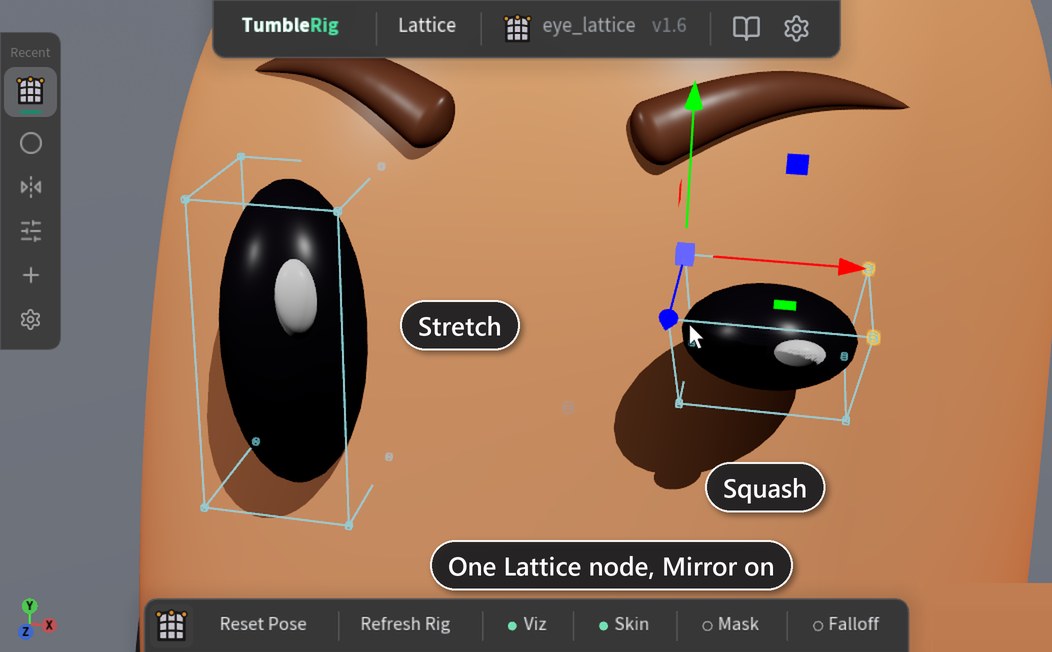
Eyes and pupils are often one piece of geometry for both sides. Lattice 1.6's Mirror splits the Group across the mirror plane and builds a lattice on each side from one node, named L_ and R_ so Mirror Pose and Rig Defaults pair them. Mirror Center moves the plane off the origin, and Cage From picks the cage: Second Input, Chain or Group.

Video One node, a lattice on each eye. Pull the left cage's corners and that eye stretches; push the right one's and that eye squashes.
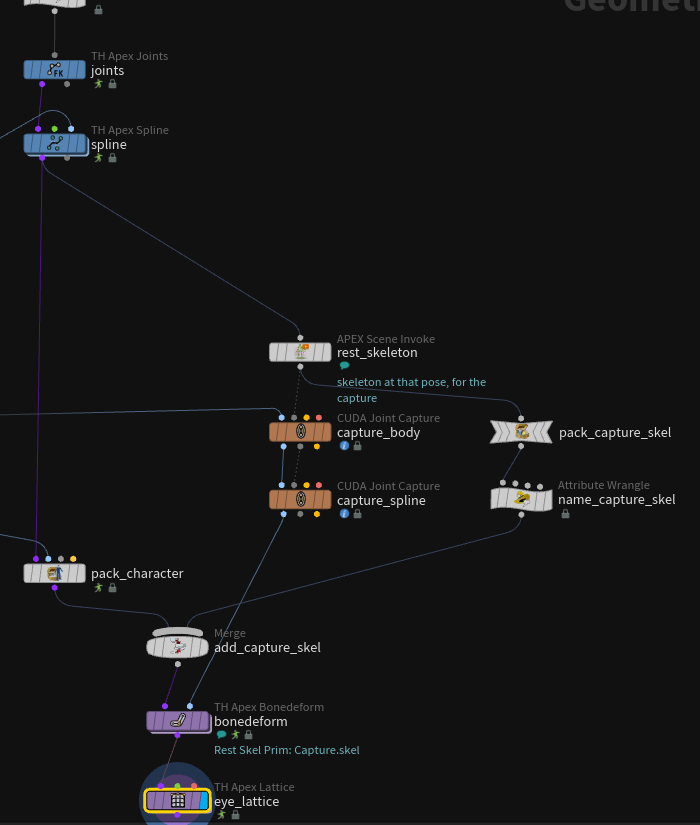
One Lattice node with Mirror on.
Node setup One Lattice node with Mirror on.
Fixed

Lattice 1.5: Show Falloff and World fixed

A Falloff toggle tints the skin by the edge falloff, a Mode line says what the lattice does, and World mode with no bone deform above no longer moves the mesh twice when the Parent Control moves.

Video Show Falloff. Red where the lattice acts, fading to white at its edge.
Updated

Joint Capture: Spline Rings and Joint Geo per chain

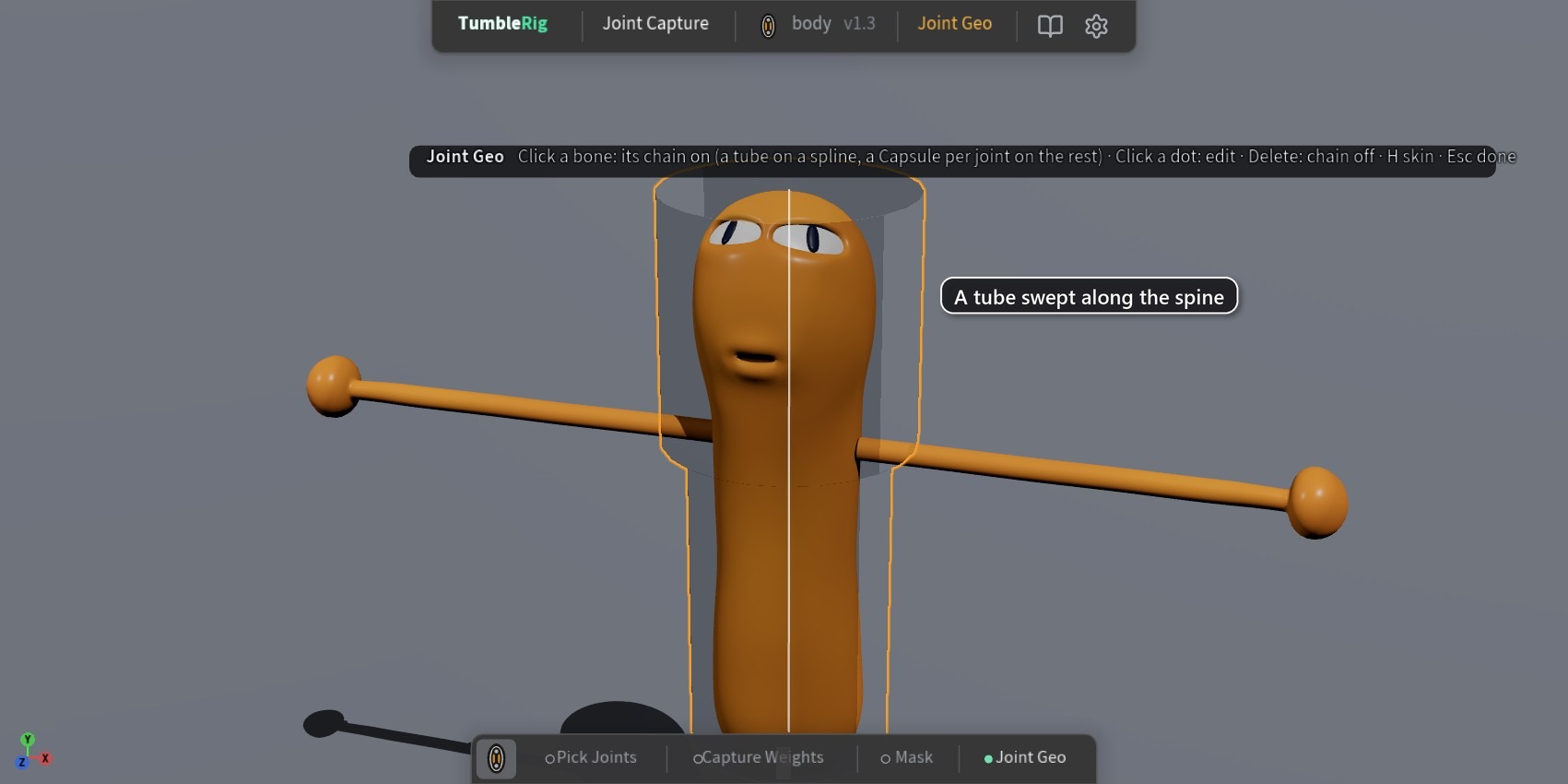
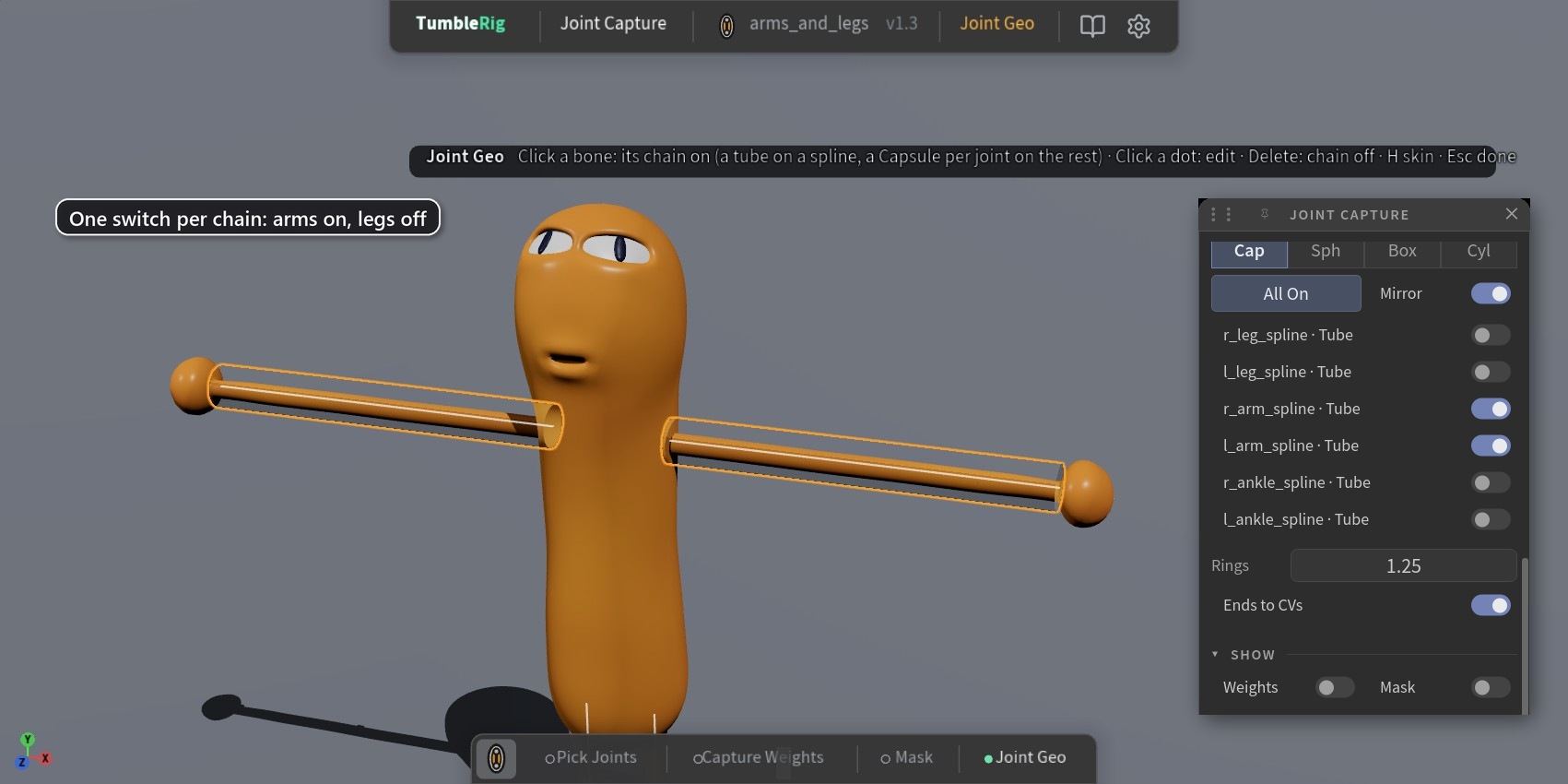
Joint Geo makes a ring through each spline joint with an even blend between them, a swept tube along the chain. Shift+click adds a whole chain, Joint Geo is on or off per chain, and the shapes draw as see-through surfaces with an outline.

The swept tube along the Noodle's spine, see-through with an outline, in the Joint Capture tool's Joint Geo mode.
One switch per chain. The arms on, the legs off, in the Tool Panel.
Fixed

Joint Capture: wrong captures now say so

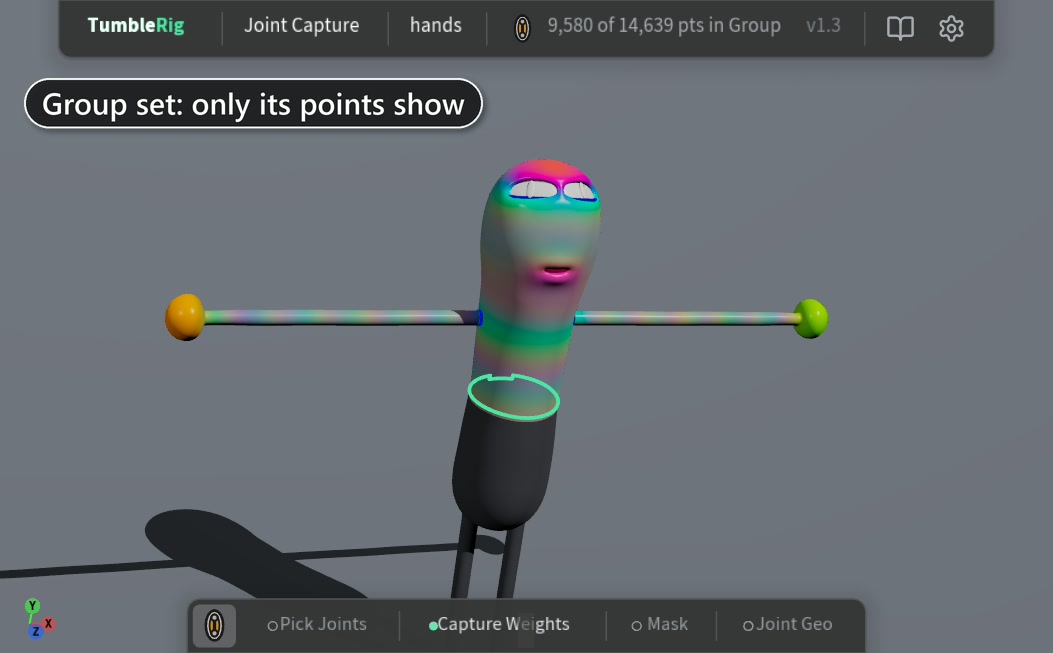
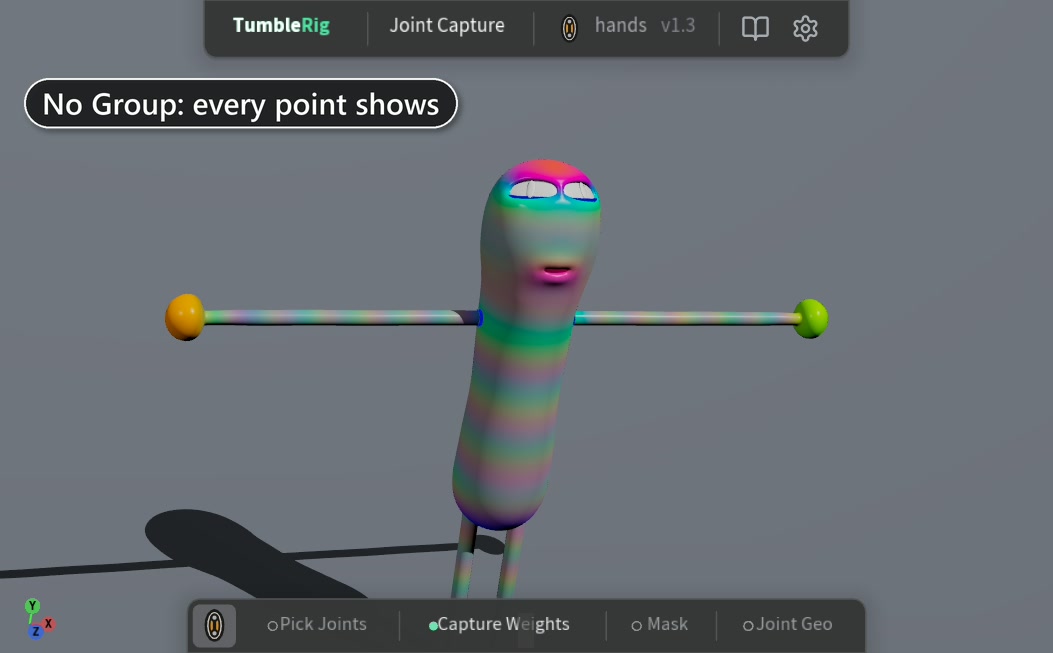
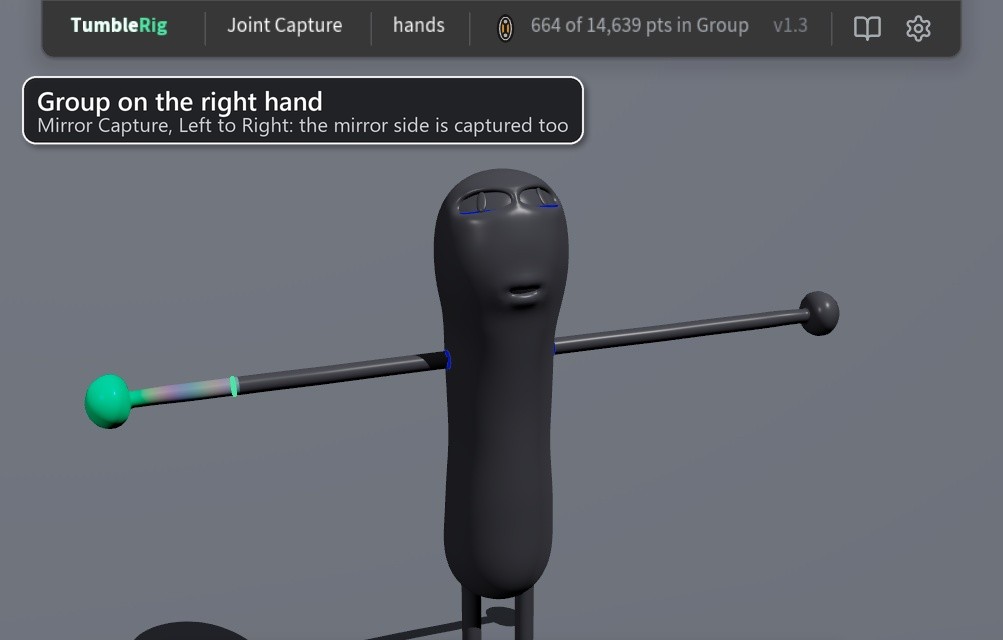
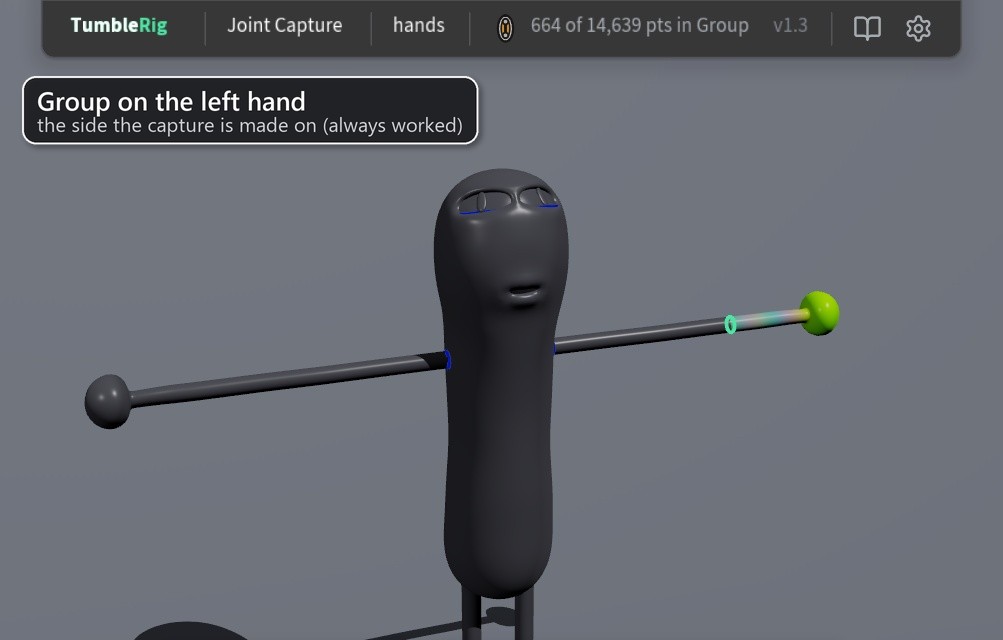
Four captures that went wrong silently now work or warn. Keep Sides no longer leaves points with no weight, Mirror Capture captures a Group on either side, an upstream change reaches the bone deform below, and Capture Joints reads typed names. Moving a mask in the tool went from 23 s to 1.1 s on a big capture.

Group set. Only its points show; the border is outlined and counted.No Group. The whole body shows its weights.No GroupGroup
No Group No Group. The whole body shows its weights.Group Group set. Only its points show; the border is outlined and counted.
Mirror Capture: the right hand is captured too.A Group on the left hand, the side the capture is made on.LeftMirrored
Left A Group on the left hand, the side the capture is made on.Mirrored Mirror Capture: the right hand is captured too.
Updated

Blendshapes 3.6: match by name

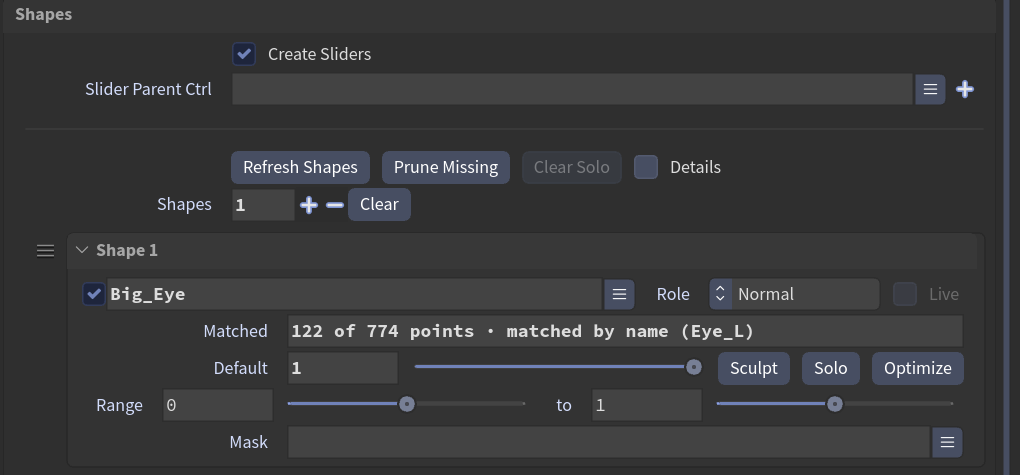
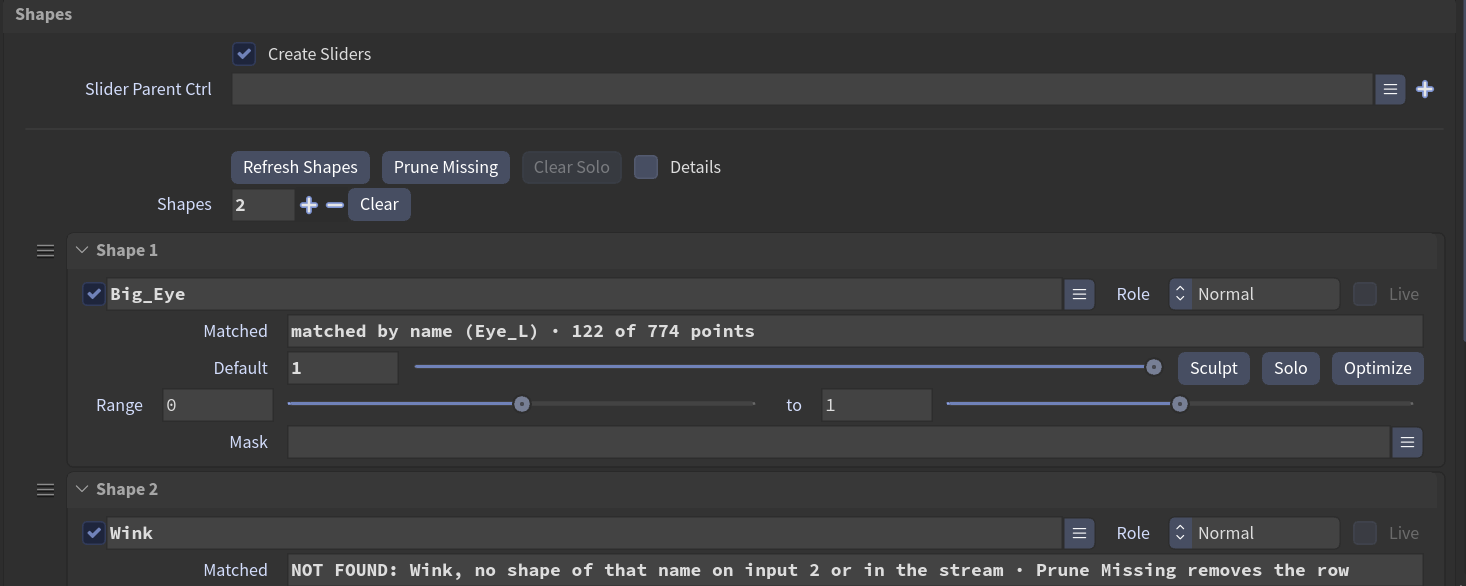
Shapes match by name, and every row says how it matched (by name, by points, how many moved) or why it failed. Match Points pairs a part of the model, such as a head sculpted on its own, with the right base points.

Every shape says how it matched. The Matched line counts the points that moved and names what they were matched to: here 122 of 774 points, matched by name (Eye_L).
A row that finds nothing says so. NOT FOUND, where it looked, and that Prune Missing removes the row.
Updated

Shrinkwrap 1.4: Collider Normals

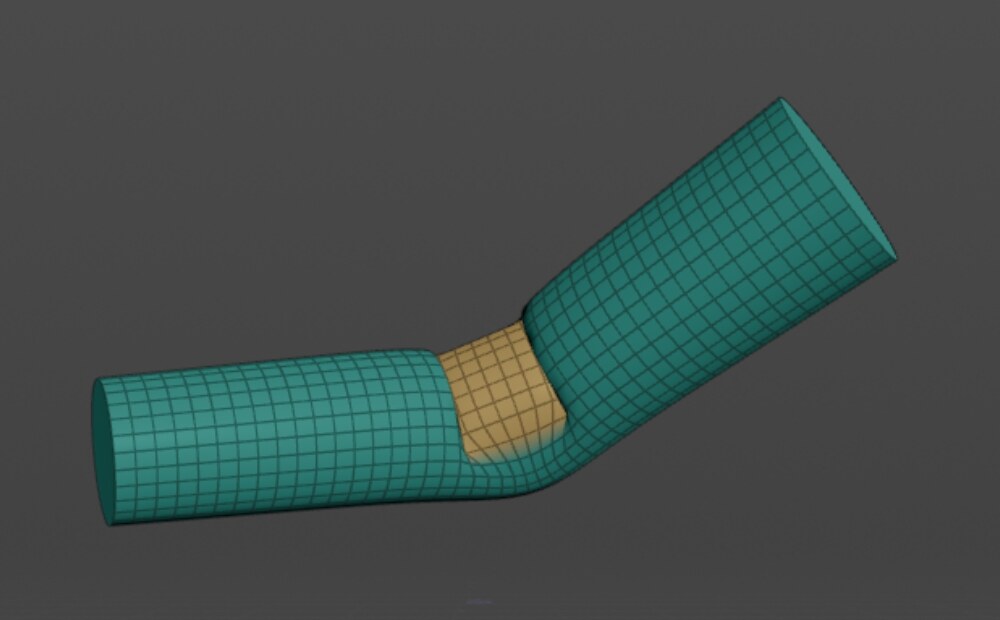
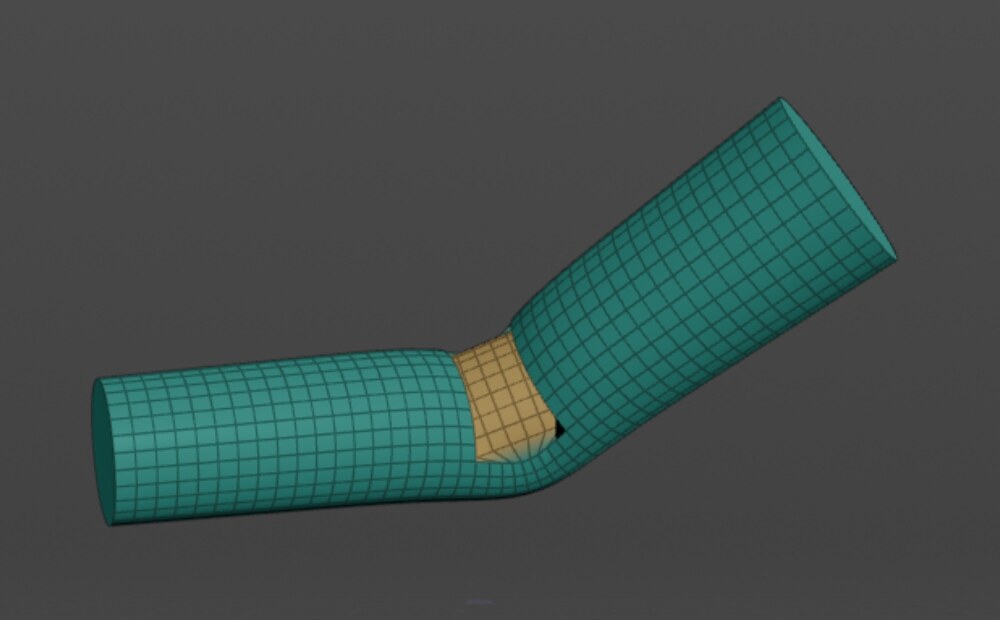
Collider Normals makes a wrapped end shade like the body under it. A seam turns with its own limb when there is no Parent Controller, and mixed Auto and named joint rows bind their own joints.

On. The seam takes the body's normal.Off.OffOn
Off Off.On On. The seam takes the body's normal.
New

Mask Primitives: mask shapes you place in the viewport

A deformer's mask as its own node: a stack of Plane, Box, Sphere, Near Joints and Group shapes, combined like image layers. Click a shape's dot or outline to select it, and a small 2D menu beside it sets its size, Falloff, Falloff Type (or a ramp), Edge, Strength and Invert. Every drag redraws the mask live.

Video Click a shape, shape its edge. The chest Sphere lights up and its 2D menu opens; dragging Falloff redraws the mask on the Figure while you drag; Type: Ramp leaves a ring; the elbow's Near Joints shape gets Edge: Outside.
Updated

Solidify 1.1: Falloff from a Group

A rigid plate or badge fades into the skin from a Group, like Lattice's Edge, instead of tearing at its edge.

Falloff on: the arm eases into the plate, and the plate stays rigid.Falloff off: a rigid plate on an elbow tears open at its edge as the elbow bends.OffOn
Off Falloff off: a rigid plate on an elbow tears open at its edge as the elbow bends.On Falloff on: the arm eases into the plate, and the plate stays rigid.
Updated

Follow Controls 1.2, Capture Transfer, Capture Blur

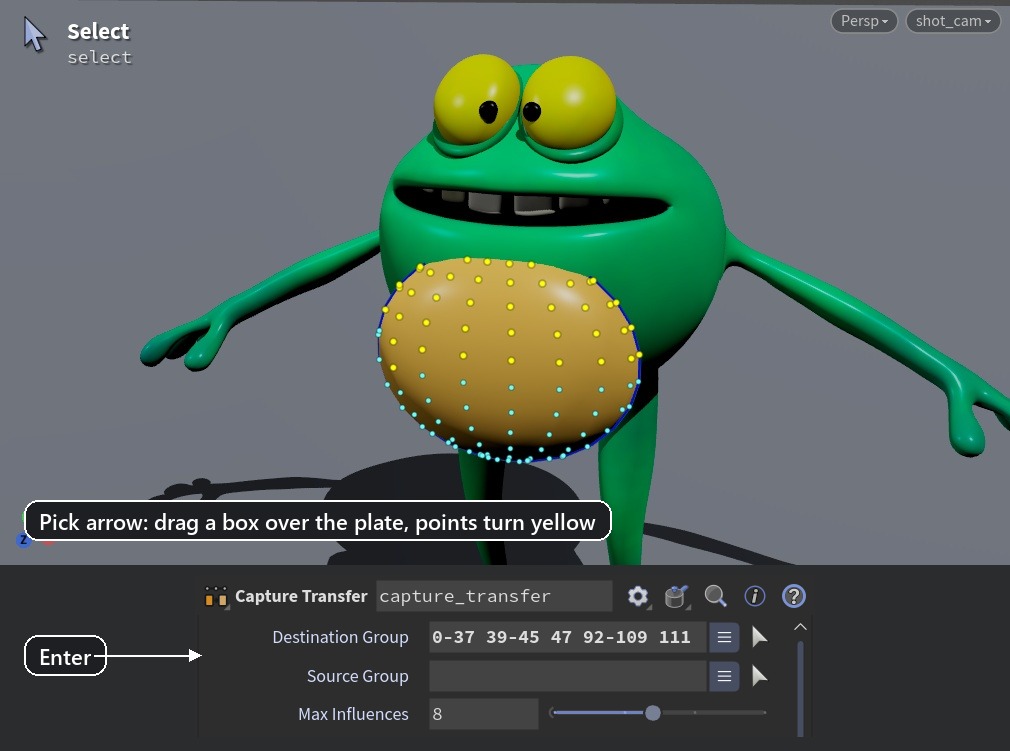
Follow Controls has a Bind Group and warns when a Boolean cuts the mesh it follows. Capture Transfer gets pick buttons on its groups, and Capture Blur's Group lists primitive groups and named pieces.

Destination Group picked in the viewport: the arrow beside the field box-selects the plate's points, and Enter fills the group.
Updated

Eye Rig 3.1: cartoon lids

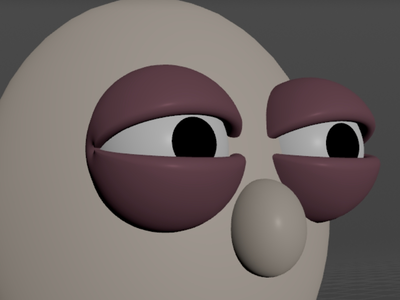
Cartoon lids are a sheet laid out the way the rig moves it, with Lid Thickness, and the blink sliders are channels. A header over the Parameter pane shows what is set up and what to set next. The lids use Apex Spline 6.15's new Order for closed loops, From the Middle Out.

Thick Lids recipe.
Thick Lids recipe.
The Parameter pane header.
TumbleTrove+

Remesh 1.1 and Boolean 1.4

Apex Remesh follows SideFX's Remesh to Grid step for step, with Project to Original and Post Smooth, and smooths 3 times faster. Apex Boolean cuts on the rest shape even with a Live Rig cutter. Needs a TumbleTrove+ plan.

Video Live in the rig. The Figure plays a mocap stretch, and Apex Remesh fuses its pieces into one quad skin on every frame.
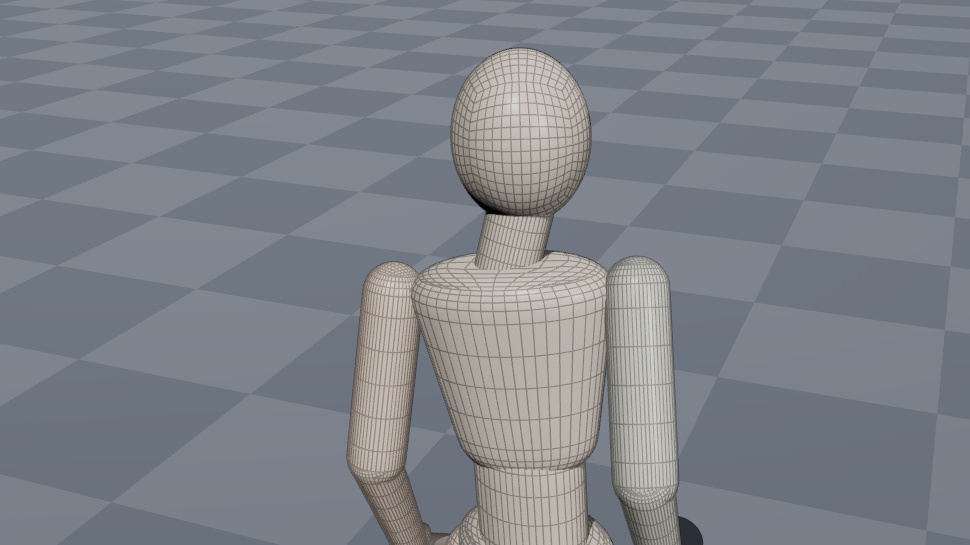
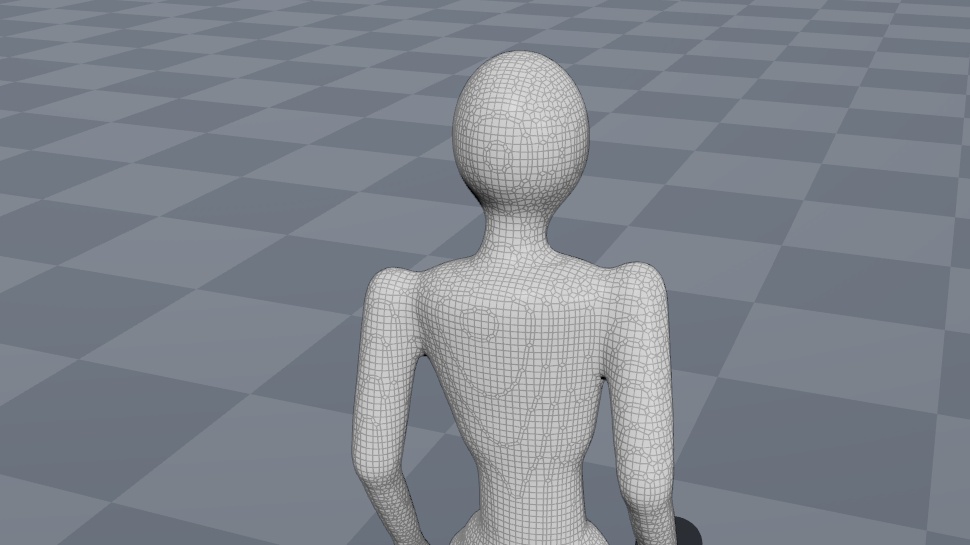
Remesh off: the Figure's capsule pieces, each with its own seams.
Remesh on: the same pieces as one quad skin, from the same camera.

Tools that stay out of the way

Every 2D menu of a shot in one list, resizable panels, a camera that follows its keys.
Panels and viewport tools
Tool

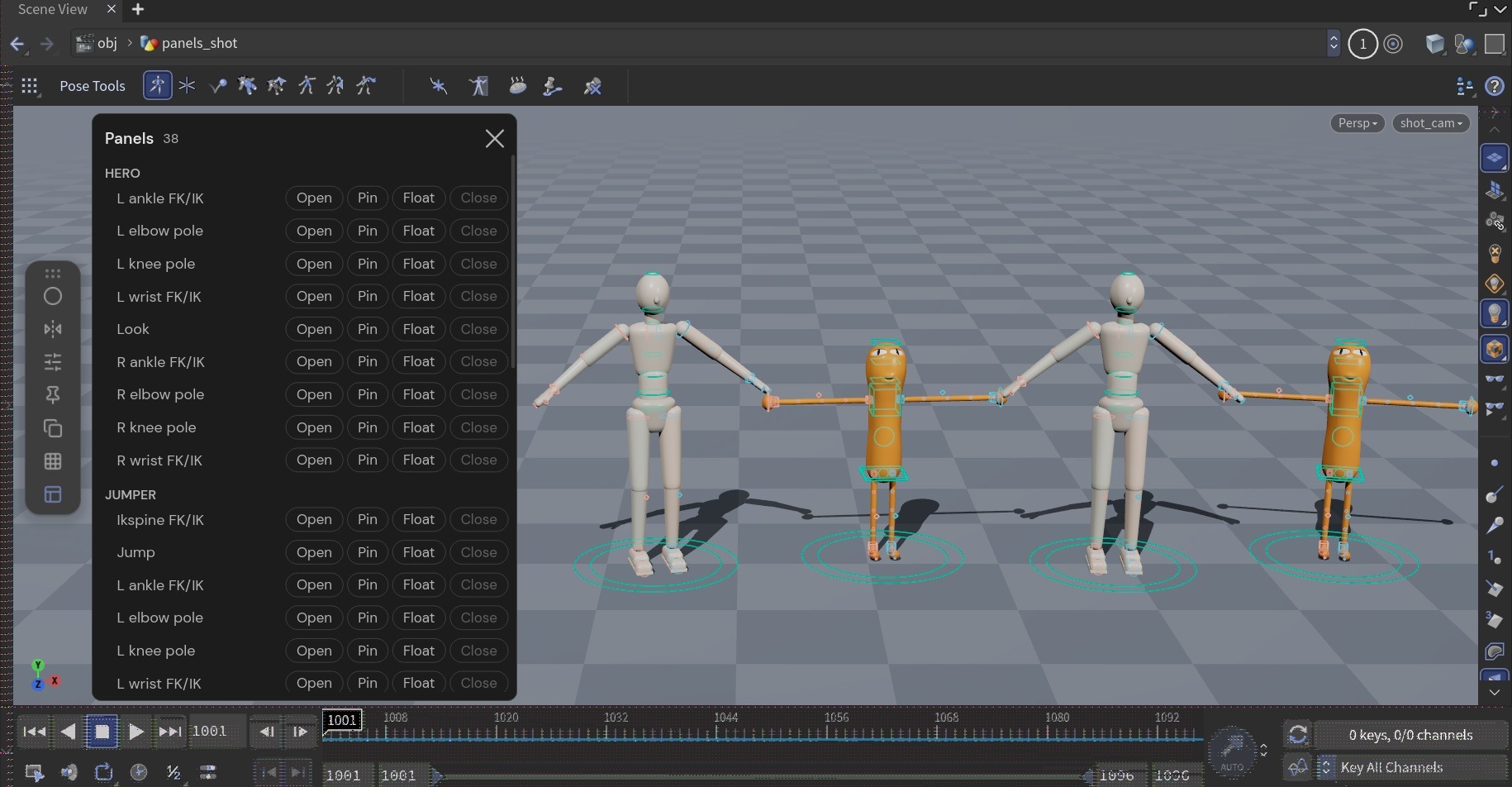
The Panels list: every 2D menu of the shot

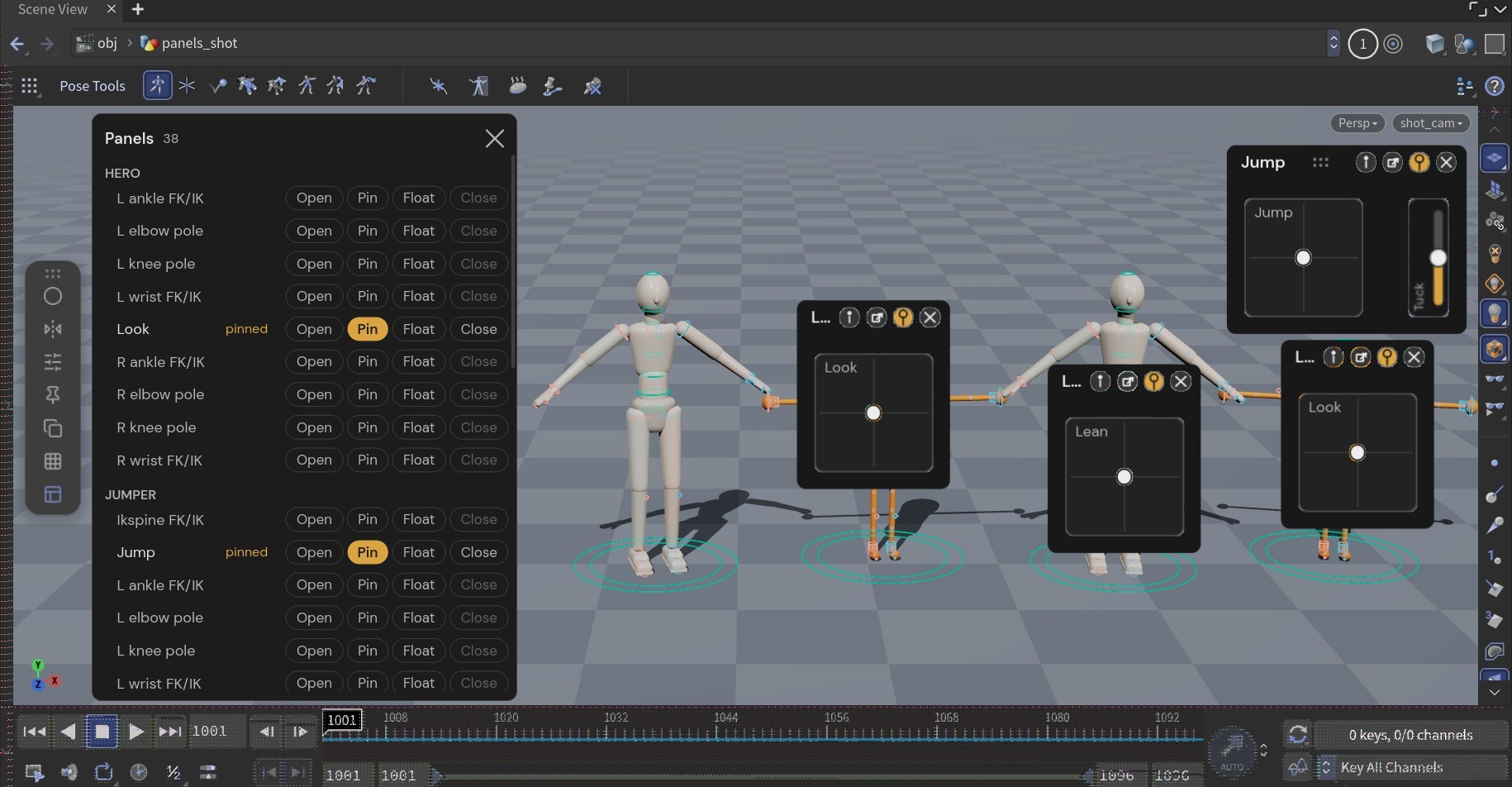
A shot with a dozen characters has dozens of 2D menus. The new Panels tile on Scene Animate's tab bar lists every 2D menu in the shot by character, with Open, Pin, Float and Close per menu, and Shift + right-click > Close all pinned 2D menus clears them. Opening, selecting and dragging menus no longer stall Animate.

The Panels list over a four-character shot: every 2D menu, grouped by character.
Four menus pinned from the list, each over its character.
Tool

Tool Panels resize

Drag the grip on a Tool Panel's bottom edge to make it shorter or taller; the height is kept per panel and the body scrolls. Tool Panels refresh on macOS, and the tab bar drags to the top and bottom of the viewport.

Video Dragged shorter with the grip on the bottom edge; the body scrolls.

TumbleRig nodes on SideFX's autorig rigs

Build a character with SideFX's APEX autorig components, then add TumbleRig nodes after it. We tested every TumbleRig node family on five of SideFX's rigs (Electra and Otto from Houdini 22, the Content Library's Pirate, Harry and Harry with wings) and fixed what broke. Playback speed is unchanged.

SideFX autorig rigs
UpdatedHighlight

Mix them in one rig

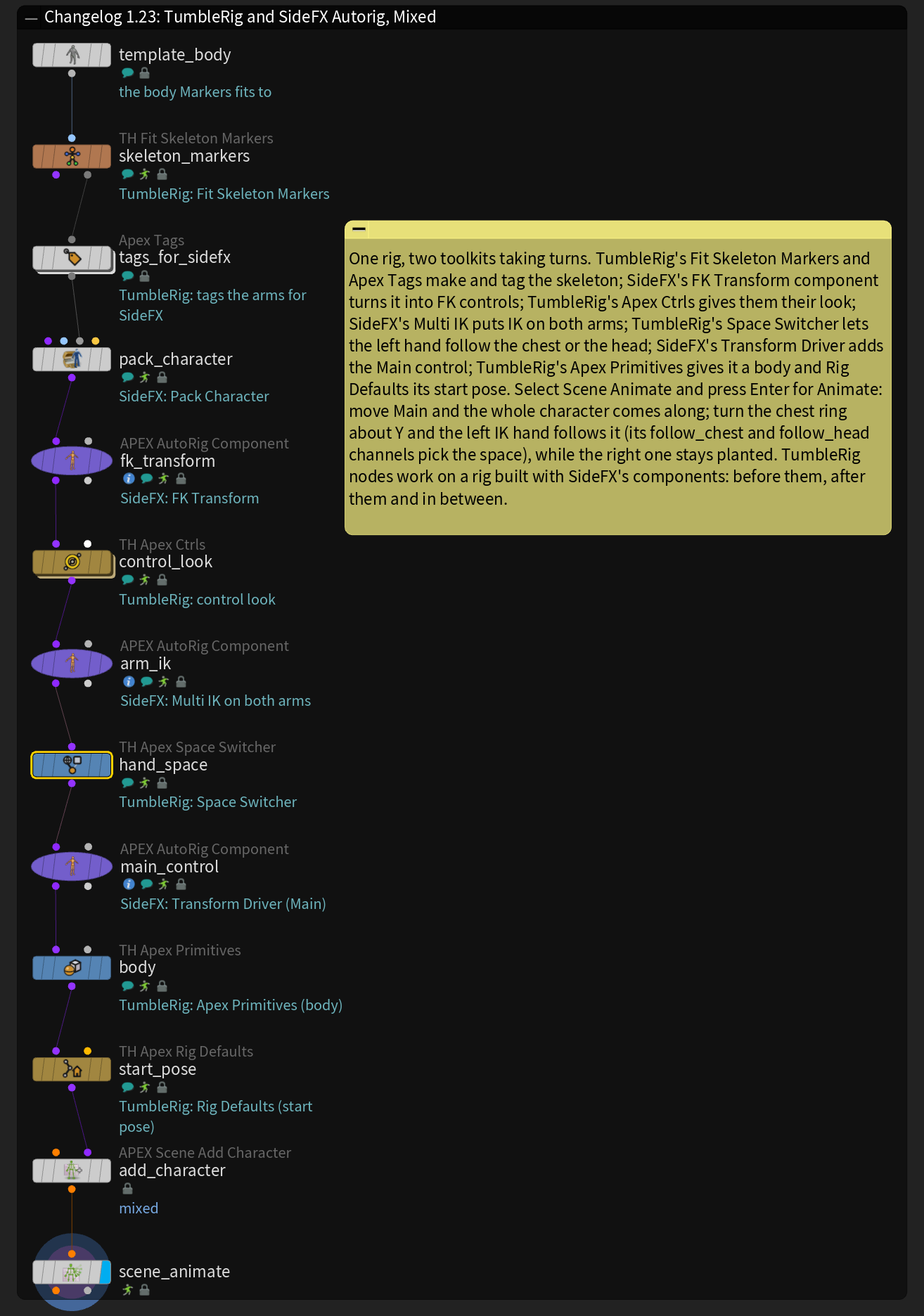
You don't have to choose between SideFX's autorig components and TumbleRig. Put them in the same chain, in any order. The recipe hands over six times: TumbleRig's Fit Skeleton Markers (wrists only, no fingers) and Apex Tags, SideFX's Pack Character and FK Transform, TumbleRig's Apex Ctrls for the control look, SideFX's Multi IK on both arms, TumbleRig's Space Switcher on the left hand, SideFX's Transform Driver, then TumbleRig's Primitives for the body and Rig Defaults for the start pose: one rig you animate in Animate, where controls from both draw, pick and key the same way.

  • Your rig's settings survive our nodes: Auto Clavicle, IK stretch, twist settings and the blend shape layout stay on the rig after any TumbleRig node (before, 85 to 180 of them were dropped per rig).
  • Arms, legs, spine and fingers found on their own from SideFX's skeleton data, mirror plane and component tags, with no names guessed: Electra 15 chains, Otto 16, the Pirate 16, Harry 11.
  • These work after an autorig rig: Space Switcher, Channels, Sliders, Constraints, Parent, Rig Defaults, Offset, Sticky and Follow Controls, Delta Mush, Motion Effects and Temporal.
  • Apex Spline works on SideFX skeletons: a bone with no name takes its parent joint's name.
  • Boards draw on these rigs: Motion Effects, Temporal and Joysticks.
  • No jump at rest: Space Switcher and Constraints no longer move a SideFX IK target when nothing is posed.
  • Clear messages where the rig already does the job: IK Chains, Inverse Foot, Bone Deform and Skinning say so instead of failing or deforming twice.
  • Tested on five SideFX rigs: Electra, Otto, the Pirate, Harry and Harry with wings. Playback speed is unchanged.
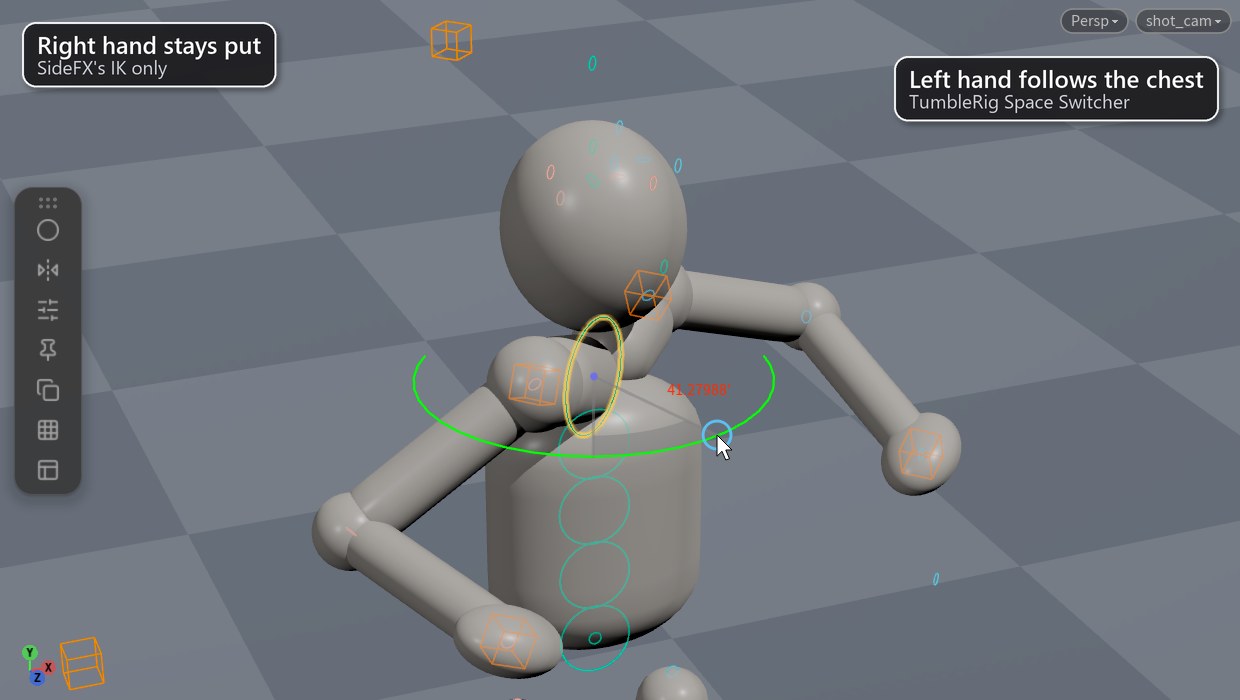
Video One rig, two toolkits. Turn the chest (SideFX's FK control, TumbleRig's look): the left IK hand follows it through TumbleRig's Space Switcher, the right one, on SideFX's IK only, stays put.
The recipe, one column: TumbleRig and SideFX nodes taking turns, each labelled with whose it is, SideFX's components in their own purple. Asset Browser > TumbleRig > Changelog > 1.23.
Node setup The recipe, one column: TumbleRig and SideFX nodes taking turns, each labelled with whose it is, SideFX's components in their own purple. Asset Browser > TumbleRig > Changelog > 1.23.
Fixed

Your rig's settings survive our nodes

An autorig rig keeps part of its setup as stored values on the rig: Auto Clavicle, IK stretch, twist settings, the blend shape layout. Every TumbleRig node that edits a rig used to drop them silently, 85 values on Electra, 123 on Otto, 180 on the Pirate, so the clavicles stopped following the arm after a Parent or a Sliders node. Now no TumbleRig node loses them, on any of the five rigs. Our own rigs come out exactly as before.

Updated

Arms, legs, spine and fingers found on their own

Nodes that work on chains (Chains selections, Visibility's Limbs, Rig Noise chains, Selection Sets, the chain menus) used to find nothing on an autorig rig. They now read SideFX's own skeleton data, its mirror plane and component tags, with no names guessed: Electra gets 15 chains, Otto 16, the Pirate 16, Harry 11.

Updated

Space Switcher, Apex Spline and the boards

Space Switcher, Channels, Sliders, Constraints, Parent, Rig Defaults, Offset, Sticky and Follow Controls, Delta Mush, Motion Effects and Temporal all work after an autorig rig. Apex Spline used to stop on SideFX skeletons, whose bones carry no names; a bone now takes its parent joint's name, so it works on all five rigs. Motion Effects, Temporal and Joysticks now draw their board on these rigs.

Video SideFX's autorig rig, then Space Switcher. Otto's IK hand follows the chest, then the head, then stays in the world.
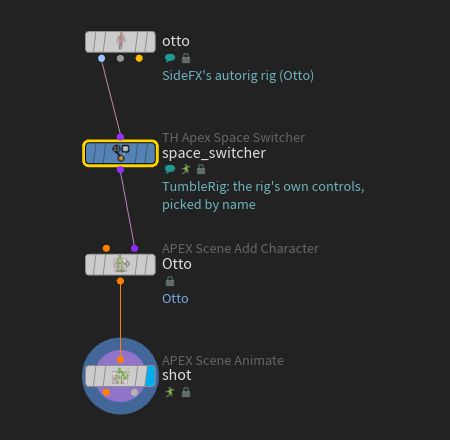
SideFX's autorig rig, then TumbleRig. Otto, then Space Switcher on its own controls, picked by name.
Node setup SideFX's autorig rig, then TumbleRig. Otto, then Space Switcher on its own controls, picked by name.
Fixed

Clear messages where a node doesn't apply

An autorig rig brings its own IK, reverse foot and skin deformation. IK Chains and Inverse Foot now say so, and name the nodes that do work, instead of stopping with an inner error. Bone Deform and Skinning say the rig already deforms its skin, instead of deforming it a second time; Delta Mush and the shape nodes work on top.

  • Not yet: deformers on the Pirate (its rig drops points before our node), and IK Spline after a SideFX FK rig, which builds but adds no controls.

Also fixed

Small fixes, one line each.

Fixes
Fixed

Fixes

  • Mirror Pose mirrors fingers on any character, also one facing another way, and pairs a spline's controls by rest position. Ctrl+Shift+M keys the flip; Ctrl+Alt+M works on AltGr keyboards.
  • Temporal: a drive into a shape's slider no longer leaves the rig evaluating to nothing, Temporal reads a control past its noise nodes, and joints lag again on IK Spline rigs.
  • Inverse Foot 1.3: Apex Ctrls can restyle the foot roll pivots.
  • Sticky Controls 1.2 works after Merge Graph and has a Shape menu.
  • Apex Camera 1.4: the head, track and crane are handles again, and the board is another way to reach them.
  • Merge Skel keeps an Apex Spline on either input.
  • Rig Defaults no longer makes a control jump after an eye is scaled, and is several times faster on big rigs.
  • Camera rig: looking through it in the APEX Animate LOP follows its keys.
  • Camera Lag lags an Apex Camera 1.3 with its default Camera Body; before, it did nothing until you picked head_x. A new Lag the Aim option trails the whole turn toward the aim target, tilt as well as pan.
  • Apex Camera: Add Camera Lag builds Camera Lag 1.2 (it built 1.0), and Add Camera Shake builds Camera Shake 1.2.
  • Farm jobs and scripts: Animation from Skeleton, Ragdoll Bake and Mirror Pose work on TumbleRig rigs in hython too, so a crowd steered by Temporal renders the same on the farm as in Houdini.
  • Space Switcher and Constraints no longer make a SideFX IK target jump at rest.
  • Character Picker: entering Animate a second time no longer leaves a rig's picker (Visibility Limbs, Selection Sets) dim and unclickable.
  • Controls tool: Save keeps the rig's Viz off; it used to come back on with every Save.
  • Long lists fold: each row of a long list (Joints, Chains, Primitives, Shapes, Switches, Channels and more, on 13 nodes) folds to one line you open when you need it.

Scenes that open in a second

Measured on production-size rigs.
Performance
Tool

Node cache: reopen without rebuilding

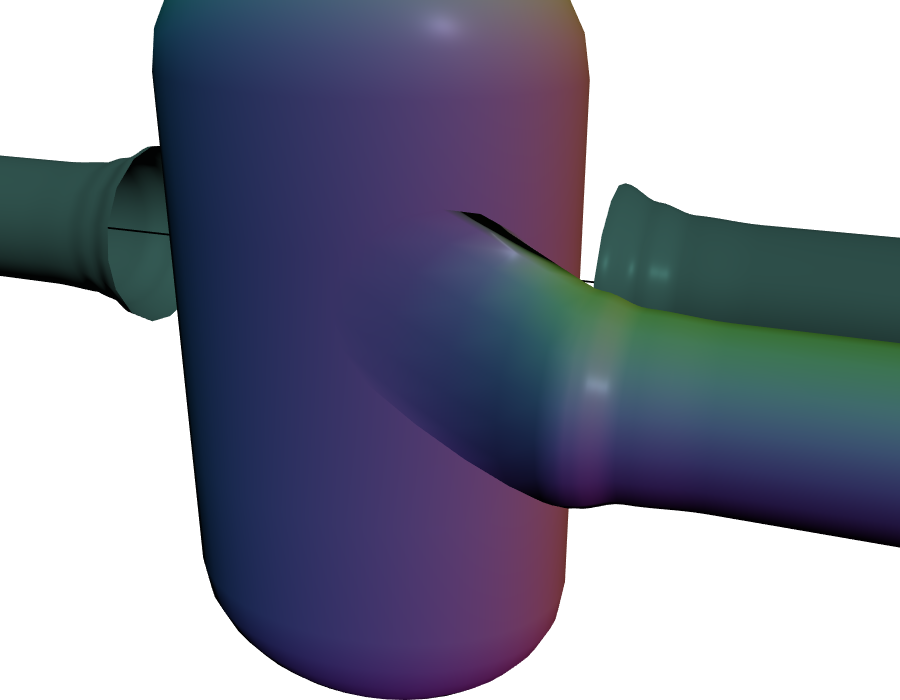
Every TumbleRig node keeps its result, so a saved scene reopens showing the displayed node without rebuilding the rig above it: 0.4 to 0.9 s of cooking instead of 9 to 14 s on two production rigs. Recache in a node's right-click menu after a model edit no parameter shows. TumbleTrove Settings > TumbleRig > Caching.
Tool

Faster builds and drags

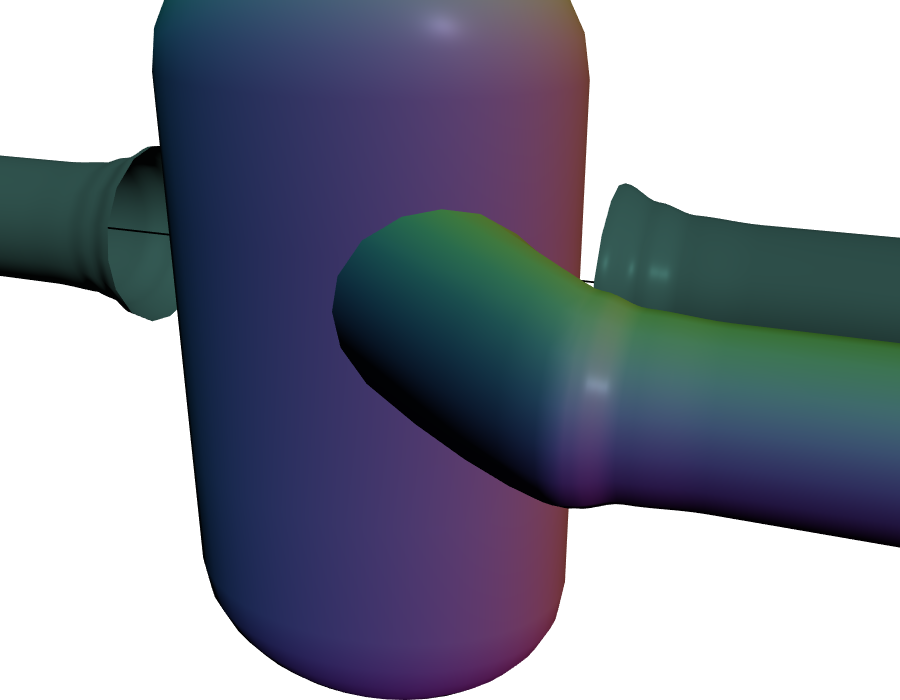
Most rig nodes now build faster, Space Switcher and Apex Spline build in one pass instead of three or four, and the control shape library is stored instead of rebuilt. A head lattice drag on our Blu character went from 83 to about 18 ms a frame.

Upgrading

New versions install next to the old ones; saved scenes keep theirs until you swap (Version Update does it in one step).

Every change: 378 commits since v1.22.0

New in 1.23.0 (309)

  • Collisions 1.4 recipes: strands that let go softly, a ball brushing across strands, feet that stop skating
  • Collisions 1.4: docs (temporal.md, Collisions) and the 1.23 what's new line
  • Apex Collisions 1.4: Release, Rebound, Friction (bodies remember their push between frames)
  • th::collisions::1.3: Release, Rebound and Friction (a memory between frames on the shared SimClock)
  • Skeleton 1.10 hides its joint controls outside Joints mode again (user 2026-11-15)
  • Skeleton / Primitives audit package E: the batteries follow the node, a headless Session test, records brought up to 1.10 / 1.7
  • Rig Noise: idle recipe's Tremor on l_wrist_IK; presets sized to read at a medium shot
  • Joysticks look_poses recipes: Look left / Look right poses swapped back
  • Skeleton 1.10 / Primitives 1.7: parameter layout and tool UX (audit package D)
  • Node thumbnail for Primitives 1.7
  • 1.23 sweep: Primitives stays 1.6 (held), 9 more recipes move (rig graph changes only)
  • Rig Edit Cache passes its input on with the input's data ids: Capture Blur's GPU weights reach Bone Deform again below every asset's out_node_cache
  • Apex Skeleton 1.10: joint names and rows in the corners (audit package B, SR-1..SR-8)
  • What's new 1.23: Primitives 1.6-1.7 line
  • 1.23 sweep: 9 recipes move to the newest nodes, 47 held in release.json with their numbers
  • Eye Rig 3.1: nested Channels 1.1 -> 1.2 in place (1.23 sweep)
  • Apex Primitives 1.7: lean rows with Handle Style Dots, rig fixes; Skeleton 1.10 re-made on it (audit SP-5, PR-1..PR-4)
  • Apex Skeleton 1.10: the same rig without 1.9's builder run; Primitives 1.6 inside (audit SP-3, SP-7, TD-5)
  • Primitives 1.5 / 1.6: the builder gets only what it reads; a Color or Groups edit no longer rebuilds the rig (audit SP-2)
  • Primitives 1.5 / 1.6: lean builder program without the sliders' 2D and joystick code (audit SP-1); Skeleton tool draw cuts (SP-11)
  • Skeleton + Primitives rows: write only what changes, add many rows at once (audit SP-6, SP-8, SR-9)
  • Primitives + Skeleton tools: audit package A (held edits, undo steps, autosave timing)
  • Helper Joints recipes on Figure 1.3: the four Figure boxes publish again (helperJoints v0010)
  • Animation Filters recipe Arcs Around the Shoulder: the arm swings in the front plane so the arc shows
  • Lattice 1.6: recompiled with the constraint rest fix (516d1c6db), so its parent row keeps a SideFX IK target's own restlocal
  • Skinning 2.0: Deform Normals toggle (default on); vertex N test through the skinning chain
  • Changelog 1.23 mixed-rig recipe: SideFX autorig components keep their own purple (v0009)
  • cuda_bonedeform: Deform Normals turns a vertex N too (the 1.23 octopus's pale patches)
  • Changelog 1.23 mixed-rig recipe: Fit Skeleton Markers (no fingers), the shoot's body, poles out, a start pose
  • Animation Filters 1.0: Arcify Around a Pivot (moves swing round a joint, a hand round its shoulder), with a recipe
  • Animation from Skeleton, Ragdoll Bake and Mirror Pose work on TumbleRig rigs in hython too (farm jobs, scripts): the inverse-rig wrapper is installed at start-up there, as in the GUI
  • Animation Filters 1.0: Arcify (straight moves of a control's translate become arcs), with a recipe
  • Changelog 1.23 recipe: Rig Noise, a wave down three chains
  • Changelog 1.23 recipe: TumbleRig and SideFX autorig, mixed in one rig
  • Recipe: Collisions 1.3 keeps three IK Spline chains apart (changelog_1_23_collisions_chains)
  • Octopus out: the user scrapped it, so changelog_1_23_rig_noise_octopus and example_collisions_octopus_chains do not ship
  • Figure 1.3 starts with the rig's Viz off: no joint boxes poking out of its hands (they drew black under a Scene Animate)
  • Octopus recipes: no stale normals, Collisions at 8 iterations (rig_noise v0013, collisions v0015)
  • IK Spline 1.15: Bend Controls Middle bends the spine on a parabola, no corner at the middle joint
  • Apex Blendshapes 3.6: a Shapes row whose shape is not found says NOT FOUND and where it looked on its Matched line, instead of an empty line or the previous shape's pairing
  • Visibility Limbs: a click in the Limbs tab hides the limb in about a third of a second instead of 1-2 s (one write-and-key pass, no channel widget rebinds)
  • Character Picker: a second Animate entry no longer leaves it dim and inert when the picker comes from the rig (Visibility Limbs, Selection Sets)
  • Apex Collisions 1.3: Chain Stiffness (0.3) and Allow Overlap at Rest (was Skip Pairs Touching at Rest)
  • Controls tool: Save keeps the rig's Viz off (it came back on with every Save)
  • th::collisions::1.2: chain stiffness spreads a push along a chain; overlap at rest is an allowance, not a skip
  • Tap resolver: a joint with two feeds gets the one beside its own TransformObject (IK Spline's guide CVs no longer win)
  • Constraints: a control that is also a skeleton joint keeps its own restlocal (no jump at rest on SideFX IK targets)
  • Apex Visibility Limbs: a hidden hand or foot leaves no sliver or ring behind, and clicking an arm or leg in the Limbs tab hides its hand or foot with it
  • Camera examples on Camera 1.4: every node in the ten boxes on its newest version, the three blocked ones ship
  • Apex Visibility 2.4: Limbs works on the Figure: Add Limb Switches finds its arms, hands, legs, feet and spine, and the Character Picker gets its Limbs tab
  • IK Spline 1.15: empty Chains warns and keeps the character, a dot per chain, no Space Switcher run without rows
  • Apex Channels: a channel added with Add From Port... or Add Channel while Animate runs below shows in Animate and its Channel Box at once, without Reload Scene (N), and the pose not keyed yet is kept
  • Apex Solidify 1.1: Group Found shows the group's count after a scripted edit, a scene load or a cook, instead of 'matches nothing' / 'counts once the input has cooked' while the node solves
  • Channel Box: Extra grows to show its channels (up to 8 whole rows) and its arrow scrolls one row per click, instead of one row at a time and half rows
  • Port picker (Add From Port..., Drives, Wire To, Rig Noise's Pick...): opens at the button that opened it and stays on the Houdini window, not wherever the pointer is
  • Octopus showcase: Apex Collisions 1.3 as the colliders step (EX_utilities/rig_noise v0012)
  • Recipe: Collisions 1.3 Chain bodies keep the octopus's tentacles apart (example_collisions_octopus_chains)
  • Mocap to Controls: From Source no longer solves again every frame with an animated Second Input or File source (the clip range was read at the current time)
  • Recipe Mocap to Controls: a SideFX Walk Cycle, Looped: Loop Animation's Last Frame is Own Pose, so each cycle plays all 25 poses of SideFX's walk (it skipped the 25th at every seam)
  • Apex Collisions 1.3: works on joints IK Spline places; Chain bodies (capsules), Skip Pairs Touching at Rest
  • Noodle 1.7: the spine's FK/IK switch is IK Spline's dot, not the big white FK/IK at the hips
  • Loop Animation 1.1: a line under Repeat says how far the loop reaches (4 more cycles, to 1006), and End = Start points at Last Frame: Own Pose, which holds that frame
  • Loop Animation: a renamed character is named in the count label (no hero in the input: pick Character) instead of the node silently matching nothing
  • Loop Animation: a Layer Name with a space (in place) becomes in_place instead of erroring the node; a name that still can't be a layer is named in the status label
  • Loop Animation and Mocap to Controls: the info labels follow scripted parm changes, a scene load and the node's own cook instead of waiting for a UI refresh
  • Loop Animation 1.1: Last Frame: Own Pose loops a mocap cycle on all its frames (keys 1001-1025 loop as 25, 1026 is 1001's pose), so SideFX's walk no longer skips a pose at every seam
  • th::collisions::1.2: chains of capsules, groups and rest skip (for Apex Collisions 1.3)
  • Noodle 1.7 and Figure 1.3: the FK/IK dot that shows with its limb, and every node inside on its newest version (same joints in every pose)
  • Camera 1.4: the head, track and crane are handles again, and the board is another way to reach them
  • Changelog 1.23 recipe: the Rig Noise octopus under water (skinned, smooth tentacles, three switchable layers)
  • Camera 1.3: a click on the camera opens its slider board, and the board rows show their keys
  • Recipe: IK Spline 1.15, a spline on every arm of a starfish (changelog 1.23)
  • Recipes: the Rig Noise octopus wave on ONE IK Spline 1.15, octopus recipes on 1.15
  • Skeleton tool: J switches to Joints again
  • Skeleton tool: G toggles the grid while drawing, S and X reach the tool again
  • Autorig compatibility: Bone Deform and Skinning refuse a SideFX rig that already deforms its skin
  • IK Spline 1.15: one node builds a spline on each of several chains
  • Input check in the shipped assets: pass on the output the wire comes from (244 definitions)
  • Show Invoked Rig: the viewport no longer skips every other edit above a node
  • TumbleRig: Mocap to Controls follows IK spline spines (the Noodle 109 mm -> 1.6 mm mean), Noodle Deep Squats recipe
  • Lattice 1.6: the Lattice tool draws the cage as lines, both sides with Mirror, with Viz
  • Arm Overlap recipe trails as placed: Rig Defaults starts the Noodle's arms in FK; the builder measures it as placed
  • TumbleTrove+: Wheel 1.3 Lean With Speed Changes, Max Turn Speed 45; scooter leans, firmer cars
  • TumbleRig is a regular package again: an older TumbleRig install on the path no longer mixes its modules into a new one (Spline 6.7 / 6.14 'slider_rows' error)
  • anim_editor_style: grey Channel List rows (opt-in) instead of blue
  • Autorig compatibility fix 6: chain readers translate SideFX autorig skeletons from their own data
  • TumbleRig: Mocap to Controls 1.1 library recipes; clips play from their own frame 1 in a shot
  • Scene mode: the Character menu lists every character on a time-dependent scene, the viewport follows every upstream edit
  • APEX PSD: a pose that can never turn on is left out instead of blanking the rig; Helper Joints + APEX PSD tested together
  • A tab click opens a HUD for every TumbleRig tool node, without its tool
  • TumbleRig: Mocap to Controls 1.1, Source: Library: pick a clip, no setup
  • Camera panel, Panels list, Sim board and Fit Markers sliders stay inside the viewport
  • Autorig compatibility fixes 1-5: stored rig values kept, /parms fallback, unnamed bones, plain IK message
  • Quick Actions stops at the bottom of the viewport; a tab click opens a HUD, never the parameter window
  • Channel Box: the panel no longer moves when the selection changes
  • Helper Joints recipes on the default capture: A Knee That Keeps Its Volume ships
  • CUDA Bonecapture: helper joints at the end of a branch take skin weights
  • Channel Box: Display Layers (V, Normal / Template / Reference) for Animate's controls
  • Helper Joints recipes: a slider that swells the knees, a tilted ring with one joint moved, five test recipes with a skin
  • Subgraph manifest: thjoy's line back to the committed source (8a4a82b8f took another session's uncommitted hash with it)
  • Helper Joints: helpers join the bind set, and a helper-hosted bend driver reads the bend
  • Channel Box: Animation Layers under Extra, and presses on numbers start channel gestures
  • Helper Joints tool and pane: slider drags undo, a cut-short drag writes nothing, rows hide what they do not use
  • Scene Animate Panels list: a tab bar tile that lists every 2D menu of the shot, to open, pin, float or close
  • TumbleRig.channel_transfer: move or copy a channel's keys to another channel on every layer, one undo step
  • Apex Sliders 2.0 hidden from the Tab menu; Tab 'Apex Sliders' / 'Sliders' puts down Apex Channels
  • Scene mode audit: folder order and a moved .char kept, second-output inputs, camera default, exact stale match; test compares every value
  • Helper Joints 1.0 / 1.1: the push holds past 120 degrees, scale blends, mirrored channels, and bad rows warn
  • Channel Box phase 2: the real panel in the dock, and the dock collapses when Animate exits
  • 2D menus: an open menu's key colours no longer ask the binding for channel names on every row and tick
  • Channel Box dock: TumbleRig's Animate state splits the viewer's pane on entry and docks the Channel Box beside it (phase 1, placeholder panel)
  • animate_state: hide Animate's state-info HUD (title + hotkey list) in Full and Clean
  • TumbleTrove+: Wheel 1.2 Max Turn Speed (casters swing round over frames); hero-wheel examples
  • TumbleTrove+: Wheel 1.2, backing up rolls backwards; Limit Turn; casters face their motion
  • parm_header: skip the refresh tick while Houdini cooks (state_ui.cooking); point at the Qt-in-parm-pane rules
  • Capture Joints read typed joint names; the CUDA capture says which backend ran
  • TumbleRig: Parameter pane header pilot on Eye Rig (Houdini 22 parm-pane Python Panel)
  • Tab bar: drags reach the top and bottom of the viewport, stepping off only what is drawn there
  • animate_state: Clean keeps a scene's selection sets through a reset save (stand-in writes back the apex_sel_mgr_sets it loaded)
  • TumbleRig: Mocap to Controls 1.0 is beta: label (Beta), help note, catalogue 'Beta:'
  • animate_state: TumbleRig's Animate state prototype (SideFX's state subclassed under its own name; setting Animate state Off / Full / Clean, off by default)
  • anim_editor_style: Channel List cleanup (wider list; Maya-blue rows opt-in)
  • TumbleRig: Mocap to Controls recipes: a mocap walk on the Figure, mocap into the base keys
  • TumbleRig: Mocap to Controls 1.0, a mocap clip or animated biped onto a character's controls as keys on a layer
  • Apex Skeleton tool: Skeleton to Extend joints can be clicked as a parent (P) and drawn on from
  • anim_editor_style: darker Maya graph background (#2b2b2b, grid #383838)
  • TumbleRig.anim_editor_style: Maya Graph Editor look for the Animation Editor
  • TumbleRig: Joysticks Sculpt set-up and one-axis drags, audit fixes
  • TumbleRig: Joysticks Sculpt sets up the Apex Blendshapes; a 2D stick moves along one axis
  • Apex Blendshapes 3.6: the Matched line puts how first ('matched by name (Eye_L), base moved · 98 of 13,070 points')
  • Apex Blendshapes 3.6: a failed shape's Matched line is the reason alone, short enough to read
  • Apex Blendshapes 3.6: shapes match by name; the Matched line on every row
  • Primitives: a shape on a mirrored joint (det < 0) faces out, so the figure's l_ shapes are no longer inside out
  • Apex Spline 6.14: a spline on the joints another spline added gets its joints
  • Apex Spline 6.14: Rest Skeleton takes the evaluated rig when the selection finds no joint in the rest skeleton
  • Apex Channels: Add Channels lists multiparm rows and the parts of vector settings
  • TumbleRig: Eye Rig 1.0 runs derotate_aim_base compiled (its script text strips in a release)
  • Eye Rig 1.0 fix rebuilt from the previous definition: only the edited parms change
  • Apex Spline: a spline after Merge Skel works when input 1 already had a spline
  • Eye Rig 1.0 cooks again: lid splines on Geo Type Points, one show_tweaks setup
  • Merge Skel + Apex Spline recipes: a spline on each side, a spline after the merge
  • Merge Skel 1.0: the keep-rig_b's-own pass reads wires only for colliding nodes
  • Recipes on the fold versions: 87 recipes move to Skeleton 1.9, Primitives 1.6 ... Channels 1.2
  • Animation Filters, Animation Noise: the layer they add gets a guid from its path, not a random one (every cook wrote different geometry, so their recipes could never match a golden)
  • Version Update: put back Primitives 1.6's risk=OK line (lost in df45c871e, the file did not parse)
  • Apex Spline 6.15: Order for Closed Loops, From the Middle Out; Eye Rig 3.1's lids use it
  • Slide on Surface: the walk stops at an open surface's rim instead of flinging the control
  • Apex Skeleton 1.9: each Joints, Chains, Extra Primitives and Tweaks row folds
  • Rivet 1.0: chain_ports runs its compiled graph (it never cooked, but shipped its text)
  • Tool Panels: a grip on the bottom edge resizes the panel, and the height is kept per panel
  • Ragdoll Setup 1.1-1.3 run their compiled graph; the root control group keeps only its animator tag
  • Eye Rig recipes on 3.1: the recipe pass Eye Rig 3.0 was owed since the 1.22.0 freeze
  • Eye Rig 3.1 lids: Independent CVs and a closed slide surface; the round's new HDAs get their event blocks back
  • Bone Deform 2.2 and Solidify 1.0 always run their compiled graph; no script node is compiled for default settings only
  • Inverse Foot 1.3: Apex Ctrls can restyle the foot roll pivots (shape, colour, size)
  • Apex Visibility 2.3: a slider wired to a switch replaces its Default Value instead of moving the range
  • Lattice 1.5 / 1.6: World with no bone deform above acts as Automatic, so moving the Parent Control no longer breaks the lattice
  • Delta mush post-smooth: bind pose gives the rest mesh for every type (Taubin puffed it)
  • IK Chains 2.4-2.18: ik and twist_ik always run their compiled graph (24 script nodes ship no text)
  • IK Chains 2.2-2.9, IK Spline 1.13 / 1.14: the empty settings helpers of 14 compiled builders no longer cook; compiled-only doc: level 3
  • Compiled-only rollout, level 3 (batch D2): IK Chains' twist, FK/IK menu and dot scripts run their compiled graphs
  • Apex Blendshapes 3.4: Match Points, a part of the model pairs with the right base points
  • Level 3 families: the empty settings helpers of their compiled builders no longer cook (76 builders in 45 assets)
  • Eye Rig 3.1: 3.0 on the newest nodes, the blink sliders as channels
  • Compiled-only rollout, level 3 (batch D1): 45 assets run their compiled graphs
  • TumbleRig: Apex Visibility 2.3 Limbs: hide a limb while animating, FK and IK alike, from the Character Picker
  • Set Driven Keys 1.2: a menu and a Pick icon on Driven Controls, the same picker on Driver Control
  • Shrinkwrap: a ring's side comes from its joint's rotation, not the live ring normal
  • Lattice 1.6: Mirror names the lattices L_<name> / R_<name>, so Rig Defaults' mirror pairs their controls
  • Level 2 families: the empty settings helpers of their compiled builders no longer cook (89 builders in 54 assets)
  • Compiled-only rollout, level 2 (batch C): 28 assets run their compiled graphs
  • Lattice 1.6: Cage From is Second Input, Chain or Group, with the cage settings in one block
  • Animation Filters: six recipes (shaky pass, keyed holds, after Animation Noise, then Loop, unwrap, bouncify)
  • Animation Filters 1.0 (TumbleTrove+): Live Record's Clean filters as a node below Scene Animate, plus Rotation Unwrap, Bouncify, Amount
  • Node cache: finding a node key evaluates nothing and cooks nothing (nodes erroring "Local variable 'N' not found", minute-long "Evaluating python" freezes since 1.22.14)
  • Batch B families: the empty settings helpers of their compiled builders no longer cook (45 builders in 29 assets)
  • Compiled-only rollout, batch B: chain_ports runs compiled in 28 level-1 asset versions (+ Push, Sticky Controls, Wrap 1.3 main scripts), the same rig
  • Deltamush 1.0: its chain_ports script runs compiled, the same rig (chain_ports pilot)
  • Batch A families: the empty settings helpers of their compiled builders no longer cook (21 builders)
  • Compiled-only rollout, batch A (assets and graphs): the 20 asset versions of b79707d49 run their main script compiled
  • Graph lookups: the member-pointer size check is MSVC only (Linux and macOS builds failed on it)
  • Shrinkwrap: with no Parent Controller a seam turns with its own limb
  • Procedural Start: the empty settings helpers of its compiled builder no longer cook
  • Rig Noise 1.1 / Animation Noise 2.1: recipes, docs, feature map
  • Procedural Start: its add_procedural_start script runs compiled (1 version), the same rig
  • state_ui: Tool Panels refresh on macOS (app_active counts a focused Houdini window)
  • Rig Noise 1.1, Animation Noise 2.1: noise along a chain, per-chain offsets and randoms, Sine
  • Solidify 1.1 recipes: plate and badge on 1.1, guard plate on an IK arm, falloff + mask
  • anim_noise: a Sine shape (shape 4), a clean wave whose phase follows the seed
  • Apex Solidify 1.1: Falloff from the Group, like Lattice's Edge
  • Live Record 1.2: Holdify, Hard start and Hard stop in Clean
  • Release build strips APEX script source from the staged package: apex_script/ and the text of script nodes that only run their compiled graph
  • Joint Capture 1.3: Mirror Capture help says the Group works on both sides
  • Joint Capture Mirror Capture: a Group on the destination side is captured (it captured nothing)
  • Spline 6.7 and 6.14 run one builder when they have no CV slider rows (three before), the same rig as written
  • Space Switcher 1.2 / 1.3: one builder run instead of four, the same rig
  • Joint Capture: the Islands label reads a point Group off its points again
  • Graph lookups in C++ (th::graph), and a constraint rest walk that no longer searches the rig per hop
  • FK/IK Match pose keeps a locked elbow / knee in place
  • Shrinkwrap 1.4: Collider Normals sits in Wrap; the Tool Panel opens with Follow the Joint and Smoothing folded
  • Joint Capture 1.3: four wrong captures that said nothing now work or say so
  • Precompiled builders: the two helper nodes that hand over nothing no longer cook
  • Shrinkwrap 1.4: the audit's asset changes as a patch on the file, so the node caches and shared invokes stay
  • Shrinkwrap: mixed Auto and named joint rows bind their own joints, Envelope 0 stops the smoothing, count labels fill in on a loaded scene
  • Joint Capture: the Group labels count a primitive or edge Group in C++ (2.5 s -> 0.14 s on a 10k polygon Group)
  • Joint Capture tool: the grey cover comes back after Pick Joints; a click on a driver no longer clears the pick
  • Recipes: Rig Noise (9) and Animation Noise (5), published from EX_utilities
  • Joint Capture: a change in an upstream capture reaches the bone deform below
  • Apex Joints 8.1: one wrangle tags the FK joints
  • Control shape library: the shapes are stored, not redrawn on every first cook
  • Animation Noise 2.0: the noise as keys on an animation layer, below a Scene Animate
  • Lattice 1.5 / 1.6: Guess from Group works in the falloff and the box fit; a missing Target Shape warns; the lattice recipes move to 1.6
  • Joint Capture: Sides line says when points past the middle take the one side's joints; Keep Sides one-side test
  • Joint Capture: Keep Sides no longer leaves points with no weight
  • Keep build leftovers and HDA backups out of the package
  • Rig Noise: its icon
  • Lattice panel: Mirror center row
  • Lattice 1.6: Mirror Center, and two Mirror recipes (eyes, the Noodle's head)
  • 2D menus: a key on a menu's own channels no longer keeps it pinned; Shift + right-click > Close all pinned 2D menus
  • Lattice 1.6: Mirror, a lattice on each side of the mirror plane from one node
  • Apex Controls 2.0: Place Shapes, the handle moves the control shape instead of the joint
  • Live Record 1.1: takes in the panel, record into a take, countdown in the viewport
  • Node thumbnails for the 8 node versions added since 1.22.5
  • Apex Remesh 1.1 recipes: pieces melt into one, only the torso kept on the shape, an open sleeve gets thickness; the scene's recipes moved to 1.1
  • Release CI: each platform's archive carries the pinned license agent
  • TumbleTrove+ without Desktop: tt_license starts a bundled license agent, and the card signs in
  • Apex Remesh 1.1: SideFX's Remesh to Grid step for step, with Project to Original, Post Smooth, Offset and Scale; Smoothing 3 times faster
  • Lattice 1.5: point controls default to pale cyan, apart from the yellow row controls
  • Apex Skeleton 1.8, Apex Push 1.0: Scene Invokes on the stream no longer read the frame
  • Node cache before every Output of 96 assets: a reopened scene reads a node's result without cooking what is above
  • Animation Noise: examples with the other animation nodes, and an octopus
  • Lattice panel: Layer and Point Controls first, saying what each gives
  • Animation Noise: Joints rows (noise on joints, after IK)
  • Rig Edit Cache node mode: no key asked from a worker thread or while the input is time dependent; node user data in the key
  • Rig Edit Cache node mode: a cache before an asset's output named by the node chain above, read without cooking it
  • Copy Animation 1.2 and Loop Animation 1.1: Read, Base Animation or As Played
  • Joysticks 1.5: Side Names, the names of a stick's sides drawn in its frame
  • Animation Noise panel: the chip stays on one line
  • Copy Animation and Loop Animation: say which layers are left out; audit clean-up
  • Joysticks 1.5: recipes on 1.5, three test recipes; a corner's dead zone is per side
  • Rig Edit Cache: a builder below a time dependent node is not re-run on a frame change
  • Animation Noise: fixes from the live session
  • Animation Noise 1.0 (th::apex_animation_noise, TumbleTrove+)
  • Cook guard: ask whether a node needs to cook without reading the time
  • Joysticks 1.5: a 2D board moves its poses; poses read by value; animation played by the board; dead zone; named sides
  • TumbleTrove+ license: finds Desktop's server when Houdini was opened directly, and sends the Houdini major
  • 2D menus: one node places a sprite instead of 35 (th::ctrl2d::placeSprite::1.0)
  • Apex Ctrls 2.0: look controls up by name once instead of searching the rig per joint and per row
  • Constraints: the rest walk stops searching the rig once it has finished
  • APEX scripts: empty ids instead of searching the rig for a name that never exists
  • Caching settings page; chained node keys prototype
  • Shared invoke: drop empty-id node searches from loaded programs; rig profiling tools
  • Rig Defaults Set no longer crashes Eye Rig 3.0: no tick runs inside a scene read
  • Shape normals warning: the check never reads the scene inside a cook or another read
  • Precompile + share the menu scripts: fkik_menu, space_menu, Apex Collisions
  • Rig Defaults: changing a parm no longer drops the pose of controls not yet set
  • Shared invoke: pass empty constraint types through (no load, run or save)
  • Follow Controls 1.2: a control that drives a shape from its own channel leaves that shape out
  • Rig Defaults: Set from Selected no longer crashes on the Eye Rig, and is faster
  • Apex Zipper 3.5: l_ / r_ corner names and a Mirror setting (Scale / Rotate / Off)
  • Animate reloads by itself after a change above its node (Bone Deform didn't show a moved mask or new Capture Blur iterations)
  • Deform Mask 1.0: Switch-If tests and the mesh cooked first; a masked capture stack is no longer time dependent
  • Shrinkwrap: a ring facing along its roll axis is no longer placed turned
  • Lattice 1.5: with no bone deform, Automatic carries the mesh with the Parent Control
  • Blendshapes Mirror: points pair by the mesh's connections, like Flip, so a mesh that is not quite symmetric mirrors true
  • Switches that read geometry become Switch-If tests: 9 more assets (sweep done but Deform Mask)
  • Apex Zipper 3.5: cj_switch is a Switch-If test (rule time-dependence/switch-expression)
  • Deform Mask 1.0: ok_switch reads a VEX flag (ok_flag) instead of Hscript attribute functions
  • Switches that read geometry become Switch-If tests (9 assets), rule time-dependence/switch-expression
  • Apex Spline 6.14: Pair CVs Across X (a spline over the middle pairs its CVs for Mirror Pose)
  • Orient tool, Joints mode: the named axes reach past the rotate rings
  • Apex Zipper 3.5: left / right corner controls follow the skeleton's side names
  • Orient tool: readable axes (blades, named axes, hold X/Y/Z to try an axis, words)
  • Joint Capture 1.3: the wiring hooks' import is skipped without a UI (hython, husk, the farm printed an error)
  • Apex Skeleton 1.8 orients its joints: Orient Joints 1.2 inside, and Orient in the Skeleton tool
  • IK Chains 2.18: no more recook on every frame in the GUI (For-Each, ik_twice_bypass, stream_freeze)
  • Eye Rig 1.5 recipes: Thick Lids, Lids Follow a Look Up; Wide Open on 1.5
  • Apex Zipper 3.5: Corner Joints for New Controls; menu tokens are positions
  • Recipes: Mirror a Spline Across X (Apex Spline 6.13); spline recipes on the newest nodes
  • Apex Spline 6.13: Mirror Across X builds the other side in every CV source
  • Capture Blur 1.2: Group's dropdown lists primitive groups and named pieces, and Group selects them
  • Fit Skeleton 3.2: no more recook on every frame in the GUI (SideFX Rig Pose $F caches)
  • IK Chains 2.17+: Match Rest Twist no longer errors when no chain has a goal to sample
  • Joint Capture 1.3: dropped on a wire between captures, it wires all three streams (Vellum's hooks)
  • Apex Zipper 3.5: Corner Controls (hide the stacked lip end controls, or build named corner controls)
  • Joint Capture chain, round 2: rings without a Blast, Capture Blur replays, dicts hash by content, a shorter mask path
  • Apex Skeleton 1.8: Name Chain (nose_1, nose_2 ...), Joint Only (O), and the Skeleton to Extend's joints can be renamed
  • Recipes: Mirror a Spline Across X (Apex Spline 6.13); spline recipes on the newest nodes
  • Apex Spline 6.13: Mirror Across X builds the other side in every CV source
  • Shrinkwrap 1.4: Collider Normals, the wrapped rings shade like the body under them
  • Bone capture: Group solve composites on the whole mesh; TUMBLERIG_CAPTURE_FULL_SOLVE; chain test
  • Eye Rig 1.5: back follows the lids, old lid capture removed
  • Bone capture: a chain of masked captures no longer solves every node again on a mask move
  • Deform Mask 1.0: combine the mask over points in parallel (35 ms -> under 1 ms per masked node on a 233k skin, same mask)
  • Eye Rig 1.5: procedural lid thickness, Lift sliders move the lid again
  • Blendshapes + Space Switcher: don't inherit an earlier slider builder's rows
  • Eye Rig 1.5: the lid follows its three curves in polar coordinates (th::lidLoft::1.0)
  • Eye Rig 1.5 step 1: the cartoon lid is a sheet laid out the way the rig moves it
  • Apex Visibility 2.2 node thumbnail; drop the stale */apex_wrap recipe hold
  • OpenCL verbs keep their per-frame data on the GPU between nodes
  • Camera on the stage: looking through the camera rig in the APEX Animate LOP follows its keys
  • Apex Visibility 2.2: a new stream's passthrough keeps 2.1's node names
  • Apex Visibility 2.2: each switch reads any .shp of the character stream
  • Sculpt in pose sets its Scene Invoke's output parms, so saved defaults can't break it
  • cuda_noise on OpenCL keeps P on the GPU between nodes
  • Docs: point APEX callback work at SideFX's HDK sample apex_opencl.h
  • Follow Controls 1.2: a shape a followed control drives is left out only for that control
  • Mask from Mask Geometry on the GPU: deform_mask's Distance from Geometry is th::cuda_distance_from_geometry, and Joint Capture / Capture Blur measure only their Group
  • Follow Controls 1.2: a shape driven by another control is followed, and Apex Wrap's Merge no longer hides the stages above it

Shipped in 1.22.5 (16)

  • Thumbnails: Apex Channels 1.1, Apex Constraints 2.4, IK Chains 2.18, IK Spline 1.14, Space Switcher 1.3, Fit Skeleton Markers 1.6
  • Capture Transfer 1.0: pick buttons on Destination Group and Source Group
  • Capture Blur 1.2: Blend works with the mask on and no mask source
  • IK Spline 1.14: IK Spaces on the chest IK; IK Chains 2.18 keeps IK Spline's looks
  • Pick Joints: a click also lists other chains' joints within reach of the cursor (a spline's end a few px from an FK ankle or wrist took the nearer one, no list); its own chain's neighbours stay out
  • Mask view: only the mask tint; the Mask Geometry input is no longer drawn as an amber wireframe (Joint Capture, Capture Blur and the footer Mask button)
  • IK Spline 1.14: IK Spaces on the chest IK; IK Chains 2.18 keeps IK Spline's looks
  • Pick Joints: the list of joints on one spot reads clearly: a solid panel with an edge, no hint line or chain names over it, and it opens upward when it would reach the button row
  • Apex Channels 1.1: keep the final newline of manifest.json and examples.json
  • Apex Channels 1.1: Add From Port..., any port in the rig as a channel, through one shared port picker
  • Apex Parent and Apex Constraints: Maintain Offset no longer jumps after Rig Defaults scales an eye
  • Fit Skeleton Markers 1.6: Hands = Wrist Only, arms that stop at the wrist
  • Lattice 1.5: a Falloff toggle in the tool's footer tints the skin by the edge falloff; the Mode line no longer says no bone deform after a scene load
  • Lattice 1.5: Group is respected again (Fade Into, Group Only by default), and a Mode line says what the node does
  • Recipe example_blu_class_rig (Blu: a Whole Character Rigged for Class), a TumbleTrove+ example; the publisher ships @plus boxes now (TumbleTrove+ nodes allowed in them, meta.plus)
  • Rig Defaults: Eye Rig lids take the posed value, and Set is several times faster on big rigs

Shipped in 1.22.4 (3)

  • Rig Defaults: Eye Rig lids take the posed value, and Set is several times faster on big rigs
  • Lattice 1.5: a Falloff toggle in the tool's footer tints the skin by the edge falloff; the Mode line no longer says no bone deform after a scene load
  • Lattice 1.5: Group is respected again (Fade Into, Group Only by default), and a Mode line says what the node does

Shipped in 1.22.3 (1)

  • Recipe example_blu_class_rig (Blu: a Whole Character Rigged for Class), a TumbleTrove+ example; the publisher ships @plus boxes now (TumbleTrove+ nodes allowed in them, meta.plus)

Shipped in 1.22.2 (45)

  • Hotkey HUD: free the key widgets every rebuild leaves behind, not only on Animate exit
  • Primitives 1.5: a Tube whose points follow joints moves with its ring/box control again (point parent = joint x the control's offset from rest). Blu: the cutter box stands upright, the head lattice starts at the head joint, Edge falloff 0.1
  • 2D menus and Apex Pupil: selecting, opening and dragging no longer stall Animate
  • Lattice 1.5: Stretch and Squash values ride the cage and are read per update, so changing Pin Start, Stretch and the rest no longer rebuilds every node below (Blu 1.2 s -> about 0.15 s, same result)
  • Slide on Surface 1.2: the second run's rig is held in the node, so Animate no longer compiles it again on every update (Blu lattice drag 80 -> about 18 ms a frame, same result)
  • Joysticks 1.4 recipes: every pose box on 1.4 with its Mode; a pose on a corner and a Centre pose
  • Joysticks 1.4: a Mode per joystick (Shapes, Poses, Animation, Clips); Poses read whole, linear from the centre to each side
  • IK Chains 2.17: Match Rest Twist measures its 17 samples on one copy of the rig instead of 17 Scene Invokes; same skeletons to the bit, Figure 5.8 -> 4.3 s, Spider 13.2 -> 9.6 s
  • Shared invoke: lean Sliders graphs without the Draw 2D and joystick code, run when the parms show neither is used (APEX compiled ~18k untaken nodes on every Sliders cook); Noodle Sliders 2.7 -> 0.7 s, cold cook 17.7 -> 15.9 s, same character
  • Rig Edit Cache: a File SOP key input counts by its parms and the file's path, size and time, not cooked (the precompiled programs were loaded only to be hashed); Noodle cold cook 19.0 -> 17.7 s, same character
  • Apex Pupil 1.0: both menu dots show up close (the Shape dot had gone behind the camera)
  • Lattice 1.5: Show Falloff colours the skin by the falloff mask (viewport and Animate); a new lattice starts with Falloff off (saved scenes keep theirs)
  • Spline Rings: the swept tube is one even radius along its chain (90th percentile of the joints' skin radii), no longer following every bump of the skin
  • Eye Rig 1.4: the Ring and Dot controls drawn where you can see them
  • Joint Capture: Joint Geo is on or off per chain; a spline chain only ever gets its swept tube, any other chain a primitive per joint
  • Primitives 1.5: a Tube's Box control is as tall as the tube is wide (its Y size is the length scale along the points, so the box was a metre long), in the rig and the tool's live refit
  • Primitives tool: make the selection outline drawable when the tool starts (one made inside onDraw never shows)
  • Primitives tool: a selected primitive gets an outline again (Outline Only). Animate outlines a selected skin control from its drawable_output's skin highlight, which stays empty for these shapes, so with the fill off a selection showed nothing; the tool now outlines the selected prims of the skin shape itself, posed
  • 2D menus: slider rows drag again (Apex Pupil, and every apex_sliders 2D row)
  • Joint Capture: Joint Geo draws shapes and spline tubes as see-through shaded surfaces with an outline, not rings and wire lines
  • Recipes: Apex Pupil notes for the two menu dots (ochre Pupil, violet Shape)
  • Apex Pupil 1.0: two 2D menus (ochre Pupil, violet Shape), on/off rows as checkboxes
  • Joint Capture tool: Joint Geo is clear in the HUD, the Group is outlined and counted, guides are calmer, F and [ ] fit shapes
  • Primitives 1.5: turning a Tube point about the tube twists it there (smoothly between the points, on top of the twist handles), so Animate's rotate handle shapes a ribbon. The rig passes the points' parent matrices (s<i>_ptp) beside their own; the verb reads each point's turn about its local Y. Save folds the turns into the row as Per Point twist and zeroes the turn channels
  • Spline Rings: the tube past a chain's end gives way to nearer joints; the tube guides are visible
  • Primitives tool: edits no longer go into the node on every mouse up (each write rebuilt the rig and every control and the HUD flashed); they stay live and are written when the tool is left, on the band's Save (back) and before the scene is saved. A selected Tube point keeps Animate's move / turn / scale handle in Shape mode (the handle was hidden as for the dot shapes, but a Tube has no dots)
  • Recipes: Apex Pupil notes for the 2D topic dots (select the pupil, then its dots)
  • Joint Geo: Fit All and Shift+click only on the capture's own joints; spline rings drawn faint, the chain under the mouse bright
  • Apex Pupil 1.0: topic menus as 2D dots that show while the pupil control is selected
  • Spline Rings are a swept tube: the chain is the spine, a ring loop at every joint, the skin blends by where it lies along it
  • Temporal: a drive into a shape's slider no longer leaves the whole rig evaluating to nothing
  • Joint Capture 1.3: Spline Rings, a ring through each spline joint at 100% and an even blend between; Shift+click adds a whole chain
  • Joysticks port colours: Poses and Animation input is Scene Animate orange, rig purple 0.577, colours kept after a cook
  • Apex Skeleton tool: no autosave while a mouse button is held, so dragging a joint's transform handle no longer stops after about a second (the autosave wrote the rows and rebuilt the rig mid-drag; Animate's is_dragging_control only covers a drag on the control's shape)
  • Recipes: Apex Pupil examples without the orange aim discs (they hid the pupils), notes for the Ring and Dot controls and the topic menus
  • Apex Pupil 1.0: Ring and Dot controls drawn where you can see them
  • Pupils: standard Ring and Dot controls, menus per topic, Inner Move moves only the dot
  • Thumbnail: Apex Rivet 1.2's purple Rig to Attach input
  • Apex Rivet 1.2: Rig to Attach input is purple (it had no colour)
  • Apex Pupil 1.0: drag dots twice the size
  • Apex Pupil 1.0: the menu shows (its control group kept), drag dots on their outlines
  • Apex Pupil 1.0: a real control group, so the 2D menu shows; pupil control on the eye's front, dots only while it is selected
  • Apex Pupil recipes: googly eyes with a keyable Ring pupil, Link Eyes, spiral pupils on the poke-dodging eyes; @test From Joint on the Peak-Eyed Head
  • Apex Pupil 1.0: a pupil ring you can see, bigger drag dots; the ring look is one solid (7ff69bb1)
  • Pupil Ring: the ring, the iris and the dot are one solid, so the iris always fills the space between them

Shipped in 1.22.1 (4)

  • Apex Rivet 1.2: Rig to Attach input is purple (it had no colour)
  • Apex Pupil 1.0: drag dots twice the size
  • Apex Pupil 1.0: the menu shows (its control group kept), drag dots on their outlines
  • Apex Pupil 1.0: a real control group, so the 2D menu shows; pupil control on the eye's front, dots only while it is selected