TumbleRig 1.17

Beta Everything new in 1.17 is in beta: it works in our tests, but it hasn't had long use in production yet. Tell us in the community what you run into.

New and updated nodes in 1.17

Highlights

In depth

Build and fit

Skeleton Builder, Primitives, Fit Skeleton Markers.

New nodes
NewBeta

Skeleton Builder

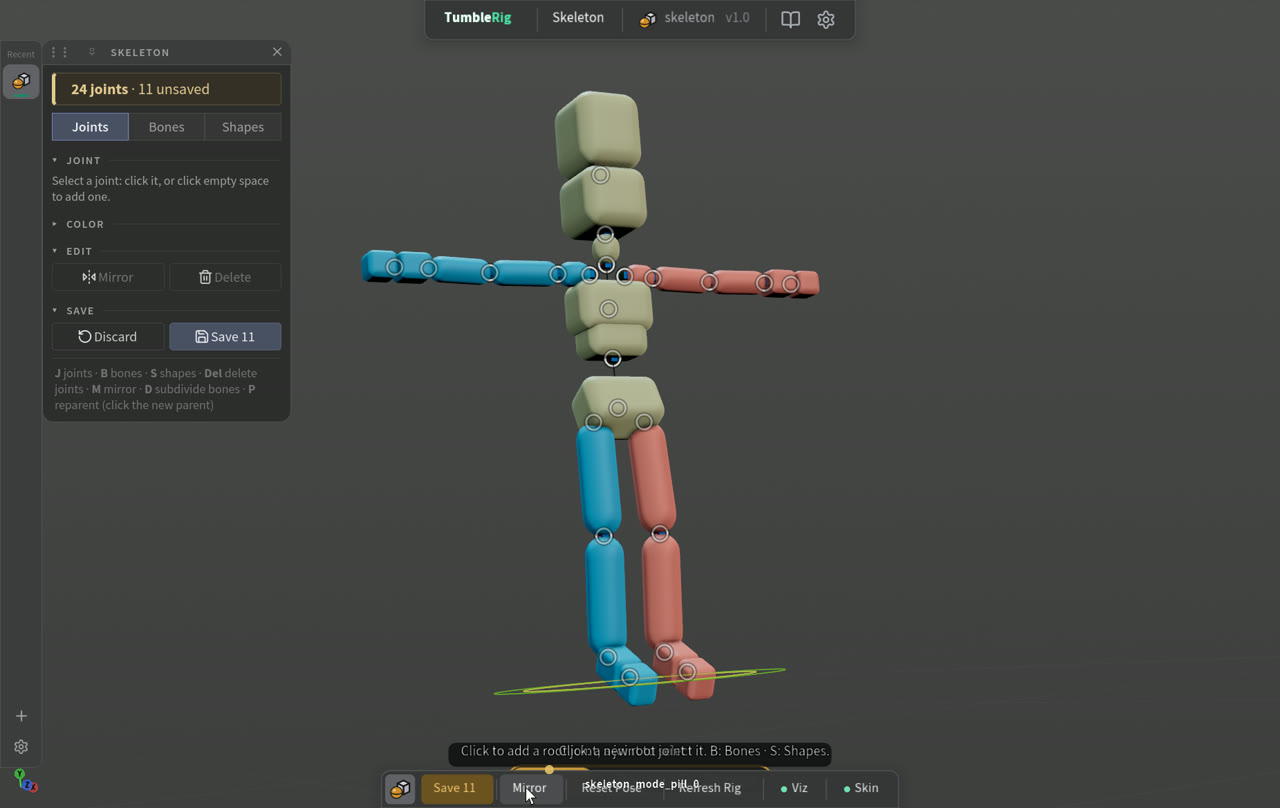
Click joints into place in Animate; the cursor shows what a click does (select, insert on a bone, add a child). Reparent by pressing P and clicking the new parent. Four example feet come as a recipe in the Asset Browser, under Changelog › 1.17.
Video A character in clicks. Each click adds a joint with its shape; Mirror builds the other side.
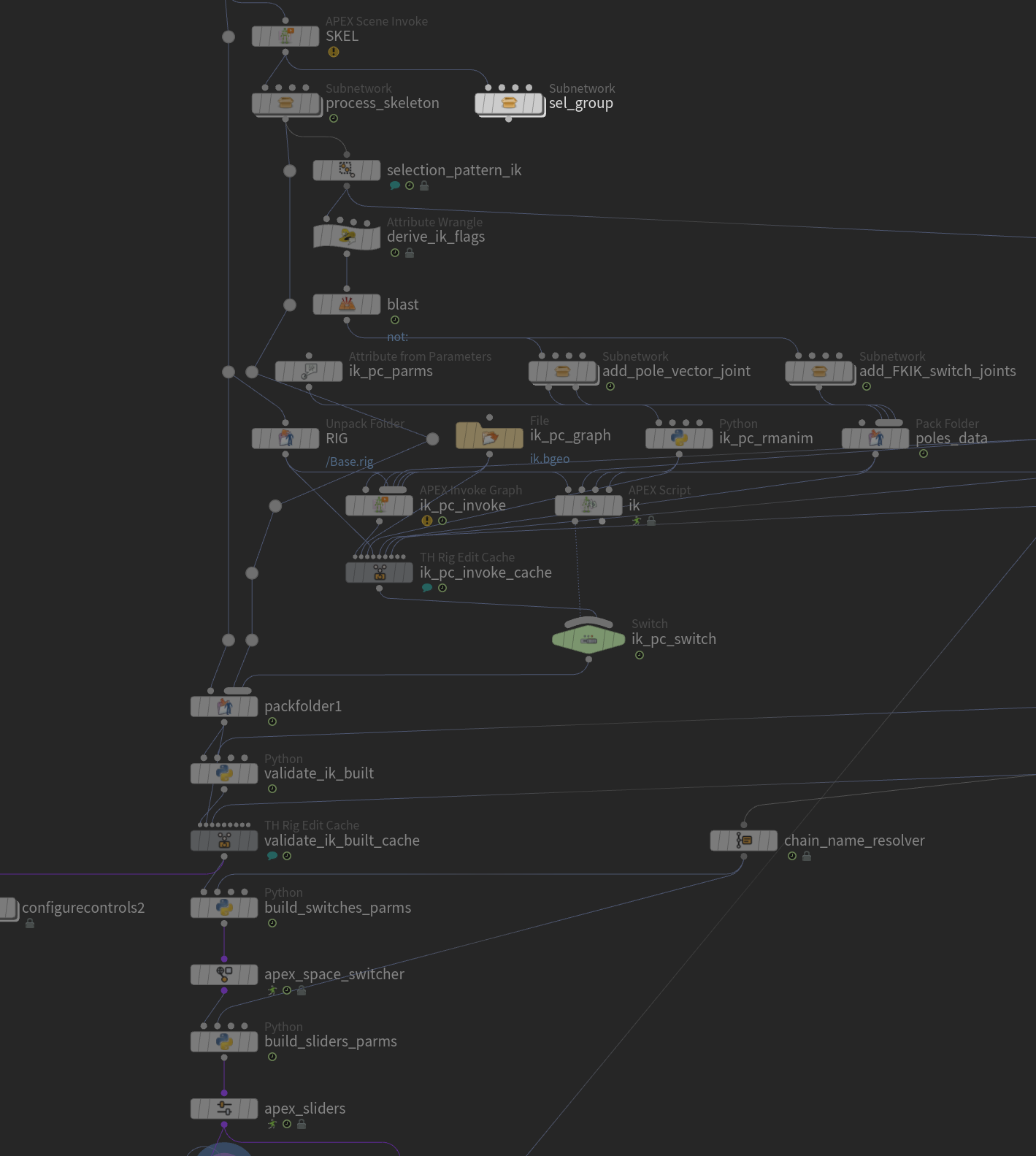
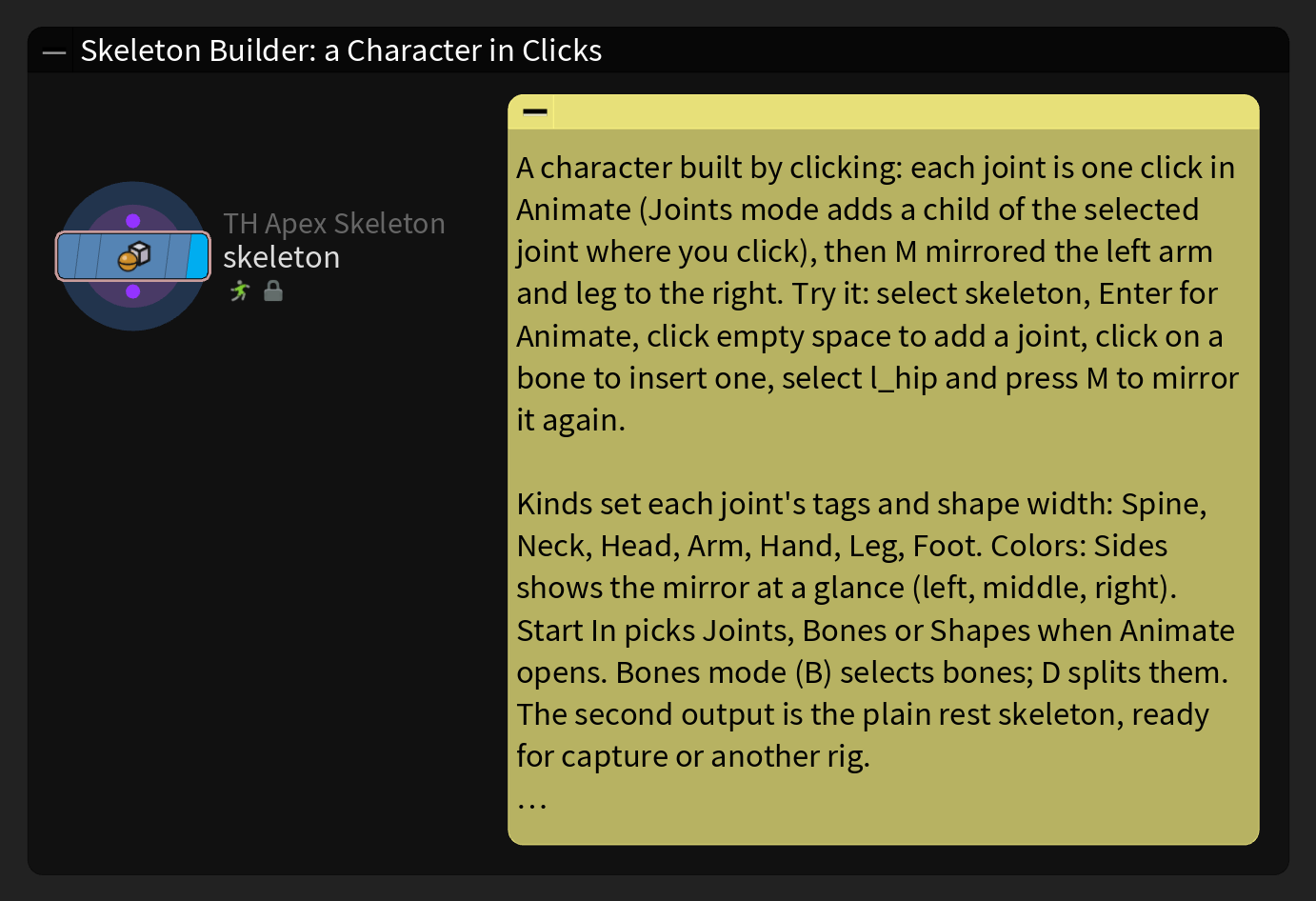
The recipe's node setup. Find it in the Asset Browser under Changelog › 1.17 › Skeleton Builder: a Character in Clicks.
Node setup The recipe's node setup. Find it in the Asset Browser under Changelog › 1.17 › Skeleton Builder: a Character in Clicks.
Video An ogre's foot, built from nothing. Click the joints in, then shape them with the handles: size, round, taper.
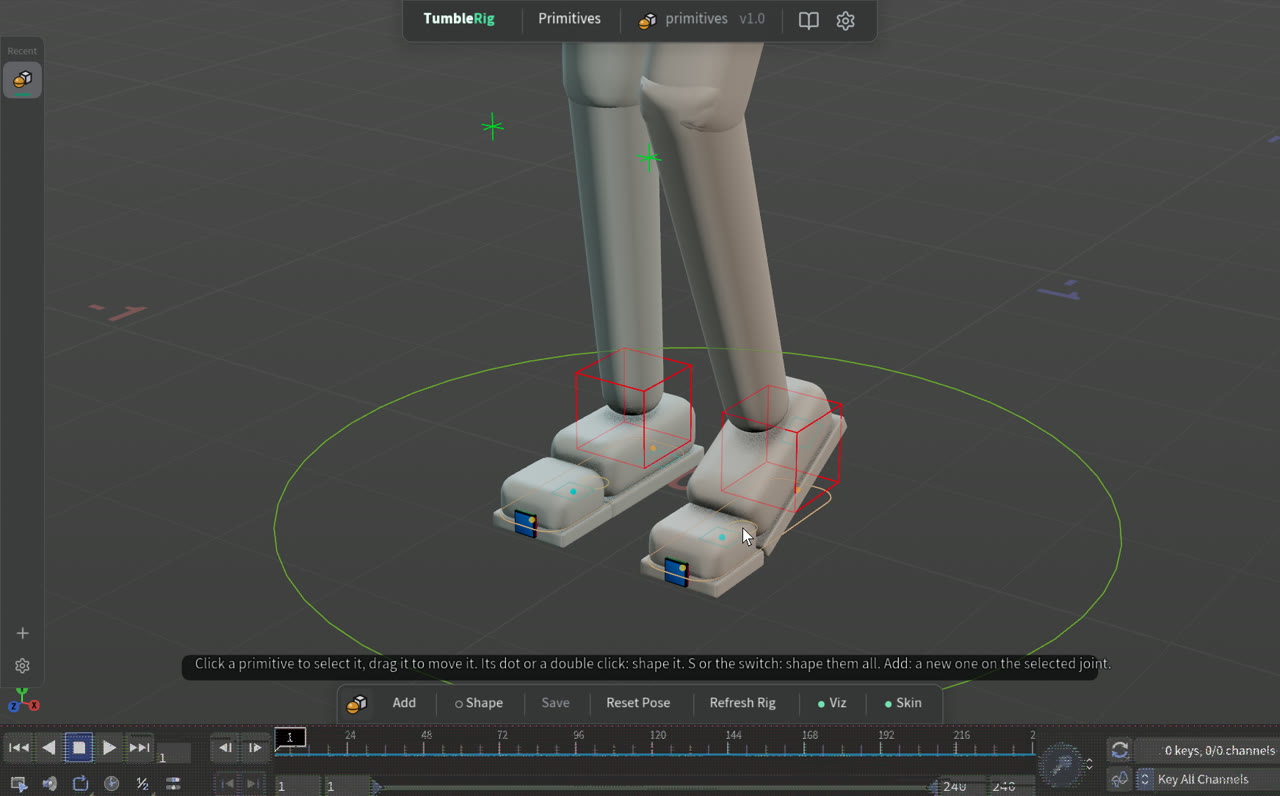
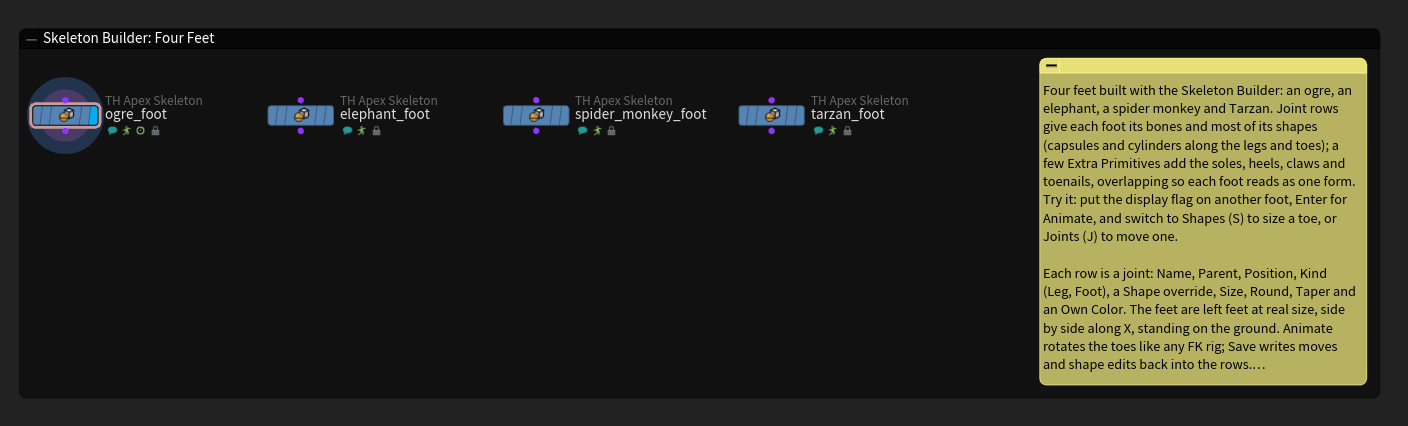
Four feet, one Skeleton Builder each. Find it in the Asset Browser under Changelog › 1.17 › Skeleton Builder: Four Feet.
Node setup Four feet, one Skeleton Builder each. Find it in the Asset Browser under Changelog › 1.17 › Skeleton Builder: Four Feet.
NewBeta

Primitives

Spheres, boxes, capsules, cylinders, cones, tori, planes and a Tube that sweeps a section along a curve. Handles on the shape set size, round and taper. They can also paint colour or mask a deformer.

Video Block out a room from an empty scene: add a primitive, then shape it with the handles on it.
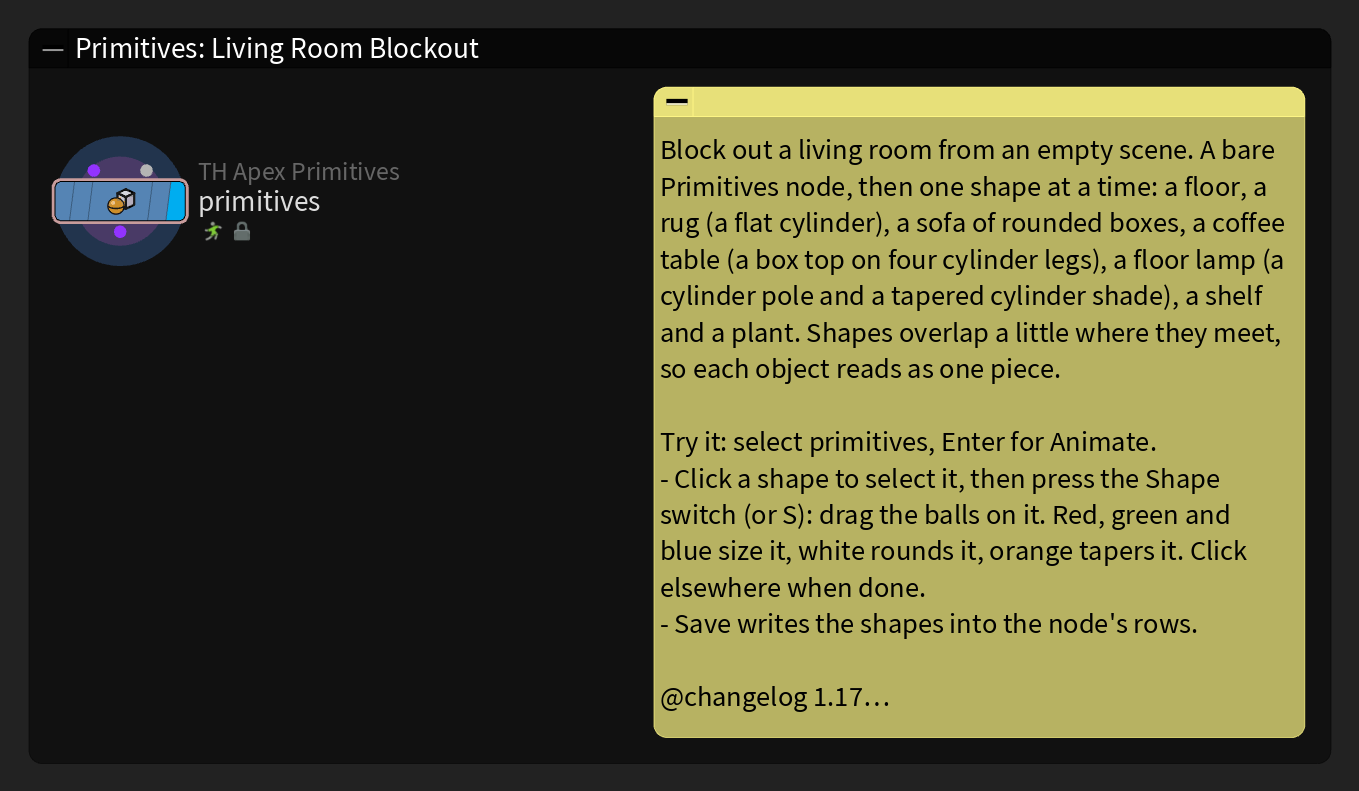
The Living Room Blockout recipe: one Primitives node. Find it in the Asset Browser under Changelog › 1.17 › Primitives: Living Room Blockout.
Node setup The Living Room Blockout recipe: one Primitives node. Find it in the Asset Browser under Changelog › 1.17 › Primitives: Living Room Blockout.
NewBeta

Fit Skeleton Markers

Fit a skeleton by dragging joint controls: knees and elbows have Along, Bend and Out handles, each finger has an in-between control. Output is a character stream and the rest skeleton.

Video Drag a wrist, an elbow, then a knee. Mirror moves both sides; knees and elbows show their Along, Bend and Out handles.
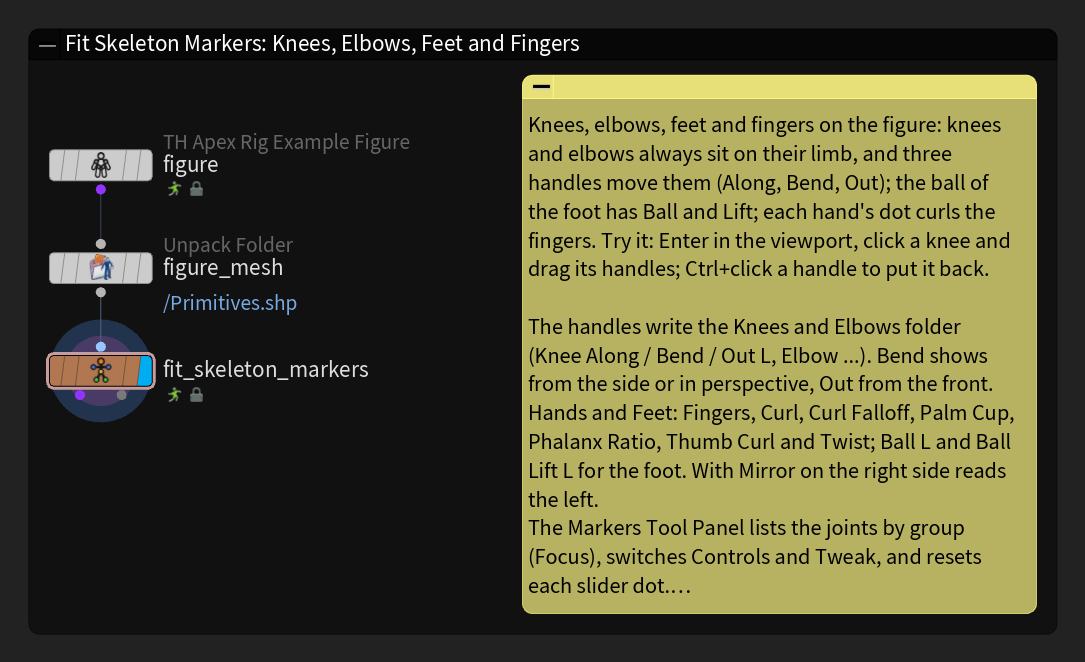
Fit Skeleton Markers on the figure. Find it in the Asset Browser under Changelog › 1.17 › Fit Skeleton Markers: Knees, Elbows, Feet and Fingers.
Node setup Fit Skeleton Markers on the figure. Find it in the Asset Browser under Changelog › 1.17 › Fit Skeleton Markers: Knees, Elbows, Feet and Fingers.

Controls, feet and IK

Smaller steps on nodes you already use.

Rigging
UpdatedBeta

Inverse Foot 1.1

Works on IK Chains 2.3 and later. Pivots from Generate, joints or guide points, extra pivots, role colours, found-labels. The Noodle 1.4 has the reverse foot built in.

Video The foot rolls onto its heel, then over the ball: the toe stays planted while the ankle and heel lift.
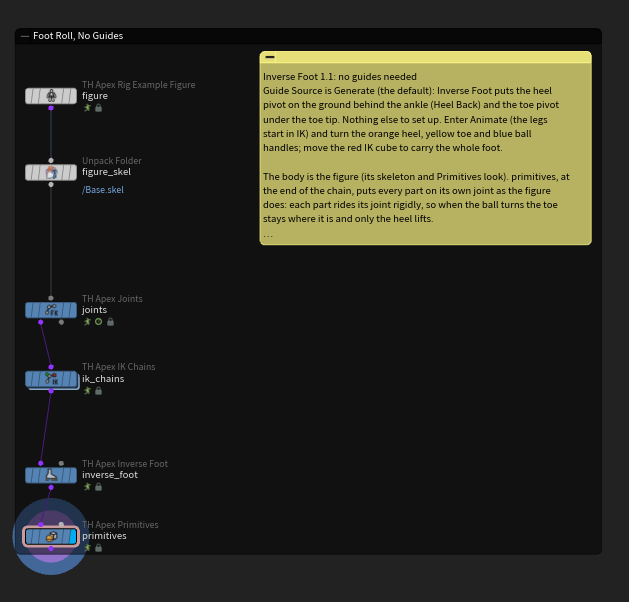
Foot roll with no guides. Find it in the Asset Browser under Changelog › 1.17 › Foot Roll, No Guides.
Node setup Foot roll with no guides. Find it in the Asset Browser under Changelog › 1.17 › Foot Roll, No Guides.
Video Bank pivots: the foot rolls onto its outer and inner edge.
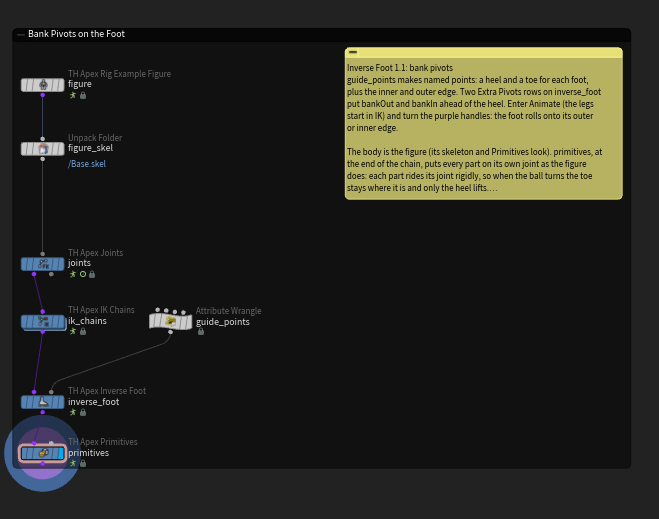
Bank pivots from named points. Find it in the Asset Browser under Changelog › 1.17 › Bank Pivots on the Foot.
Node setup Bank pivots from named points. Find it in the Asset Browser under Changelog › 1.17 › Bank Pivots on the Foot.
UpdatedBeta

FK/IK switch dot

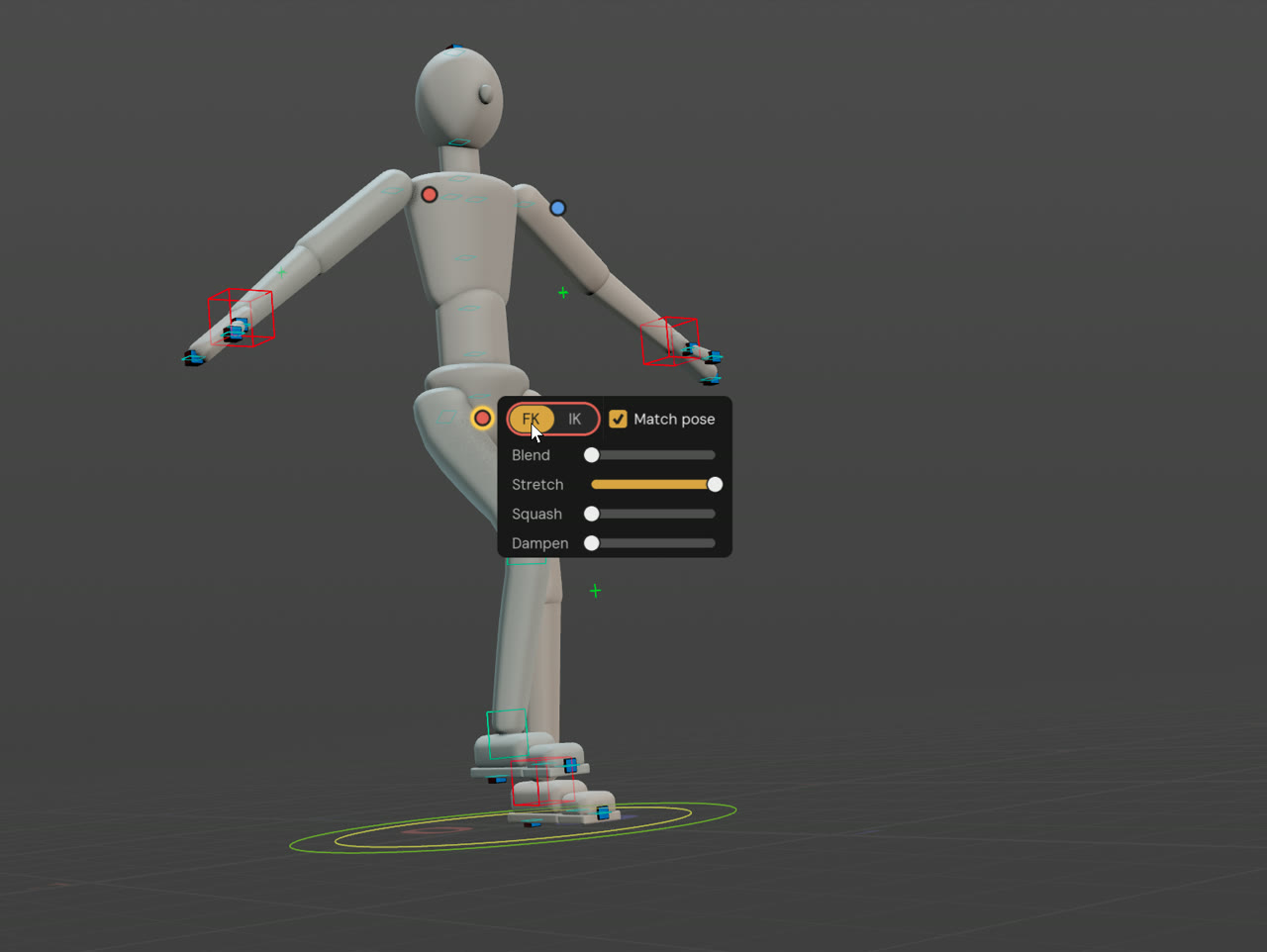
Click the dot to switch a limb between FK and IK; Shift-click keys it. A Match pose option keeps the pose.

Video Click the dot, switch FK and IK. The leg keeps its pose.
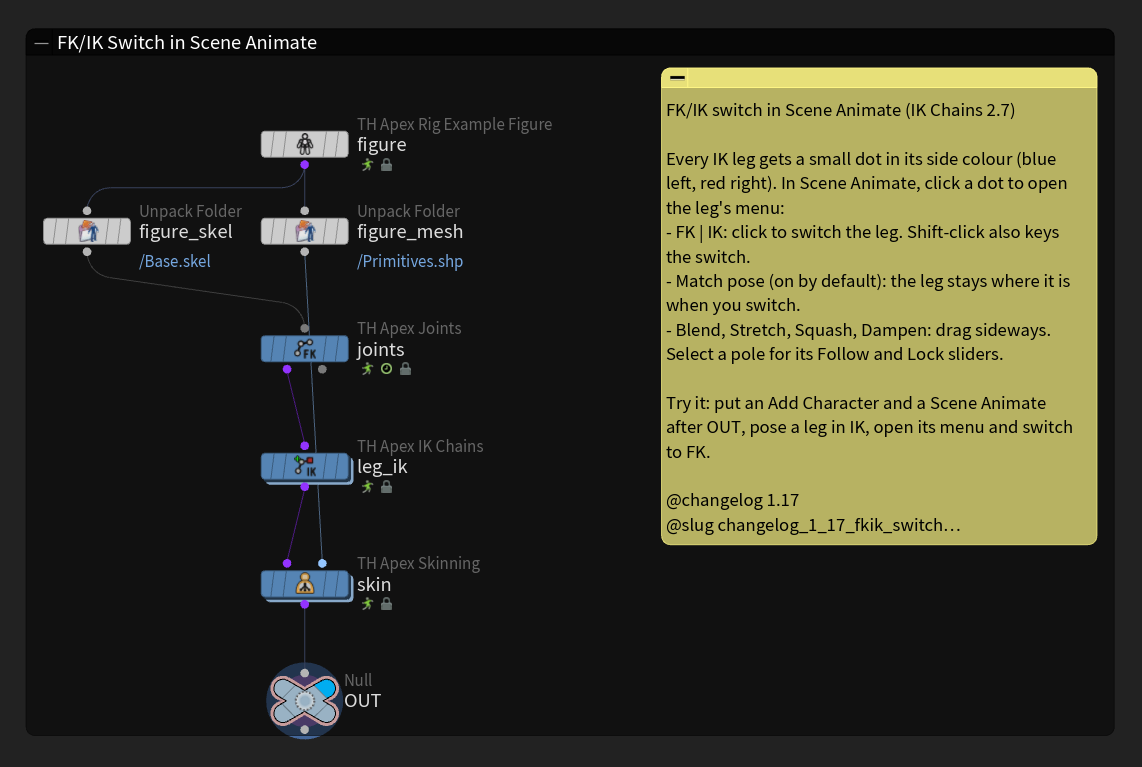
IK Chains 2.7 on the figure. Find it in the Asset Browser under Changelog › 1.17 › FK/IK Switch in Scene Animate.
Node setup IK Chains 2.7 on the figure. Find it in the Asset Browser under Changelog › 1.17 › FK/IK Switch in Scene Animate.
Video The arm's menu: drag Blend, then switch FK and IK.
UpdatedBeta

Splines, zipper, IK spline, rivet

apex_spline 6.2: Joints on the Edges, Parent for edge CVs. apex_zipper 3.2: Zip Each Corner. apex_ik_spline 1.3: the root duplicate follows the root's parent chain. apex_rivet 1.1: every rivet gets a control that rides the skin, to parent to. Group selection picks exactly the bones you click: at a branching joint each bone is its own pick, and a run that passes through its root joint now follows the path.

Video IK Spline 1.3: the chest control bends the spine, the hip swing turns the hips.
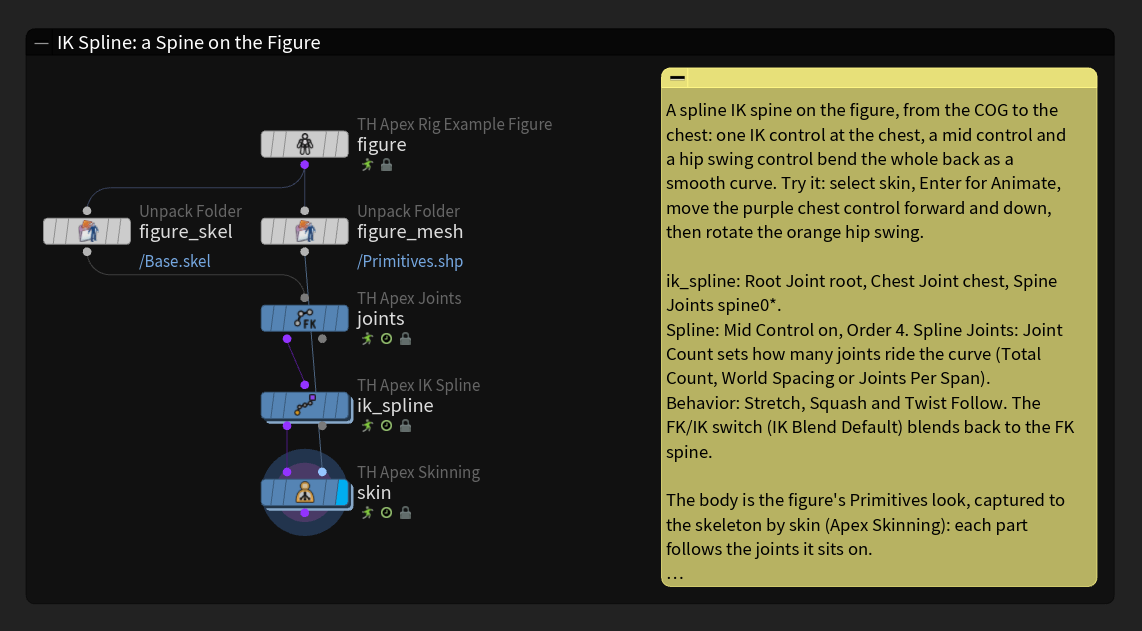
A spine on the figure. Find it in the Asset Browser under Changelog › 1.17 › IK Spline: a Spine on the Figure.
Node setup A spine on the figure. Find it in the Asset Browser under Changelog › 1.17 › IK Spline: a Spine on the Figure.
NewBeta

Slide on Surface

Slide on Surface keeps controls on a surface: drag a control, or anything constrained to it, and it slides over the surface instead of leaving it, like googly eyes rolling round a head. The surface can be polygons, NURBS or Bezier patches, or a primitive sphere, and patches and spheres are followed exactly. With Turn to Surface on, a sliding control also turns with the surface so it keeps facing out, and while you drag, a preview marks where each control will land.

Video Drag the orange aim discs and the googly eyes slide round the head instead of leaving it.
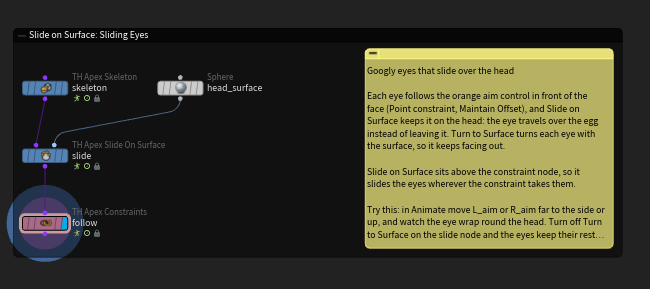
Slide on Surface above the constraint node. Find it in the Asset Browser under Changelog › 1.17 › Slide on Surface: Sliding Eyes.
Node setup Slide on Surface above the constraint node. Find it in the Asset Browser under Changelog › 1.17 › Slide on Surface: Sliding Eyes.
UpdatedBeta

Joint Capture: sides and separate pieces

Keep Sides Apart keeps left and right joints on their own side of the middle, so one leg never pulls the other; it is on for new nodes. Separate pieces (eyes, teeth, accessories) keep their own weights instead of borrowing them across a gap: new nodes no longer bridge pieces, Max Bridge Distance limits it when you do, and a piece no joint reaches follows its nearest bone instead of staying still. Smooth now works in every Mode, Proximity (Distance Only) and point clouds included, and its folder shows in every Mode. A joint at the end of a chain (a ball, a thumb) now owns its bone, so toes follow the ball and thumbs follow the thumb instead of the ankle or wrist.

Fixed

Shrinkwrap anchors stay put

Anchor Smoothing is measured from the seam, so moving the Noodle's root up no longer drags the open arm ends onto the belly (up to 43 cm jumps before).

Video Raise the Noodle's root: the arm ends stay on the shoulders.
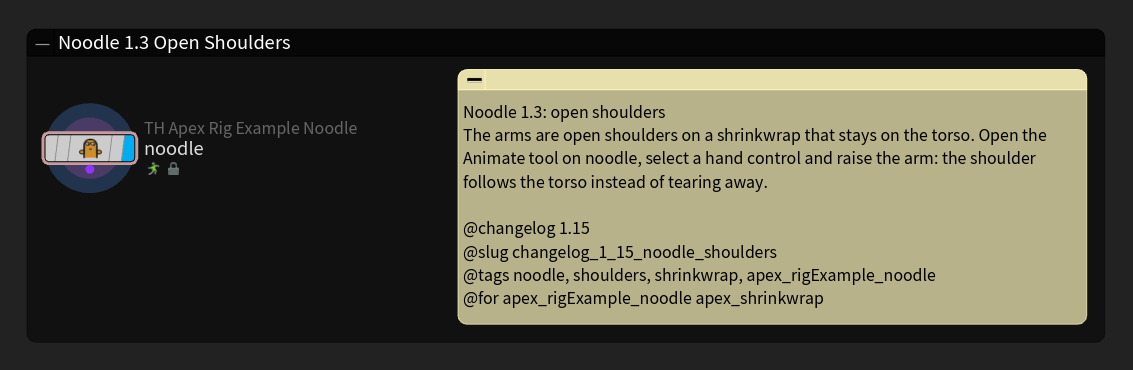
Noodle 1.3 open shoulders. Find it in the Asset Browser under Changelog › 1.15 › Noodle 1.3 Open Shoulders.
Node setup Noodle 1.3 open shoulders. Find it in the Asset Browser under Changelog › 1.15 › Noodle 1.3 Open Shoulders.

Motion that follows what you did

Temporal, Collisions, SOP Block and the sim switch.

Motion
NewBeta

Temporal

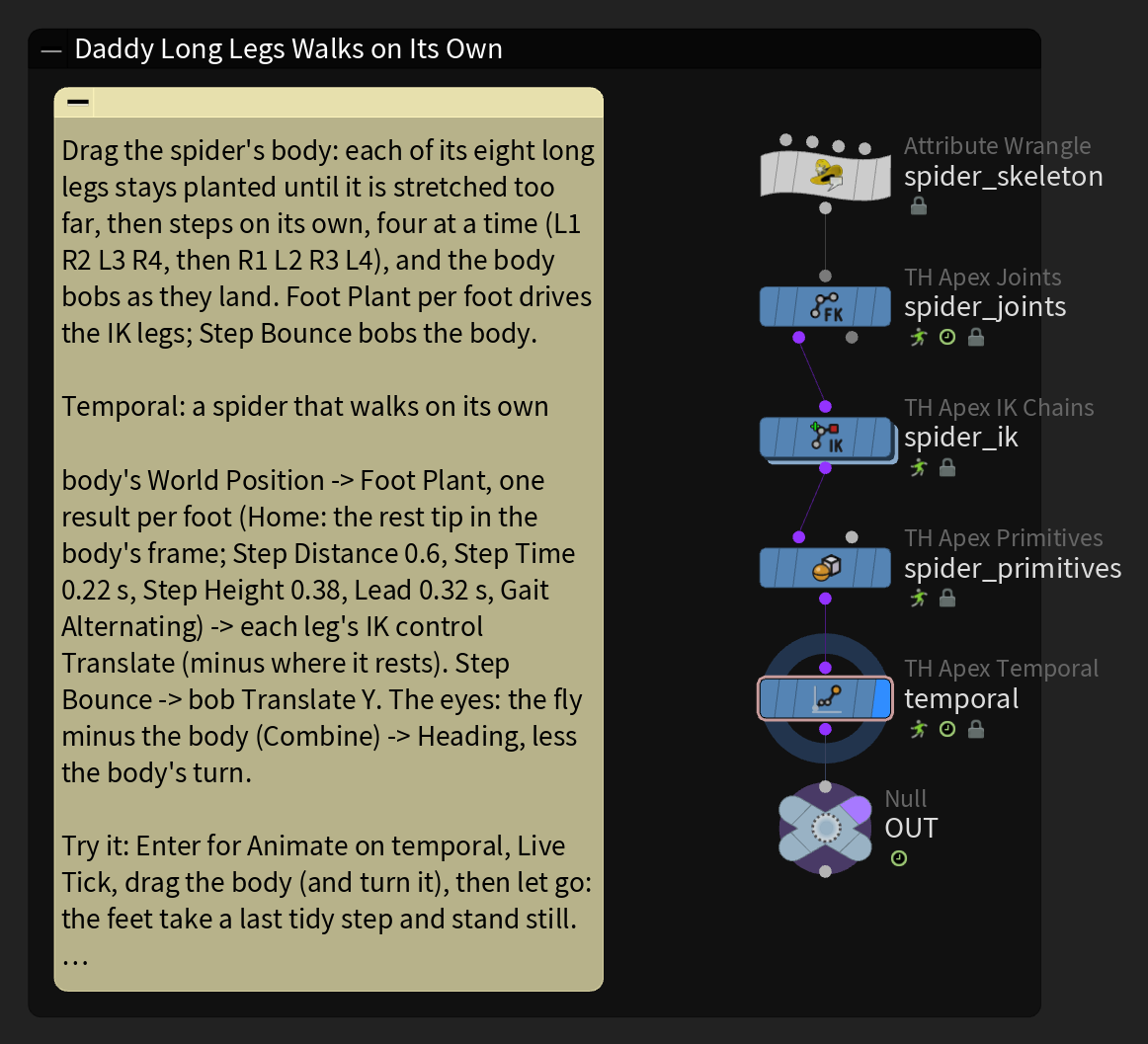
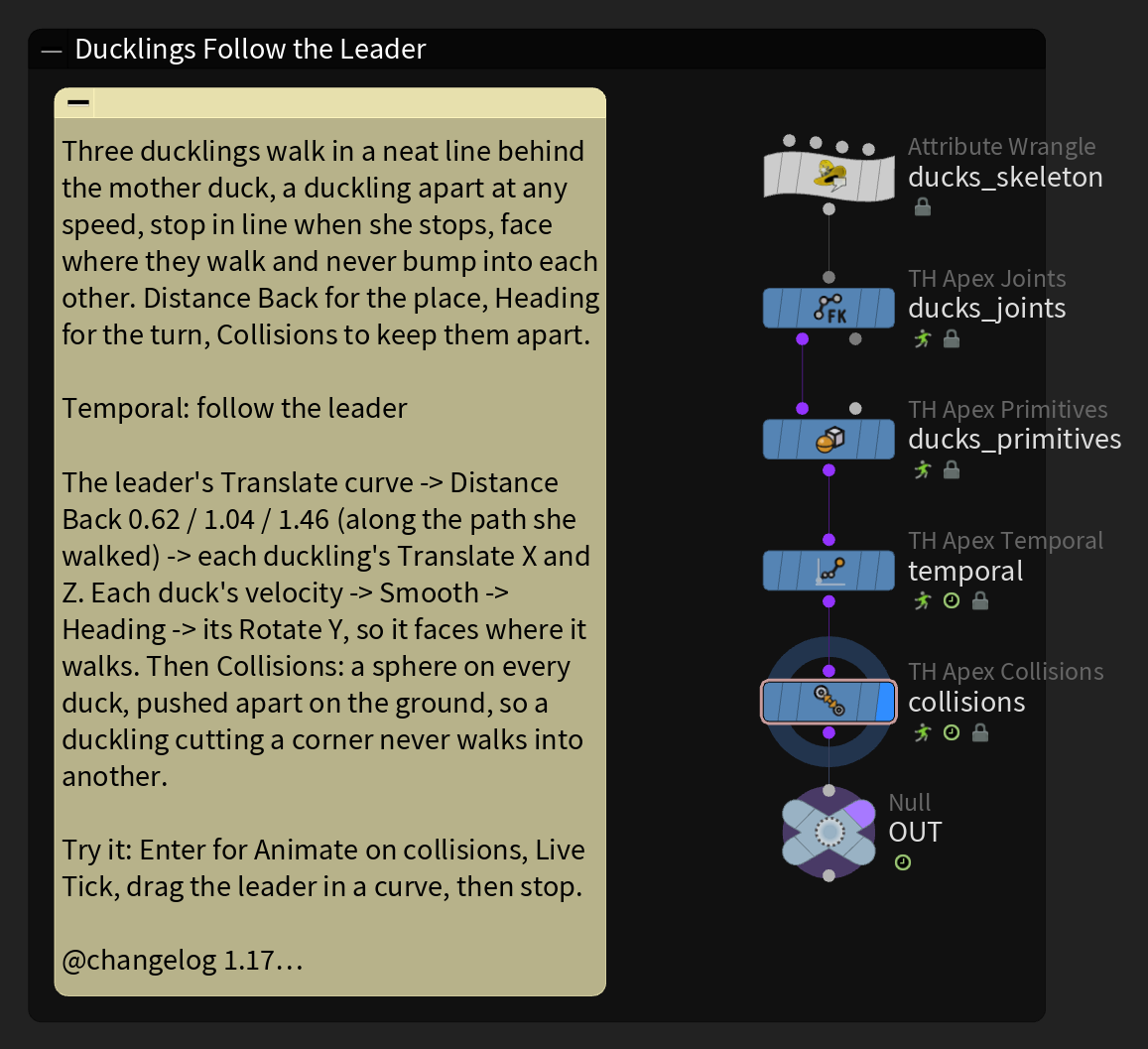
Temporal remembers what a control, joint, curve or shape did and works out speed, direction, spring, smoothing and more. Distance Back rolls a wheel back when you back up; Foot Plant and Step Bounce keep feet planted and bouncing. Fifteen-plus examples ship as Changelog recipes: a spider that walks itself, ducklings following their mother, bunny ears, a sleepy owl and a jelly hop.

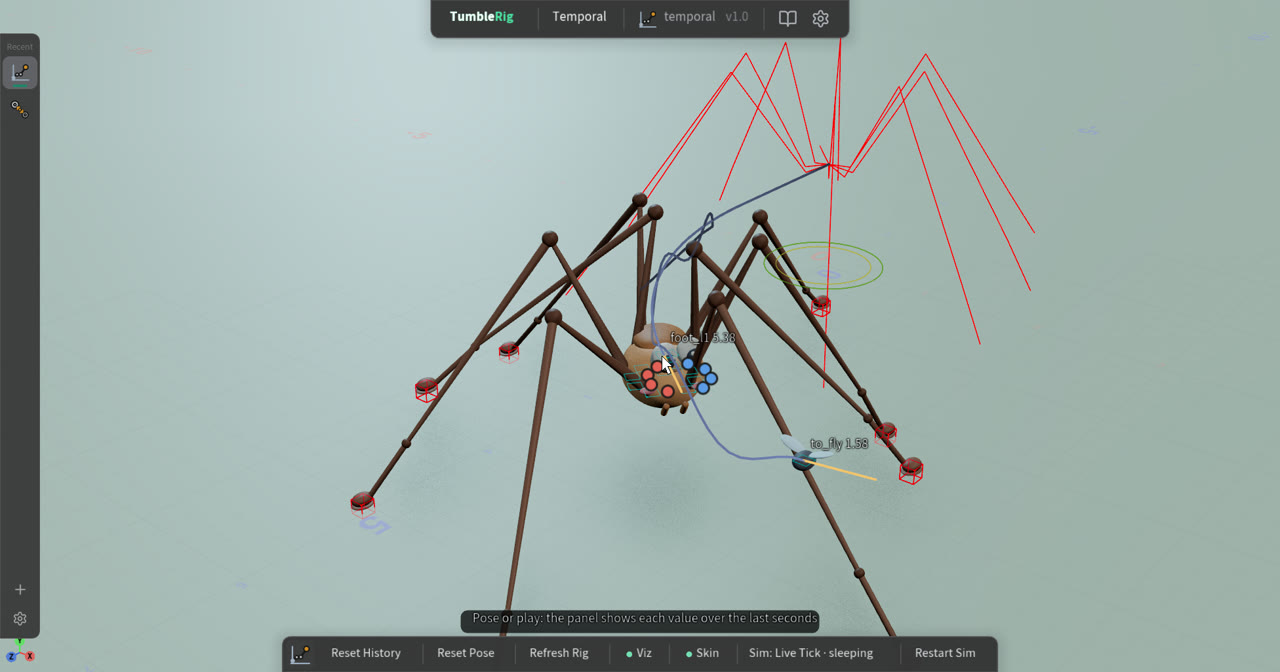
Video A spider that walks itself. Drag the body; each leg steps once it is stretched past the step distance.
Joints, IK Chains, Primitives, Temporal. Find it in the Asset Browser under Changelog › 1.17 › Daddy Long Legs Walks on Its Own.
Node setup Joints, IK Chains, Primitives, Temporal. Find it in the Asset Browser under Changelog › 1.17 › Daddy Long Legs Walks on Its Own.
Video Ducklings follow the leader in a line, at any speed.
Temporal then Collisions. Find it in the Asset Browser under Changelog › 1.17 › Ducklings Follow the Leader.
Node setup Temporal then Collisions. Find it in the Asset Browser under Changelog › 1.17 › Ducklings Follow the Leader.
NewBeta

Collisions

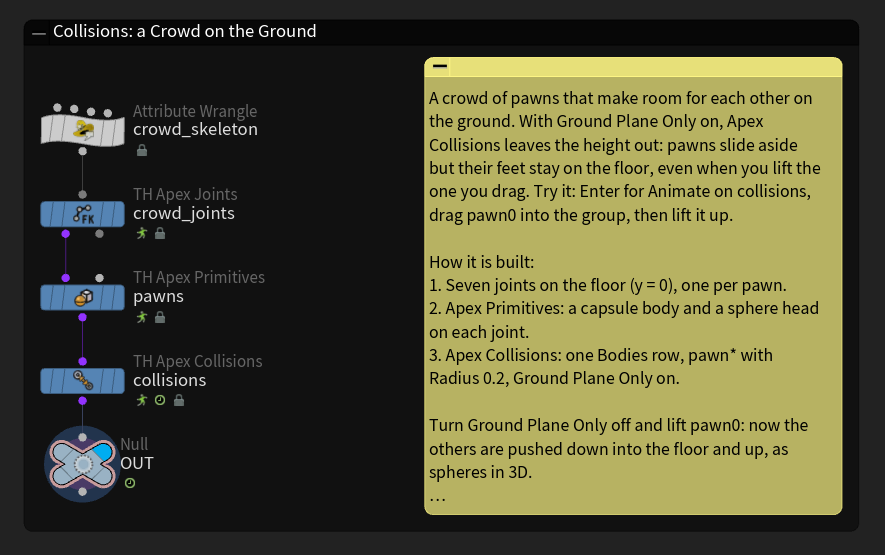
Puts a sphere on each joint you pick and keeps them apart: drag one into the others and they push off each other, the bigger one moving less. Ground Plane Only keeps feet on the ground while bodies push sideways. It runs after Temporal, so the ducklings following their mother keep a neat line instead of piling up.

Video A crowd that makes room. Drag the red pawn through the group: the others slide aside and every foot stays on the floor.
Seven joints, primitives, Collisions with Ground Plane Only. Find it in the Asset Browser under Changelog › 1.17 › Collisions: a Crowd on the Ground.
Node setup Seven joints, primitives, Collisions with Ground Plane Only. Find it in the Asset Browser under Changelog › 1.17 › Collisions: a Crowd on the Ground.
NewBeta

SOP Block in the rig

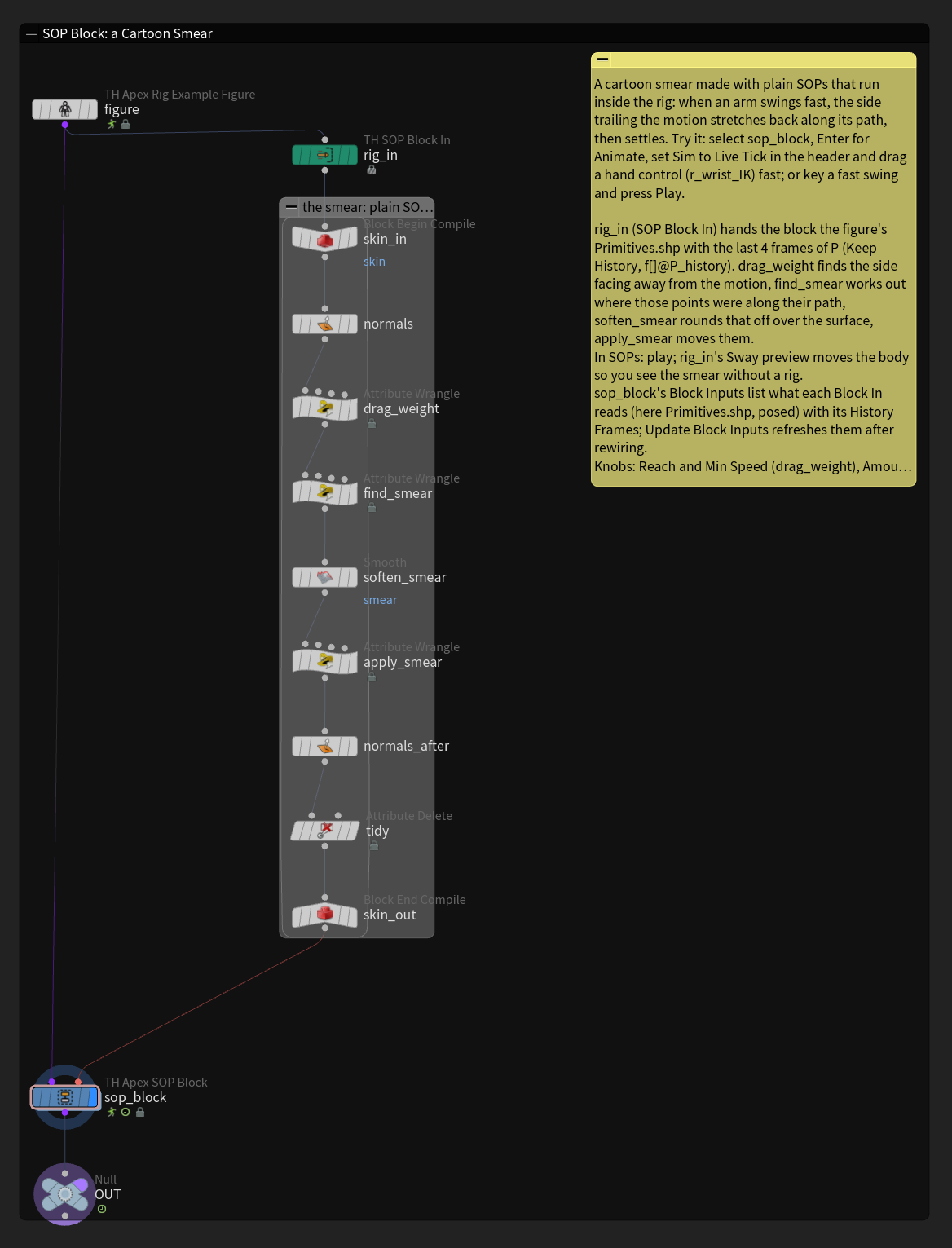
Build any SOPs between Block Begin and Block End and the block runs inside the rig, live in Animate and in published rigs. Keep History per input remembers earlier frames, so a block can simulate, as in the cartoon smear example.

Video A cartoon smear: the swinging arm stretches back along its path, then settles.
SOPs inside the rig between Block Begin and Block End. Find it in the Asset Browser under Changelog › 1.17 › SOP Block: a Cartoon Smear.
Node setup SOPs inside the rig between Block Begin and Block End. Find it in the Asset Browser under Changelog › 1.17 › SOP Block: a Cartoon Smear.
NewBeta

Sim Switch

Sets how each character simulates: Scene, Start, Forward, Live, Quasi or Off, keyable. In Scene Animate, the Sim chip in the footer opens a small board with one row per character, plus All to Scene and Restart.

Video The Sim board. Open it from the footer chip and set the character's row to Live: the head trails.
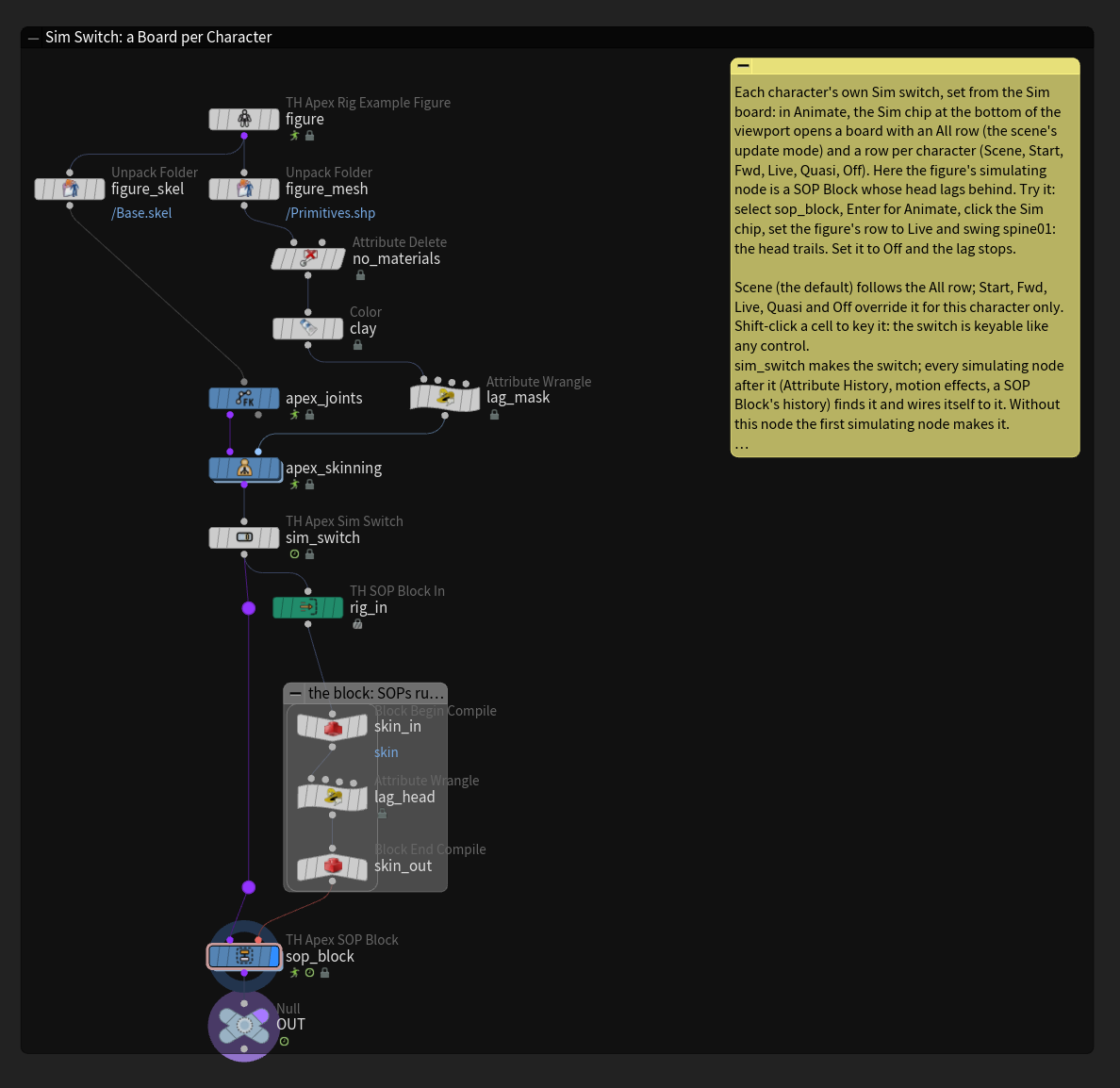
A Sim Switch before a SOP Block. Find it in the Asset Browser under Changelog › 1.17 › Sim Switch: a Board per Character.
Node setup A Sim Switch before a SOP Block. Find it in the Asset Browser under Changelog › 1.17 › Sim Switch: a Board per Character.
NewBeta

Joysticks, now free, with a 2D panel

Set Draw to 2D for a compact panel by the control: pads, sliders, switches and grids in the FK/IK menu's look. Face boards and slider joysticks drive shapes and controls. 2D controls shrink and hide as the character gets small on screen. Joysticks now come with TumbleRig for everyone.

Video A 2D joystick menu by the face. Sliders and a pad drive the Noodle's face shapes.
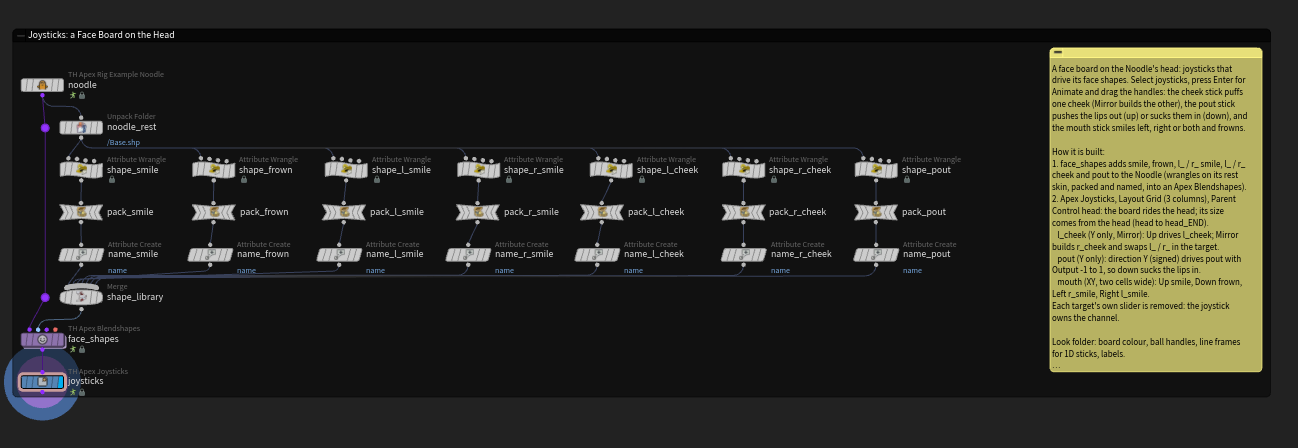
A face board on the Noodle's head. Find it in the Asset Browser under Examples › Apex › Joysticks: a Face Board on the Head.
Node setup A face board on the Noodle's head. Find it in the Asset Browser under Examples › Apex › Joysticks: a Face Board on the Head.

Smaller things

Panels, cages and the catalogue.

Tools and panels
UpdatedBeta

Joint Cages

One cage per branch: a joint with several children gets a plain cage to its first child. Capsule, Sphere and Box cages now work like Primitives: click a cage to move it, switch to Shape (the switch under it, its dot, S or a double click) and drag the red, green and blue handles to make it wider or longer, or the white ball to round Box cages.

Video Click the cage, switch to Shape, then drag the red handle wider and the green handle longer.
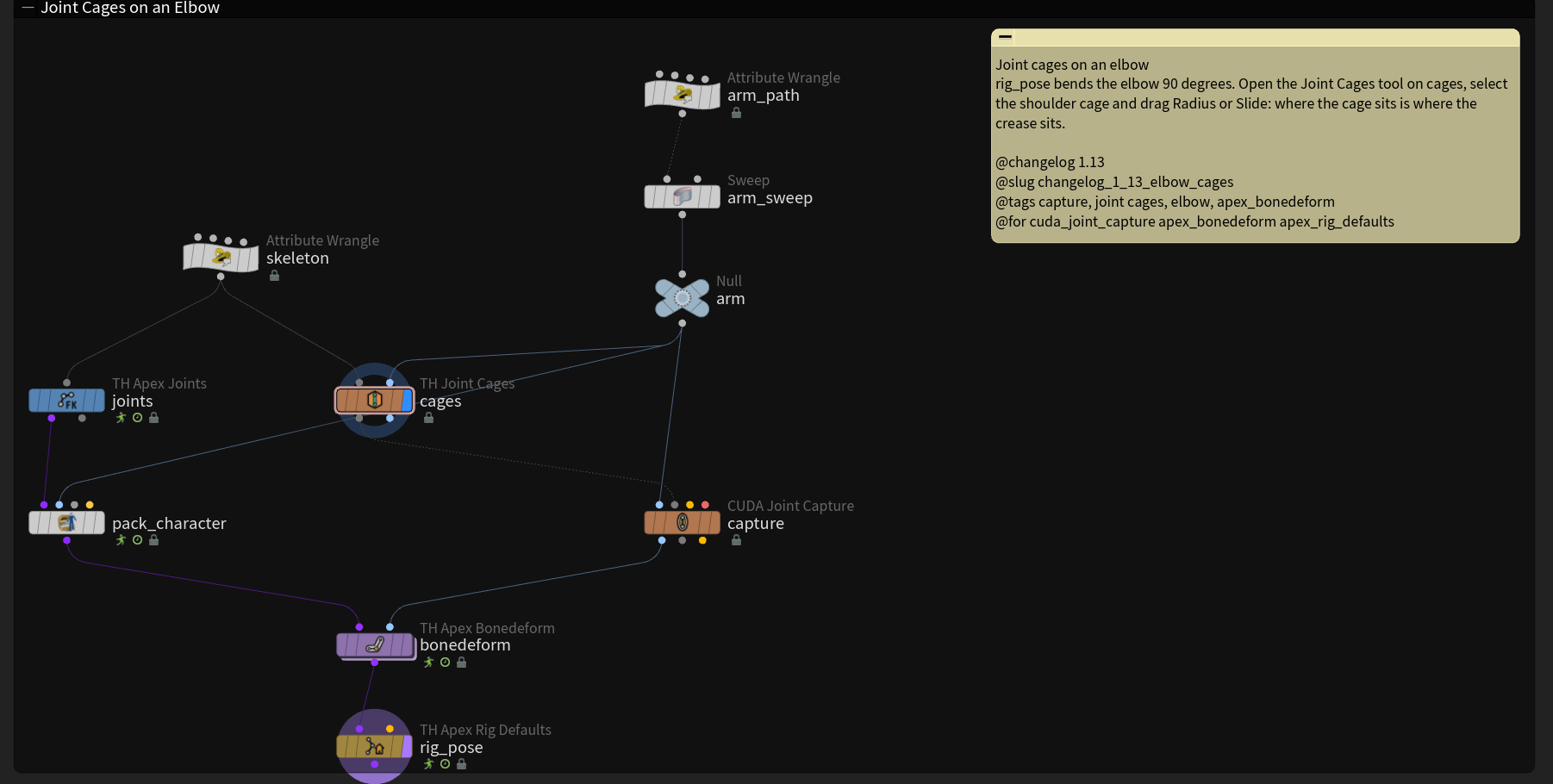
Cages, capture, bone deform. Find it in the Asset Browser under Changelog › 1.13 › Joint Cages on an Elbow 1.13.
Node setup Cages, capture, bone deform. Find it in the Asset Browser under Changelog › 1.13 › Joint Cages on an Elbow 1.13.
UpdatedBeta

Joints panel

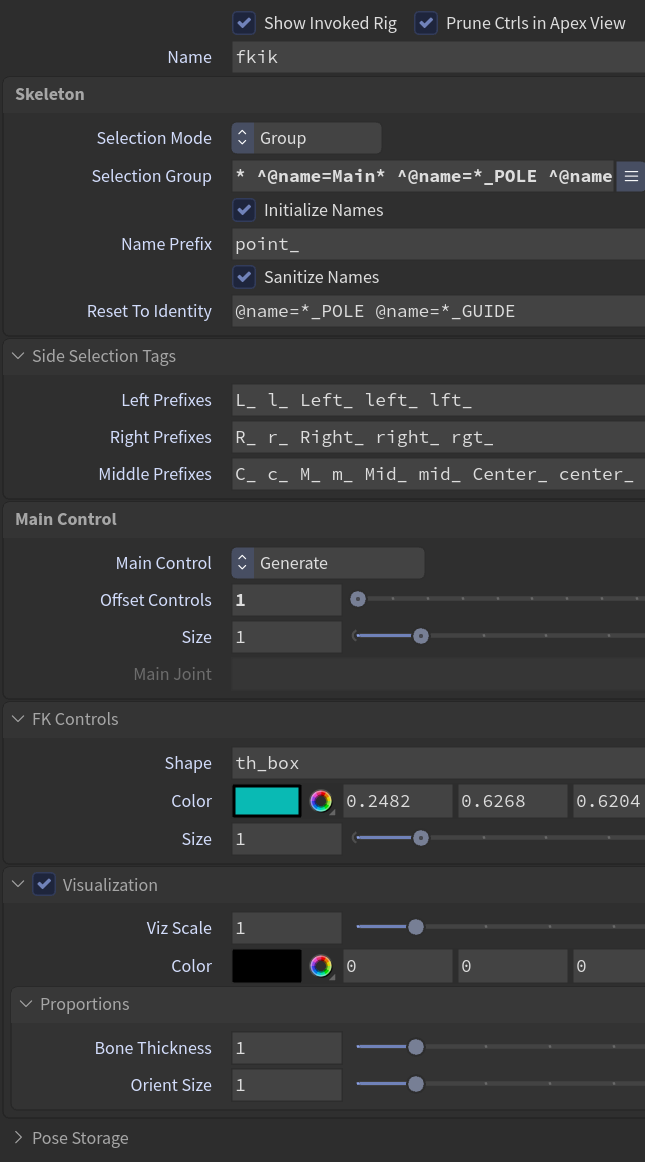
Bone width, axes size and bone colour sit right under Joint size; a Main Controls fold sizes the Main, Layout and Offset circles together.

The Joints panel: Main Control with its Size, and Visualization with Bone Thickness and Orient Size.
UpdatedBeta

Node layout and What's New

The inside of TumbleRig's nodes is laid out in a straight, readable flow. The catalogue's Changelog list shows the New and Updated nodes of each release, with a NEW or UPDATED pill on their cards.

Inside IK Chains 2.7: the nodes in a straight flow.

Upgrading

New versions install next to the old ones; saved scenes keep theirs until you swap.

Every change: 342 commits since v1.16.0

New in 1.17.0 (21)

  • orient_joints 1.0: Ctrl+click on the joint the rotate gadget sits on clears its tweak (the gadget's centre took the click)
  • selection_sets: selection sets + Character Picker layouts from templates (headless, verified on the eye rig)
  • orient_joints 1.0: keys L (Local/World) and O (Square Up): Houdini's viewer keeps X, S, K and Delete; Delete dropped; an up diamond pointing into the screen hides (it covered its pill in Front view); unchanged chain settings make no undo step (real-input GUI check)
  • orient_joints 1.0: a skeleton without a transform attribute (bare polyline) gets world axes, scale 1 (was all-zero frames); Tool Panel decision recorded; battery 35/35
  • apex_camera: rail follow (chase: the track rides the rail level with the aim target, Lead), dolly zoom channel, Controls tab (look presets, colours, sizes, body shapes), rig presets, prime menu; shake: Subtle preset; battery 61/61
  • thumbnails: orient_joints 1.0 and apex_camera 1.0 (release preflight)
  • orient_joints 1.0: Auto Bend only for forward/back/sideways bends (feet keep the vector), root chains named after their first bone, panel slider captions + full-width Up From (GUI walk)
  • apex_constraints 2.0: optional per-row Name (constraint node <driven>_<name>)
  • apex_camera: rail (a curve on input 2: the track rides it with rail_u, the lens keeps its rest place), rail drawn in the guide, camera_out pass-through for the shake; battery 40/40
  • Skeleton: snapping (Houdini's own via snappingRay, plus X=0 mid-line), Snap button in the HUD row and a Snap section in the panel (user, 1.17)
  • apex_camera: its own icon (camera body, orange lens, tripod)
  • Camera Rig example recipe (EX_camera/camera_rig): living room, figure, tripod render_camera and a crane camera; publisher knows the camera section
  • orient_joints 1.0: Orient Joints tool (Chains / Tweak viewer state, Tool Panel, chain popup), icon, catalogue entry, io-map, operators
  • apex_camera: HUD hides the other cameras' guides while you look through one; Tool Panel lens rows labelled
  • hda-io-map: apex_camera entry (inputs, outputs, viewer_state: panel built)
  • apex_camera: overlay settings in user data (a parm edit recooked the node and Scene Animate dropped unkeyed pose edits), camera glyph hidden, DOF guide off by default, Camera section in the catalogue; battery 37/37
  • orient_joints 1.0: new node, joint frames from chains of bones + per-joint tweaks (VEX solve, mirror); headless battery 33/33
  • apex_camera: camera tool (Look Through, Aim, Tool Panel: lens, composition, reference); HUD: golden-rectangle spiral, reference via op: background, reload-safe timer, tighter strip
  • apex_camera: camera HUD (composition overlays, lens info, strip, reference behind the lens), control shapes as embedded packed geometry, aim_blend channel name; battery 33/33
  • apex_camera 1.0: render_camera by default (TumblePipe), reference plane (image / sequence / movie via a File COP), Composition parms for the camera HUD, live frame input; battery 31/31
  • apex_camera 1.0: camera rig for Scene Animate (placement, track, crane, level pan/tilt/roll head, aim, focus, lens channels, guides); headless battery 24/24

Shipped in 1.17.1 (15)

  • Thumbnails: IK Chains 2.8, IK Spline 1.4
  • IK subgraph: recompile from the LF source (manifest hashed a CRLF worktree copy)
  • apex_sliders 2.0: fuzzy node + port search button on Wire To Node / Wire To Port
  • cuda_bonedeform: results come back in one pinned copy pass; cheaper capture signature
  • Rig tool HUD drawn as merged layers on main; the Tool Panel keeps its Group count
  • apex_ik_chains 2.8: joints a rig node generates (spline joints) are not baked into the geometry skeleton
  • Animate menu filter installs in the first Animate scene, not at startup (Python application event filter segfaulted Houdini 22.0.457 on macOS at launch)
  • apex_ik_chains 2.8: IK goal and pole size follow the chain's end FK control (x1.2 / x0.8 by default), optional exact-size override
  • fkik_switch: fit the mid spline control when a spine goes to IK
  • apex_ik_chains 2.8: FK/IK/pole control shapes keep the controls' own look; Controls folder (IK + pole shape, colour, size); Tool Panel Scale + Hide FK in IK
  • skeleton_doctor 3.0: Visualize draws the TumbleRig joint glyphs / gnomons in the viewport (viewer-only output) instead of the inert Rig Vis
  • apex_ik_spline 1.4: the spine gets the 2.7 limb menu with FK/IK matching, calmer chest IK / hip swing looks
  • skeleton_doctor 3.0: Reset to Identity gets a viewport joint picker (writes @name= refs, same as Leaf Group)
  • fit_skeleton_markers: Top view no longer fades the 2D controls (LOD span from the best-facing axis, not projected height)
  • fit_skeleton_markers: hand frame from finger knuckles, thumb base no longer turns the hand

Shipped in 1.17.0 (306)

  • Examples: crowd pawns overlap and stand on bases; ducklings reach the ground with wings and tails (1.17 reshoot)
  • Primitives: every shape handle shows in Shape mode; the Joint Cages switch hangs below the selected cage
  • Joint Cages: Capsule, Sphere and Box cages use Primitives' 2D controls
  • Joint Cages: Capsule, Sphere and Box cages shape with Primitives' handles
  • Slide on Surface: Sliding Eyes recipe (1.17 changelog example)
  • Inverse Foot recipes: parts ride their joints rigidly, toe stays planted on ball roll (examples v0004)
  • Slide on Surface ships in 1.17: un-excluded, its own icon, in [[operators]] and What's New
  • Joint Capture: a joint whose child is not captured still owns its bone
  • Living Room Blockout recipe: a Primitives node built up from empty (examples v0005)
  • Feet example: drop the ballerina, four feet left (ogre, elephant, spider monkey, Tarzan); recipe republished from examples v0004
  • Temporal spider recipe: shoes and soles take the leg colour (examples v0006)
  • Release 1.17: republish recipes after the Joint Capture parm changes
  • Bone selection: pick the exact bone at a branching joint, and order a run's CVs along its path
  • Joint Capture: Smooth works in every Mode
  • Joint Capture: separate pieces keep their own weights
  • Joint Capture: new nodes start with Keep Sides Apart on
  • Release 1.17: publish example recipes from the latest scenes
  • Joint Capture: Keep Sides Apart, left and right joints only capture their own side of the middle
  • 2D controls: an Animate scene with no rig is a silent no-op
  • ShrinkwrapCore.cu: include <vector> so the CUDA Shrinkwrap SOP builds with CUDA 12.9
  • Node docs bundle: one shared copy of a picture several pages show (574 -> 373 files; the site takes 500 per page)
  • Release 1.17 generators: node thumbnails for the 19 new operators (figure, spider, collisions, primitives, skeleton, temporal, ...); What's New 1.17 lists the figure and spider example characters
  • Temporal recipes from EX_motion/temporal v0005 (checked by houdini-rnd-d1): the seven figure boxes on the Primitives look (off the Skin look; squash/tired track Main_to, startle shrugs), posed thumbnails; the other recipes republished for parm re-save drift (label fix 424482a8)
  • Fit Skeleton recipe republished (fit_skeleton ANIMATION parm re-save drift)
  • IK Chains, Inverse Foot and Rig Defaults recipes: the unwired fit_skeleton left by the attach_joint_geo rehome removed (it drifted on every save)
  • Fit to Bone recipe republished (parm re-save drift)
  • Collisions recipes republished (parm re-save drift)
  • Zipper corners recipe republished (parm re-save drift)
  • Noodle recipes republished: parm re-save drift inside the unlocked Noodle (blendshape rows, fit_skeleton ANIMATION, sceneanimate)
  • Skeleton Builder character recipe republished (parm re-save; its 24 joints still show after the empty-start change)
  • Temporal labels: never stamp 'not in the rig' from an unread input; refresh on load only once the input has cooked
  • Primitives blocking recipe: the character redesigned with overlapping cylinders and capsules (each shape runs past its joints into the next; no stacked spheres), figure Look back to Primitives
  • Fix a crash on rig reload: no cached graph_parms dict in the Skeleton Builder; timers skip while Animate reloads
  • New example: Apex Duplicate, three Noodles from one rig (Boxit + Duplicate, EX_rig_building/duplicate)
  • New example: Apex Transfer Attribute, a paint ball colours the Noodle's skin (EX_utilities/transfer_attribute); examples registry
  • New example: Apex Attrib Math tints the Noodle's arms on the GPU (EX_utilities/attrib_math)
  • New example: Skeleton Doctor fixes a broken import (EX_skeleton/skeleton_doctor)
  • New example: Apex Tags, sides and regions from the figure's joint names (EX_skeleton/tags)
  • New examples: Apex Constraints on the figure, the head watches the hand and a two-handed grip (EX_constraints/constraints)
  • New example: Deform Mask from geometry and paint on the Noodle (EX_deformation/deform_mask)
  • New example: Subdivide a low-poly Noodle in the rig (EX_deformation/subdivide)
  • New examples: Solidify a belly plate and rigidify a badge on the Noodle (EX_deformation/solidify)
  • New example: Wrinkles at the Noodle's elbows (EX_deformation/wrinkles)
  • New example: Elastic Delta Mush keeps the Noodle's elbows and knees round (EX_deformation/elastic_deltamush)
  • Spider recipe: new thumbnail (final colours, no red shoes), mid-walk with the fly
  • Figure recipe: the locked current figure (was a 240 KB inline copy of the old network), sticky without the Skin look, posed thumbnail
  • Rig Defaults recipe on the figure: attach_joint_geo replaced by the figure's skeleton + Primitives look
  • Inverse Foot recipes on the figure: attach_joint_geo replaced by the figure's skeleton + Primitives look, guide points on its shoes
  • IK Chains recipes on the figure: attach_joint_geo replaced by the figure's skeleton + Primitives look (skinned); FK/IK switch off the Skin look
  • IK Spline recipes on the figure's Primitives look (off the Skin look): parts captured to the skeleton with Apex Skinning
  • Fit Skeleton Markers limbs recipe on the figure's Primitives look (off the Skin look)
  • Fit Skeleton recipe on the figure's Primitives look (off the Skin look), skeleton fitted to the figure; thumbnail shows it through the body
  • SOP Block recipes on the figure's Primitives look (off the Skin look): the block edits Primitives.shp, the lag reads the part names
  • Eye Rig 1.2 recipe on the figure's Primitives look (off the Skin look): eyes sized from the head; sticky says to show the eyelids first
  • Follow Controls recipes on the Noodle (off the figure's Skin look): recaptured mesh, face joints that do not capture, head lattice; thumbnails show the face controls and cage
  • Groom recipe on the Noodle (off the figure's Skin look): body coat + head tuft with hair controls
  • Lattice recipes on the Noodle (off the figure's Skin look): Box Axes cage on the left arm, head squash; thumbnails draw the cage
  • Delta Mush masks recipe on the Noodle (off the figure's Skin look): head mask box on the Noodle's rig
  • Slider Joysticks recipe on the Noodle's smile (off the figure's Skin look), thumbnail shows the joystick frames
  • Blendshapes recipes on the Noodle (off the figure's Skin look): Smile/Pout/Cheek Puff shapes, live head squash
  • 2D control size: a TumbleRig setting on top of the UI size
  • Skeleton Builder: starts empty; joints show as 2D rings
  • Spider example: knee and ankle balls in the leg brown (no orange)
  • apex_collisions icon: offset spheres with a double push arrow between them (no longer reads as a face)
  • Node icons for apex_rigExample_figure, apex_rigExample_spider, apex_collisions (house style, icon_design v01); collisions HDA icon -> th-apex_collisions
  • Primitives: works with nothing wired in
  • Sim Switch example (figure, Primitives look): the Sim board in the footer; thumbnail with the board open
  • Example characters: no red shoes on the figure or the spider
  • Sim board: the limb menus' size (it was far too big), a close button, and a press anywhere outside closes it
  • Sim board: a node's own Animate names its character row after the node (not sceneaddcharacter1); a row click keeps the selection (the hidden switch's handle no longer shows)
  • Skeleton Builder feet example: five feet redesigned, shapes overlap into one form
  • Figure example rig: a cleaner mannequin, shapes overlap at every joint, no eyes or brows
  • Floppy Arms example on the figure's Primitives look: the IK hands spring behind
  • Temporal: pattern rows and Write Back
  • Figure recipes republished: new thumbnails with the figure's face (25 recipes)
  • Primitives + Skeleton Builder 1.17: shape detail, Hollow, Ctrl+drag copies, extra primitives, audit fixes
  • 2D controls shrink with distance and hide in wide shots (TumbleRig.ctrl2d_lod); IK Chains 2.7 2D Controls parms, dots 20% smaller
  • Collisions 1.0: Show Invoked Rig toggle (display-invoke convention)
  • FK/IK limb menus: opaque, over the scene, sharp at the UI scale, no glow on the rows
  • Figure example rig: eyes and brows in the Skin look's Base.shp
  • FK/IK limb menus: rows over the dots (z 1 / 0.99); menu images untinted by a rig's side colours (Noodle 1.4)
  • Temporal examples on the figure: smear, speed mask, squash, startle, tired, wobble
  • IK Spline examples on the figure's spine
  • SOP Block and Sim Switch examples on the figure
  • Primitives blocking example on the figure's skeleton
  • Follow Controls examples on the figure with face joints
  • Fit Skeleton examples on the figure (no Electra)
  • Delta Mush mask example on the figure
  • Groom example on the figure: hair grown on the skin
  • Eye Rig example on the figure
  • Lattice examples on the figure: box axes on the arm, head squash
  • IK Chains examples: FK/IK switch on the figure
  • Sliders example on the figure: smile joysticks
  • Blendshapes examples on the figure (no capybara): face shapes and live shapes
  • FK/IK limb menus: opaque, over the scene, sharp at the UI scale, no glow on the rows
  • ctrl2d: no backticks in docstrings (the compile parm expands them)
  • 2D control menus: opaque, over the scene, sharp; the pad's knob under the pointer
  • Compiled subgraphs keep $VAR literal: limb-menu images no longer point at the dev worktree
  • Noodle 1.4: nested nodes on their newest versions, in place (same results)
  • Example characters: Spider and Figure recipes (Examples > characters)
  • Example characters: Spider (walks itself) and Figure (mannequin biped, primitives or one skinned mesh)
  • Wheel example: the rolling wheel on primitives replaces the old wheel (same slug; rolls, steers to its heading)
  • Rig Defaults example on IK Chains 2.7, Fit Skeleton 3.1 and Joints 8.1: rest pose (1.13 recipe)
  • Set Driven Keys example from the examples project: foot roll (1.13 recipe)
  • Controls example on Joints 8.1: fit to bone (1.13 recipe)
  • What's New 1.17: 10 new nodes, 11 updated (in place: Joints panel, Joint Cages, Shrinkwrap anchors)
  • Joint Cages example from the examples project: cages on an elbow (1.13 recipe)
  • Sliders example on Blendshapes 3.1: joysticks on the capybara's smile (1.13 recipe)
  • Wrap example from the examples project: hidden stays hidden (1.13 recipe)
  • Draw 2D on apex_sliders and apex_joysticks: 2D controls in the FK/IK limb menu's look
  • Inverse Foot examples on IK Chains 2.7, Fit Skeleton 3.1 and Joints 8.1 (1.17 recipes)
  • IK Chains examples on IK Chains 2.7, Fit Skeleton 3.1 and Joints 8.1 (1.13 / 1.16 / 1.17 recipes)
  • Blendshapes examples on Joints 8.1 and Blendshapes 3.1 (1.13 / 1.16 recipes)
  • Fit Skeleton (markers) fix: left and right controls on the same pixel (Side View) no longer hide each other: the nearer one shows; the tool keeps itself in step (an interrupted drag ends, handles and selection the mode or Focus hide let go, Hand View ends when the view changes, display sliders keep redrawing after re-entering)
  • Spline brows and zipper corners examples on Spline 6.2 and Zipper 3.2 (1.13 / 1.16 recipes)
  • Fit Skeleton (markers) fix: a new node starts on the controls with everything shown (a Tweak mode or Focus left from another node/scene hid them); leaving in Hand View restores the focus; with no character connected the tool says so, and frames the character once it is connected
  • Noodle examples on Noodle 1.4: the 1.13-1.15 noodle recipes rebuilt on the newest nodes (edits inside the noodle replayed, @unlocked)
  • apex_spline 6.2: no error with the Fit Joints input unwired
  • Collisions examples: balls pushed apart, a crowd on the ground, iterations and strength side by side (1.17 recipes)
  • Icons: the corner badge stays inside the icon box
  • Fit Skeleton Markers examples (Preview): fit the template body by moving joints, knees, elbows, feet and fingers on Electra (1.17 recipes)
  • Sim Switch example: a per-character board (Scene, Start, Fwd, Live, Off, Quasi) driving a SOP Block's history (1.17 recipe)
  • SOP Block examples: the cartoon smear, a floor inside the rig, Keep History for a lagging head (1.17 recipes)
  • Skeleton Builder examples: five feet from joint rows, and a character built by clicks and mirrored (1.17 recipes)
  • Recipes from P:/tumblerig/examples/rig_building/follow_ctrls_v002.hip: four Follow Controls examples (lattice before / after the bone deform, Follow Mode, Binding) and the 1.16 changelog recipe on the newest nodes (apex_joints 8.1)
  • IK Spline 1.3 examples: a capybara spine, and a spine under the hips whose chest control follows the COG (1.17 recipes)
  • Rivet 1.1 examples: an FK chain and a prop riding the skin on rivet controls (1.17 recipes)
  • Wheel That Rolls and Steers: thumbnail of the rebuilt scene (rolling, three balls trailing)
  • Recipes: author stamps read tumblerig in every recipe; Primitives 1.17 recipes from the examples project; Temporal examples' descriptions are their note's first paragraph
  • Temporal examples in the Asset Browser: 20 new recipes and the 1.17 Temporal recipes listed as examples, on the newest nodes
  • Fit Skeleton (markers): the ball gets handles like the knee and elbow (Along the foot, Lift); the foot dot goes; handles hide by view angle
  • Primitives: a press on Animate's transform handle inside a primitive moves the handle, not the primitive
  • Changelog 1.17 recipe: FK/IK switch in Scene Animate (IK Chains 2.7 limb menus on the capybara)
  • Slide on Surface panel: corner drag no longer stalls on rig reloads
  • Compiled subgraphs and build_parent_rows import as they stand on main (recompiled again before the 1.17 release)
  • Temporal: Foot Plant and Step Bounce; Daddy Long Legs walks on its own
  • Primitives: Shape mode per primitive, and the primitive itself as its control
  • Fit Skeleton (markers): knees and elbows are controls; a click shows three handles (Along, Bend, Out) in place of the slider popup
  • Primitives + Skeleton: shape handles grab on the first click, with a hover label
  • Primitives: shape handles on the shape (Nomad Sculpt style)
  • Fit Skeleton (markers): the Skeleton output is the fitted rest skeleton, matching Fit Skeleton 3.1 (59 joints in skel_bind, same frames)
  • Temporal examples: the batter's multiples are ghosts on Frames Back; SOP Block multiples off the menu
  • Temporal: multiples keep their topology; Tool Panel no longer rebuilt forever when its body fails
  • Fit Skeleton: tweaked joints stand out in Controls mode (amber bullseye over the controls, line back to the fit)
  • Temporal examples: ten cute toys and cartoon multiples
  • Fit Skeleton markers: Hand End control (the wrist aims at it, the whole hand turns with it); unmoved fingertips hang relaxed (fingers grow from the knuckle by Curl instead of being pulled onto a straight guess); faster drags
  • Fit Skeleton markers: slider dots are small pills (a detail tier: they hide once the character is small on screen); Shape Sliders section with a reset icon per dot; a reset icon per popup slider
  • Selection labels: no hair space in the padding (drawn as a replacement mark)
  • Skeleton + Primitives: a Parent dot by the last selected control
  • Fit Skeleton markers: while the tool runs the node shows its skeleton output (displayInvokedRig asks fit_markers_state.running_on) and the tool draws the mesh with black wire; no joint boxes over the fingers, no undo entries
  • apex_spline 6.2: Joints on the Edges fit joints point along their run
  • Primitives: the Tube, a section swept along a curve through its points
  • Temporal: Distance Back; new apex_collisions; the ducklings keep a neat line
  • Fit Skeleton markers: output 0 = character stream (FK rig via Joints 8.1 + the mesh as Base.shp), output 1 = invoked skeleton; Show Invoked Rig on by default; port colours; mesh drawable only when the node isn't displayed, black wire
  • Skeleton + Primitives: reparent by picking (P, or the panel's Parent menu)
  • Shrinkwrap Anchor Smoothing is measured from the seam, not the collider's box
  • Fit Skeleton markers: the panel's body picture follows the skeleton (pelvis + hips, clavicles to shoulders, feet, skull / ribs); control outlines and rings thin out as LOD shrinks them
  • Noodle 1.3 / 1.4: shoulder seams stay on the shoulders when the root moves up
  • Fit Skeleton markers: hand dot past the middle fingertip (clear in Hand View); screen_ctrls opacity as per-point alpha (lines dimmed too)
  • Primitives: a copy made in Shape mode is selected once the rig rebuilds
  • Fit Skeleton markers round 5: finger in-between controls, Tweak mode, Focus filters, view chips, screen_ctrls (shapes, size, opacity, LOD), popup + gadget undo fixes
  • Skeleton + Primitives: audit and polish pass
  • Inverse Foot 1.1 polish: help card, artist labels, found-labels never cook, recipes ship stamped labels
  • Primitives: a cone at Taper 0 spreads its top over the tip; a low Round gets several rows
  • Slide on Surface: slide on a primitive sphere or NURBS / Bezier patches exactly
  • Tool Panels: really free a closed panel window; Temporal drops its data on exit
  • Fit Skeleton Markers: ring finger knuckle and tip controls (eleven hand controls)
  • cook_guard.cooking: the node Houdini sat on at its last idle turn is no cook
  • Fit Skeleton Markers: nine hand controls, curl falloff, palm cup, Hand View
  • Bone deform DQS: squash and stretch joints deform correctly (two-phase DQS)
  • Fit Skeleton Markers: Spine Mid control curves the spine like a spline's middle CV
  • Fit Skeleton Markers: Scene Animate's transform gadget instead of the translate handle
  • Fit Skeleton Markers: move handle in perspective views, drag in orthographic ones
  • Slide on Surface: Turn to Surface, controls turn with the surface they slide on
  • Skeleton + Primitives: right click shuts Animate's menu for real; review cleanup
  • Fit Skeleton Markers: heel, toe and hand joints to drag; procedural fingers like 3.1
  • apex_ik_chains 2.7 limb menus: compact 20 px slider rows, padding above the toggle
  • Fit Skeleton Markers: drag any joint, 2D dots with sliders for knees, elbows, hands
  • apex_ik_chains 2.7 limb menus: rows stacked flush, round corners only on the whole box
  • Slide on Surface: show where each sliding control lands
  • Skeleton: a new joint leads the next click at once; Subdivide into 2 works
  • apex_ik_chains 2.7 limb menus: the dot stays primary after slider drags and reloads too
  • Fit Skeleton Markers: place the joints themselves, no mesh fitting; spine dot
  • Skeleton: shape the joints' primitives from the panel in any mode; right click deselects
  • apex_ik_chains 2.7 limb menus: keep the dot primary after a click; draw at TumbleRig's UI scale
  • Colours for Primitives and Skeleton: schemes, any colour, point or prim Cd
  • Follow Controls: a control does not follow shapes it drives itself; ^pattern excludes
  • apex_ik_chains 2.7: Match pose checkbox next to the limb menu's FK | IK toggle
  • Seal and Zip sliders move the skin; zipper 3.2 sliders span their drawn track
  • apex_skeleton: a spine blocks out the torso with rounded boxes (wider at pelvis / chest)
  • apex_skeleton: chain names (spine02 -> spine03), I/O map for skeleton and primitives
  • apex_skeleton tool: click to add, insert on a bone, Bones mode, Save
  • Fit Skeleton Markers: fit_skeleton 3.1's skeleton, ankles on, fingertip clicks
  • IK Chains 2.7: limb menus (dot -> FK/IK switch + sliders) as image controls
  • th::apex_skeleton::1.0: joint rows -> skeleton, Joints 8.1 FK rig, a primitive per joint
  • Primitives: a cube grid of quads instead of latitude rings (no pole fans)
  • apex_primitives 1.0: Rows From Input (second input, one point per row)
  • apex_primitives 1.0: Move | Shape pill, shape boxes and Round / Taper sliders as rig controls
  • Inverse Foot: one foot picked by joint names works; 2 more examples
  • Temporal parameter review applied: drive headings, Range Start folded, Off greys, one drive per vector
  • Inverse Foot Roll Pad: a rounded rectangle instead of the foot shape
  • Sim Switch: the board read at one fixed frame (it rebuilt the rig it ends on every frame change in the GUI)
  • Animate: the node's own geometry stays hidden (no second skin left behind while dragging)
  • Fit Skeleton Markers: 3.1's joint axes, side pass, limbs centred, heel, head top
  • Primitives verb: new data ids on the shape descriptors (Animate kept the first sizes); tool: the round square lands on the surface
  • Primitives tool: Move and Shape modes (click the shape or its ring, S, the toolbar or the panel), a round square handle, rings that follow their shapes live
  • Primitives tool: On Body lands on the body's top surface under the shape; size dots get a dark halo
  • Changelog recipe 1.17: Primitives, a blocking rig (a skeleton with a body of rigged shapes, Use as Body)
  • Primitives: Animated rows (the ring's keys stay keys: squash and stretch on its scale; Save leaves the pose)
  • Primitives tool: To Ground and On Body drop the selected primitives straight down
  • Primitives: Use as Body (the shapes join Base.shp, live), size dots in the tool; the verb's Place takes a Shape Id Attribute and carries the body
  • Deformer masks: wire a Primitives node into Mask Geometry and its primitives are the mask (soft by Falloff Radius)
  • Pickers: Boolean's Cutter Group and Shrinkwrap's Primitives / Primitives Group list a shape's groups (cutter, collider, source) and pieces
  • Joint Cages: Shape (Cylinder / Capsule / Sphere / Box): a cage can be a Primitives shape around its bone, and the capture follows it (CUDA, OpenCL, CPU)
  • IK Chains 2.7: FK/IK switch with matching in Scene Animate
  • Fit Skeleton Markers: overlay draws, clicks in silhouette gaps place, strip rows keep width
  • Inverse Foot 1.1: Roll Pad, one 2D handle on a foot outline under each foot
  • Temporal GUI round: Tool Panel opens on nodes built on Temporal; toy car shell no longer tears
  • Primitives: native verb th::primitives::1.0 (build + place, frames as detail arrays); Boolean writes face normals where one side has no N
  • apex_lattice 1.3: the Parent Control's rest from Base.skel keeps its rotation
  • Fit Skeleton Markers prototype: five front-view markers fit a skeleton
  • Temporal pane rebuilt (Remember / Drive / Simulation / Advanced), 12 presets, Set Up menu, Python API, rotation results kept continuous
  • New node: th::apex_primitives::1.0 (Primitives), rigged primitives sized live in Animate
  • Temporal: the builder is the th::temporal::build::1.0 component; unique prefix per node; one drive node per drive; Along Axis wired
  • Node Panels: masked deformers say so, sliders read their own names, Follow counts its controls
  • apex_zipper 3.2: the sliders' scale holder draws nothing
  • apex_lattice 1.3: Parent Control rest from Base.skel, so the cage no longer sits offset under spline IK
  • Temporal engine: along, combine, spring, smooth/spring rotation, angular speed; named spec fields; keep history on rebuild; th::temporal::1.0 + th::temporal::drive::1.0
  • Inverse Foot 1.1: IK control stays the stack's root, as in SideFX's reverse foot
  • apex_rivet: rivets with no parent joint take their roll from the skin, not a world axis
  • apex_spline 6.2: Fit folder hidden while Joints on the Edges sets the fit group
  • Selection feedback: a chain label waits for the input to cook instead of saying it is not in the rig
  • Node Panels: the hint skips hidden setup fields; Slide on Surface draws a sphere as three circles
  • Inverse Foot 1.1 round 2: IK handle follows the ankle, small ball pivots, Guide Source menu
  • Tool hint line on a dark pill, so it reads over any viewport
  • Control shape library: the FK/IK label uses Lato Bold, not Comic Sans
  • Rigs no longer rebuild on every frame change in the Animate state (GUI-only time dependence)
  • apex_rivet 1.1: rivet controls the rig can parent to, FK chain on a rivet, no merge cycle
  • apex_rigExample_noodle 1.4: the Noodle gets a reverse foot (apex_inverse_foot 1.1)
  • apex_inverse_foot 1.1: pivots keep their role colours under a Colour Theme; ball FK control test; guide clips
  • apex_ik_spline 1.3: the root duplicate follows the root's parent chain, new Chest IK Follows
  • Node Panel: Pick from closes the group of the last joint field
  • apex_inverse_foot 1.1: UX pass, visible pivot circles, guide found-labels, 1.17 changelog recipes
  • Rename Attribute History to Temporal: th::apex_attrib_history::1.0 is now th::apex_temporal::1.0
  • apex_inverse_foot 1.1: rolls on IK Chains 2.3+, Guide Points input, Extra Pivots
  • attrib_history: Result Name, and Replace Source for Shape rows
  • apex_spline 6.2: Joints on the Edges (the joints sit on the picked edges)
  • attrib_history: the Channel source is called Animation Curve
  • attrib_history: dropdown menus (Control, Joint, Channel, ...) no longer raise a SyntaxError
  • apex_spline 6.2 (Parent for edge CVs, keep a closed loop's upper/lower half) and apex_zipper 3.2 (Zip Each Corner)
  • Sim Switch: a per-character Scene / Start / Fwd / Live / Off board
  • Joysticks move to the free tier
  • cuda_joint_capture: Mode defaults to Geodesic instead of Nearest Bone
  • What's new D: the update hint, once per release in the viewport
  • Joints panel: bone width, axes size, bone colour and Main controls back
  • Catalogue What's new: New / Updated nodes per release, NEW / UPDATED card marks
  • apex_subdivide 1.1: a Depth slider in Animate, 0 for speed, higher to see the subdivided mesh deform
  • SOP Block: a wrangle's own sliders reach the rig
  • SOP Block: Keep History works in the rig (Attribute History keeps P_history per input)
  • attrib_history Tool Panel: Trail's slider is labelled Half-life, the parameter it sets
  • Shoot Director: Keep viewport lighting option; the viewport gets its own lighting back after a render
  • attrib_history Tool Panel: Interpolation words sized to fit (Smooth no longer cut short)
  • attrib_history Smear: Arc follows each point's turn, so a swing smears round its joint
  • SOP Block In 1.0 + SOP Block frame/time and history rows
  • attrib_history Smear: the row's Lookback is the length of the smear; it shrinks as the motion slows
  • attrib_history: Smear drags back along each point's path (Smooth, Linear, B-spline or Trail); up to 120 frames
  • attrib_history: Smear softens over the surface; the panel shows what a row writes onto the shape
  • attrib_history: Smear (the trailing side drags behind); the wheel example ships as a recipe
  • Shoot Director: multi-line values, computed readouts, Make shot opens the editor
  • apex_attrib_history: + Track / + Connect in the Tool Panel, loop guard, capybara example
  • apex_sop_block 1.0: Show Invoked Rig toggle
  • Setup Guide: one Next button; a check step is marked done by Next
  • apex_sop_block 1.0: run a SOP compile block inside the rig
  • examples: Attribute History wheel on the node (followers, skin speed mask); panel folds 4+ connections
  • th::apex_attrib_history::1.0: Attribute History node (no APEX script needed)
  • Rigs no longer cook again on a frame change: constant-frame invokes, frozen paint and labels
  • attrib_history: Rate/Acceleration/Change on Length = length of the difference
  • th::attrib_history::1.0: Attribute History callback + core maths
  • Timers skip their turn while Houdini is cooking (cook_guard.cooking)
  • Joint Cages: live channel writes select only the written controls (50 -> ~20 ms)
  • Joint Cages: real-time edits (the rig no longer rebuilds on a row write)
  • Joint Cages: status line names rings as '<joint> Top' etc.
  • Joint Cages: the Cages panel opens the first time the tool runs
  • Joint Cages: First Child for branching joints, Aim At, Radius / Top / Bottom ring handles
  • Mask and influence views paint the skin itself, after every evaluation
  • Mask / influence view: one skin tint at a time
  • apex_joints 8.1: Main controls Size; Joints panel shows bone width, axes size, bone colour
  • Setup Guide: match counts counted live (the stamped labels can be empty after a load)
  • Setup Guide: remember the open step per node
  • Setup Guide: status lines only under the open step and warnings; Stored folded
  • Shoot Director: both windows scale with the Viewport UI size setting
  • Lay out 80 nodes again with netlayout: boxes span rows, loops are boxes
  • Lay out the inside of the newest version of 80 nodes with netlayout
  • state_ui: band buttons other packages add to every rig tool
  • Changelog 1.15 and 1.16 recipes: noodle shoulders, eye rig 1.2, lattice squash, follow controls, live shapes, IK chains 2.6, masks, box axes, zipper corners, groom
  • Joysticks tool: pass keys it does not use on to the global rig-tool keys
  • state_ui: keys every rig tool takes, registered by other packages
  • apex_rigExample_noodle 1.3: nested apex_blendshapes 3.1 (same rig in every judged pose)
  • apex_zipper 3.1: Seal reaches skinned lips (rest skeleton stays unzipped)
  • Remove the old VBD solver's leftovers (the user, 2026-10-17)
  • Follow Controls follows the mesh up to the node: deformers added after it are not followed (To tap = own port at the chain end at build time)
  • Follow Frames thumbnail: four inputs
  • Follow Controls follows every deformer on its own: before AND after the bone deform, no Follow In menu; the parm reads Bone Deform
  • apex_joints HUD: a Shape dropdown (fk_ctrl_shape)
  • apex_lattice 1.3: Parent Control and Deform Space move to the top group (under Name); Parent first in the Tool Panel settings
  • Follow Controls: Follow In 'Before the skin' -- controls ride deformers placed before the skin (a Parent-Local lattice before the bonedeform)